Thanks to advances in technology, you no longer need a costly coding bootcamp or a degree in computer science just to learn how to code. Many free coding websites today not only make learning fun with hands-on practice and real projects, but they may also offer you certifications or even not require any subscription fee.
It’s crucial to understand this important catch: free is not free across the board. Some platforms freely provide all the lessons, while some only include introductory courses with advanced lessons gated behind a paywall.
To help you make a smart start in coding, we tested a number of top-rated, free coding platforms on a scale measuring friendless of use for beginners, practice opportunities, course design,free to access limitations, real-world projects, available certifications, and suitable learning outcomes.
Whether you want to learn Python, JavaScript, Web Design, computer science, or just grasp what programming truly is, you’ll surely be able to find a right platform with this extensive guide.
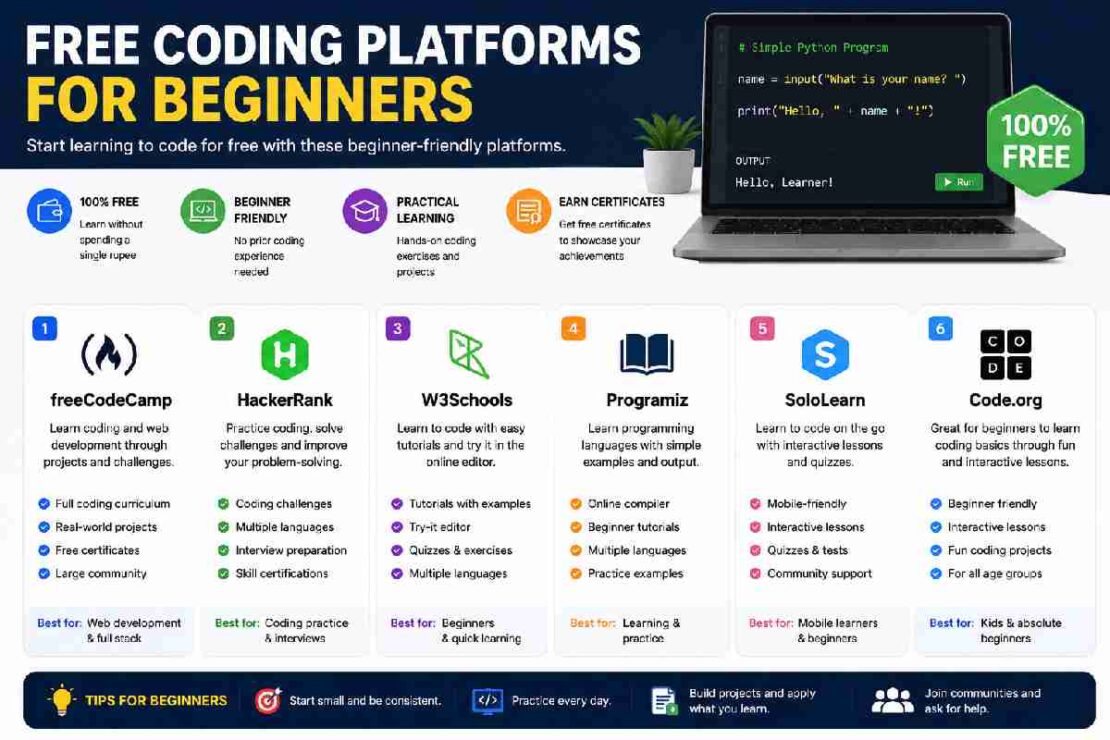
Best Free Coding Platforms for Beginners: Quick Comparison
| Platform | Best For | Free Access | Main Learning Style | Certificate |
|---|---|---|---|---|
| freeCodeCamp | Overall coding education | 100% free | Interactive + projects | Yes |
| The Odin Project | Web development | 100% free | Project-based | No |
| Harvard CS50 | Computer science fundamentals | Free to audit | Lectures + problem sets | Paid certificate |
| Codecademy | Interactive lessons | Free tier | Browser-based exercises | Paid plans |
| Khan Academy | Absolute beginners | Free | Visual + interactive | No |
| Scrimba | Interactive video learning | Free tier | Interactive screencasts | Some free certificates |
| Kaggle Learn | Python and data science | Free | Interactive notebooks | Yes |
| W3Schools | Web-development basics | Free resources | Tutorials + examples | Optional |
| Exercism | Coding practice | Free | Exercises + mentoring | No |
| MIT OpenCourseWare | Academic learning | Free | Lectures + assignments | No |
Quick answer: If you want one platform that offers the strongest combination of structured learning, projects, and free access, freeCodeCamp is the best overall choice for most beginners in 2026.
How We Evaluated These Free Coding Platforms
A platform being popular doesn’t necessarily make it good for someone learning programming for the first time.
We evaluated the platforms using six criteria:
- Beginner accessibility – Can someone with no programming experience start easily?
- Free-access depth – How much can you learn without paying?
- Hands-on practice – Does the platform make you write and test code?
- Project opportunities – Can you build something meaningful?
- Curriculum structure – Is there a logical learning path?
- Career value – Does it help develop portfolio skills, certificates, or practical experience?
This matters because the strongest free resources in 2026 increasingly emphasize practical learning rather than simply watching programming videos. Recent comparisons also distinguish between platforms that are completely free and those that use free tiers or paid certificates.
1. freeCodeCamp — Best Overall Free Coding Platform
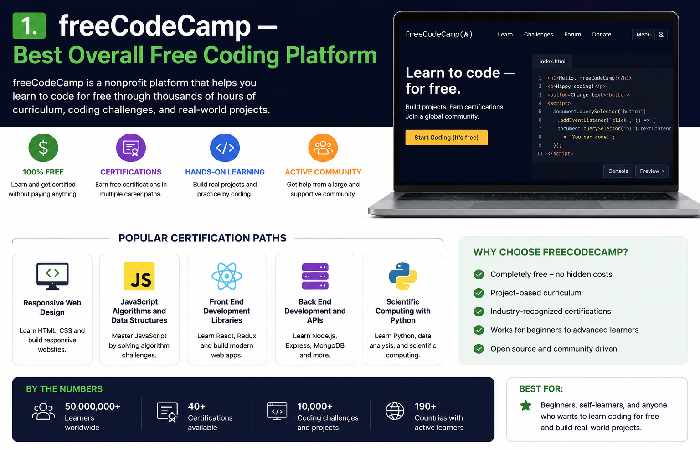
BEST FOR: Absolute beginners seeking a solid, comprehensive course of study in coding that’s free. The best starting point for those on a budget freeCodeCamp has a broad series of interactive coding tutorials and projects in areas of study including responsive design, Python,JavaScript, database basics, and other programming. If research into 2026 competitors and alternatives, we found it consistently landed at the top of all completely free options. Here are some of its best features: Unlike others, it does not teach you by having somebody else work their magic in the console; Instead you code throughout each lesson and develop along the way.
Why beginners choose freeCodeCamp
- Completely free core learning experience
- Interactive coding exercises
- Project-based curriculum
- Free certifications
- Web-development and programming content
- Large community
- Self-paced learning
Pros
- Excellent free curriculum
- Strong hands-on component
- Projects can contribute to a beginner portfolio
- No subscription required for the core curriculum
Cons
- Self-paced learning requires discipline
- Large curriculum can feel overwhelming
- Some concepts may require additional explanations
Best choice if: You want one primary platform to follow from beginner level onward.
2. The Odin Project — Best for Web Development
Best For: Absolute beginners ready to dive headfirst into web development with hands-on projects. The Odin Project is more geared toward aspiring developers. It breaks down the process by taking you out of the all-encompassing browser-based editor and into a proper development environment where you start getting acquainted with the most important technologies and tools as well as building projects that’ll have a solid presence in your portfolio.
Your learning experience will extend throughHTML, CSS, JavaScript, Git, Node.js, and more web development techniques.
You’ll find recent 2026 comparative analyses all point towards The Odin Project if you’re in the market for a fully free, hands-on introduction to web development.
Pros
- Completely free
- Strong project focus
- Teaches real development workflows
- Excellent for web development
- Encourages independent problem-solving
Cons
- More difficult for absolute beginners
- Requires setting up a development environment
- Less hand-holding than some interactive platforms
Best choice if: Your goal is to become a web developer rather than simply learn programming syntax.
3. Harvard CS50 — Best for Computer Science Fundamentals
Good for: Learners who are interested to learn more on computer science and programming as a skill and not just as a language course.
Harvard CS50 is one of the most popular free computer science courses online that you will come across. One important characteristic that you should know about CS50 is that, as an entire course it deals with more than just a single programming language and it is concerned with various aspects like algorithms, data structures, memory, abstraction, abstraction, and problem solving. This course touches on several programming languages such as, C, Python, SQL, HTML, CSS and Javascript. A course content for the Harvard CS50 is available free of cost, but if you require a verified certificate; you have to pay on the particular platform you wish to have the certificate on.
Pros
- Strong computer science foundation
- University-level instruction
- Challenging problem sets
- Multiple programming technologies
- Free access to course material
Cons
- More difficult than beginner-first platforms
- Requires significant study time
- Starting with C can feel challenging
Best choice if: You want to understand how programming works rather than simply memorize syntax.
4. Codecademy — Best for Interactive Coding Lessons
Best For: Beginners who want to dive in and code right in their browser. Codecademy might be more appealing to beginners since the practice requires no installation to start coding and an on-browser development environment is built into each course. The courses themselves consist of brief conceptual lessons, followed by immediate code practice, which gives instant feedback. It is essential to highlight this caveat, though – Codecademy is a freemium program, not entirely free of charge, and the top tier offers full access while only some intro content is free, which means competitors will continue to offer some of the highest-rated entirely free learning programs like freeCodeCamp.
Pros
- Very beginner-friendly interface
- Browser-based coding
- Immediate feedback
- Easy to start
- Multiple programming languages
Cons
- Free content is limited
- Advanced material may require payment
- Completing exercises doesn’t automatically build independent coding ability
Best choice if: You want to test whether you enjoy coding before committing to a longer curriculum.
5. Khan Academy — Best for Absolute Beginners
Good for: Students, young students, and absolute beginners. Khan Academy will help ease their transition into coding with its visual explanations and practice exercises. For anyone whose brain feels like it’s melting into a massive mush ball of non-sensical writing when they look at a piece of code, this may be a more forgiving learning method. They teach HTML/CSS, JavaScript, SQL, among other things.
Pros
- Free
- Beginner-friendly
- Visual learning approach
- Interactive exercises
- Good for younger learners
Cons
- Not designed to replace a complete developer curriculum
- Limited project depth compared with dedicated developer platforms
Best choice if: You want a gentle introduction before moving to a deeper coding curriculum.
6. Scrimba — Best for Interactive Video Learning
Best For: Those who like learning through video, but want the opportunity to play with the code in their lessons too. Scrimba presents learning videos interwoven with a code editor. As opposed to the Passive approach that some video tutorials offer, you’re given a platform to play around with the code.
This could lead to a more intuitive learning experience since you get immediate feedback.
They even have free classes (as well as paid) where novice students can find lessons to test out from their free library. The 2026 guide compares a free tier, certificates, and where their paywall starts.
Best for
- Front-end development
- HTML and CSS
- JavaScript
- Interactive learners
Best choice if: You prefer watching an instructor while being able to experiment with the code.
7. Kaggle Learn — Best for Python and Data Science
It’s ideal for you if you are brand new to coding, want a future in data science, and want to get started learning Python, data analysis, SQL, or machine learning. Kaggle Learn takes the differentiation from general online education providers by going with a deeper, data focus. Learn about practical, beginner level data science areas through short online courses, such as Python, machine learning, data visualization, and SQL through notebooks to work through on the fly as you’re learning.
Pros
- Free
- Practical exercises
- Strong Python content
- Useful for data science
- Short courses
- Real-world datasets and notebooks
Cons
- Not the best choice for general web development
- Assumes you’re interested in data-related programming
Best choice if: You want to learn Python because you’re interested in data science or machine learning.
8. W3Schools — Best for Quick Web Development Practice
Best for: Beginners who require immediate explanations and code examples.
Among the most well-rounded free websites coding resources available, W3Schools offers quick look-ups of HTML, CSS, JavaScript, SQL, Python, as well as additional technologies.
Its “Tryit” style interactive exercises make it easy to test code by modifying the syntax and observing the results. This makes it an especially handy resource when searching for something. That being said, if you’re aiming to become a paid developer, it’s probably worth considering other sources in conjunction with the tutorial sites you find. There’s simply no substitute for implementing what you learn by trying out actual coding challenges or undertaking personal projects.
The Best Option For You If: You are a beginner searching for explanations and examples of web development.
9. Exercism — Best for Coding Practice
Best for: Programmers looking for practice and who are familiar with the basics of programming already. Practising the syntax is one part of getting fluent, doing is another. Exercism helps you do plenty of that in numerous programming languages, making it quite efficient once you have already covered the very basics in some format like freeCodeCamp or CS50.
It aims to offer a learning experience that does not involve watching the next 20-hours long course about technology.
Instead you are doing challenges and getting better at writing programs yourself. Top Pick: As someone who already knows basic stuff and wants to practice it more.
10. MIT OpenCourseWare — Best for Academic Learning
Best for: Anyone looking for more university-style computer science topics to study. MIT OpenCourseware gives you access to MIT curriculum online for free. It’s not quite as user-friendly if the intent is to work through dozens of fun, bite-sized online activities (as per the other courses listed on this page), but great for those of you who want an in-depth look.
You may find lecture notes and other resources like reading lists and problem sets.
Go for this option if: You’d prefer computer science study in a way that mirrors university learning.
Free Coding Platforms: Which One Should You Choose?
The answer depends on what you want to accomplish.
| If you want to… | Start with… |
|---|---|
| Learn coding completely free | freeCodeCamp |
| Build websites | The Odin Project |
| Learn computer science | CS50 |
| Try coding for the first time | Khan Academy |
| Learn interactively | Codecademy |
| Learn through interactive video | Scrimba |
| Learn Python for data science | Kaggle Learn |
| Learn HTML/CSS quickly | W3Schools |
| Practice programming | Exercism |
| Study computer science academically | MIT OpenCourseWare |
Completely Free vs Free Tier: What’s the Difference?
This is one of the most important things to understand before choosing a platform.
Completely free platforms
Some platforms provide their core learning experience without requiring a subscription.
Examples include:
- freeCodeCamp
- The Odin Project
- Exercism
- MIT OpenCourseWare
- Many W3Schools resources
Freemium platforms
Other websites provide free lessons but reserve some content or features for paying subscribers.
Examples include:
- Codecademy
- Scrimba
Free course but paid certificate
Some university courses let you study the material without paying but charge if you want a verified credential.
Harvard CS50 is a good example of this distinction. The educational material can be accessed free, while the verified certificate is a separate paid option.
Before starting a course, ask:
- Are all lessons free?
- Are projects free?
- Is practice free?
- Is the certificate free?
- Does the platform require a subscription later?
- Is the free version enough to complete the curriculum?
This simple checklist can save you from starting a course and discovering a paywall halfway through.
Can You Really Learn Coding Online for Free in 2026?
Yes—but free resources don’t eliminate the need for practice.
The amount of free programming education available in 2026 is substantial. Understand how to build web pages or program in Python, SQL, Javascript, computer science concepts, or data science-all without the cost of enrolling in an traditional class. As compared in recent 2026 charts, the real difference between them isn’t the amount of free content, it’s the amount of free content before you start hitting topics that aren’t.
The biggest mistake beginners make is collecting resources instead of learning.
You don’t need:
10 platforms + 20 YouTube playlists + 15 bookmarked courses.
You need:
1 learning path + consistent practice + real projects.
A Simple Free Coding Roadmap for Beginners
If you’re starting from zero, don’t try to learn Python, JavaScript, C++, Java, and SQL simultaneously.
Follow a simple progression.
Step 1: Learn programming fundamentals
Start with:
- Variables
- Data types
- Conditions
- Loops
- Functions
- Basic debugging
- Input and output
Recommended: freeCodeCamp, Khan Academy, or Codecademy.
Step 2: Choose one programming direction
Choose based on your goal.
Web development:
HTML → CSS → JavaScript → Git → Framework → Projects
Python/programming:
Python → Data structures → Functions → OOP → Projects
Data science:
Python → NumPy/Pandas → SQL → Visualization → Machine learning
Computer science:
CS50 → Algorithms → Data structures → Programming projects
Step 3: Build projects
Don’t wait until you “finish learning.”
Build simple projects such as:
- Calculator
- To-do list
- Personal website
- Quiz application
- Weather application
- Expense tracker
- Blog
- Simple game
Step 4: Practice without tutorials
This is where real learning begins.
Try to build something without copying the solution line by line.
Step 5: Create a portfolio
Put your best projects on GitHub and create a simple portfolio website.
How Long Does It Take to Learn Coding for Free?
There is no universal timeline.
Your progress depends on:
- How many hours you study
- Previous technical experience
- The programming language
- Your learning method
- How much you practice
- Whether you build projects independently
A realistic beginner schedule could look like this:
| Study time | Possible progress |
|---|---|
| 30 minutes/day | Basic concepts over several months |
| 1 hour/day | Strong fundamentals in a few months |
| 2 hours/day | Faster progress with consistent projects |
| 3+ hours/day | Intensive learning, provided you avoid burnout |
The important metric isn’t the number of hours you spend watching lessons.
It’s the number of problems you can eventually solve without the tutorial open.
Common Problems Beginners Face
“I understand the lesson but can’t write code myself.”
This happens to almost everyone.
Try this process:
Learn → close the lesson → reproduce the idea → modify it → build something small.
If you only copy the instructor’s code, your brain may recognize the solution without being able to generate it independently.
“I keep switching between coding platforms.”
This is one of the biggest beginner traps.
You start freeCodeCamp.
Then you see a YouTube tutorial.
Then you try Codecademy.
Then someone recommends CS50.
Then you download another course.
Eventually, you have completed 10% of five courses and 0% of one.
Better approach
Choose one primary platform.
Use other platforms only when you need:
- Extra explanation
- Practice
- Documentation
- A different perspective
“Coding feels too difficult.”
Don’t assume that difficulty means you’re bad at programming.
Programming is a problem-solving skill.
If a topic feels difficult, break it into a smaller problem.
For example, instead of:
“I need to learn JavaScript.”
Start with:
“Today I will understand variables.”
Then:
“Tomorrow I’ll learn conditions.”
Then:
“Next I’ll write a small calculator.”
Small wins compound.
Are Free Coding Platforms Enough to Get a Job?
They can provide a strong foundation, but completing an online course alone doesn’t make you job-ready.
Employers generally care about what you can actually do.
For a beginner developer, that can include:
- Programming fundamentals
- Problem-solving
- Git/GitHub
- Projects
- Debugging
- Communication
- Understanding of development tools
- Ability to learn independently
For web developers, your portfolio can be especially important.
Instead of saying:
“I completed three coding courses.”
You want to be able to say:
“I built these three applications, here’s the code, and here’s how they work.”
That’s a much stronger demonstration of practical ability.
Best Free Coding Platform by Learning Style
Different learners need different environments.
If you learn by doing
Choose freeCodeCamp or The Odin Project.
If you learn by watching
Try CS50 or Scrimba.
If you need visual explanations
Try Khan Academy.
If you want immediate feedback
Try Codecademy.
If you want lots of practice
Try Exercism.
If you want academic depth
Try CS50 or MIT OpenCourseWare.
Frequently Asked Questions
What’s the best 100% free coding platform for beginners in 2026?
Overall, freeCodeCamp is the best for most beginners. They provide structured learning through an interactive curriculum, a hands-on approach, actual projects, and even free certifications. Three separate 2026 articles concur by listing it as among the top free resources.
Which coding platform is 100% free?
Two of the strongest examples are The Odin Project and freeCodeCamp, where 100% of their core curriculums are free. Other strong examples are Exercism and MIT OpenCourseWare.
Can you learn python for free?
Yes. You can learn python using freeCodeCamp, and CS50-related courses, among others (such as Kaggle Learn) and many other free resources.
Which free coding website is the best for the absolute beginners?
Khan Academy and Codecademy are great if you want something guided, but it might be worth opting for freeCodeCamp if you’d prefer something closer to a full curriculum on this list.
Can you learn code from Codecademy without paying anything?
Codecademy has a free tier for its learning platform, although some specific courses may be restricted to their paid subscription tier.
Can you really learn code from the Odin Project for free?
Yes, it has a totally free open source curriculum for web development learning and building, based on projects instead of chapters of coding instruction.
Is freecodecamp good enough to learn coding?
FreeCodeCamp can get you a great start, but you’ll eventually want to pair with projects beyond coursework, learn how to use Git/GitHub, solve coding problems regularly, and apply your skills in real world environments.
Which coding platform should I use for web development?
The Odin Project and freeCodeCamp are very similar and perhaps the best of The Odin Project offers the more hands on projects of the two while freeCodeCamp has the more guided curriculum and the easier beginning of the two to choose from.
Which are the best coding practice websites?
Exercism has a focus solely on programming exercises and will be a more efficient tool after you learn the basics.
Which free coding platforms give certificates?
A small few offer free certificates like freeCodeCamp and also other paid courses might offer them (like Harvard CS50) with a verified separate certificate fee, and others don’t have it at all.
Final Verdict: Which Free Coding Platform Should You Start With?
So, what is the best free coding platform for you depends on what you want to do: Best all-around free curriculum – freeCodeCamp If you wanna be a web developer – The Odin Project Best intro to computer science – Harvard CS50 If you’re brand new to programming and you prefer gentle-introduction – Khan Academy If you prefer interactive lessons in your browser – Codecademy( great for experimenting if you like programming) If you’re all into python & data science – Kaggle Learn Also a great platform to practice what you’ve learned – Exercism The MOST important thing to remember is to not waste months debating about which is the ‘BEST’ platform out there. Pick one. Learn the fundamentals.
Build things.
Practice without the tutorials. Then take the next step. The best free coding platform for you is the one you stick with.