Most interactive coding websites let you practice more directly. The advantage is getting to practice coding right away instead of watching a dozen hours of tutorials and remembering thesyntax only later. Interactive coding websites include coding editor, lessons, exercises, tests, projects and feedbacks.
So, if the purpose is to practice instead of study, then these are websites where you will probably want to be, especially when starting coding.
However not all websites function the same way: one is focused on beginners, the second more on projects, the third will be optimal for challenges, challenges in data science or in technical interviews. We’ve gathered a list of the best on the web in 2026.
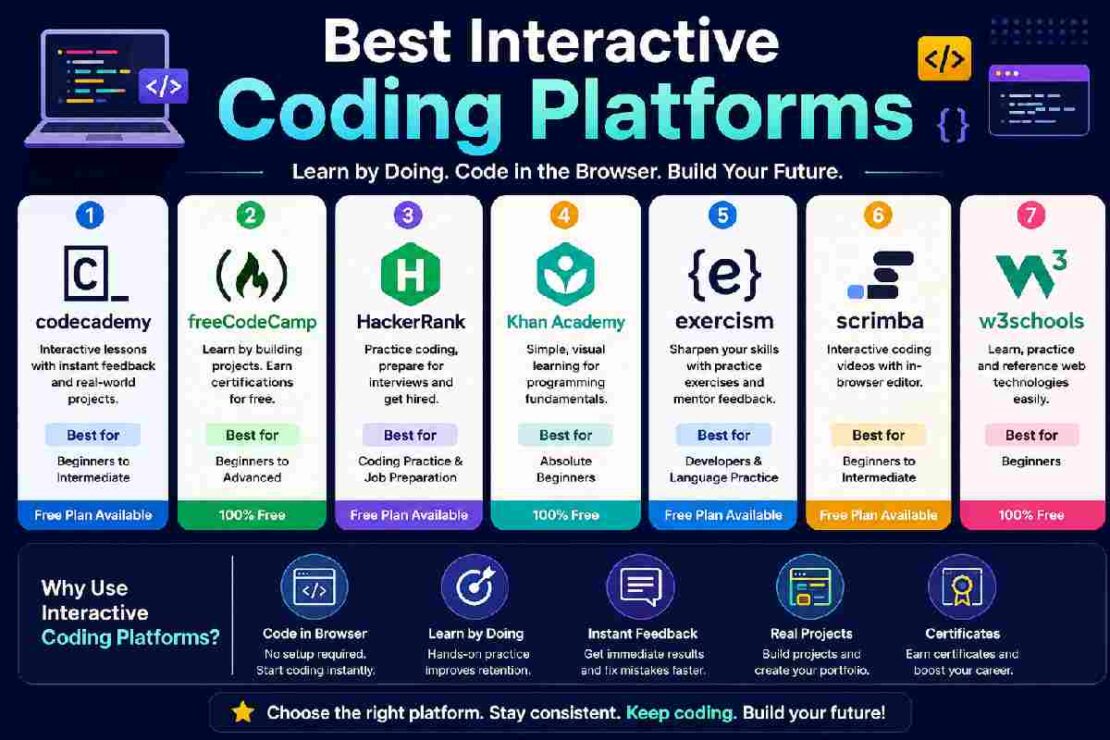
Best Interactive Coding Platforms at a Glance
| Platform | Best For | Interactive Learning | Free Option | Ideal Level |
|---|---|---|---|---|
| Codecademy | Guided coding lessons | Excellent | Yes, limited | Beginner–Intermediate |
| freeCodeCamp | Free courses and projects | Excellent | Yes | Beginner–Advanced |
| HackerRank | Coding challenges | Excellent | Yes | Beginner–Advanced |
| Khan Academy | Visual beginner learning | Excellent | Yes | Beginner |
| Exercism | Language practice | Excellent | Yes | Intermediate–Advanced |
| Scrimba | Interactive video lessons | Excellent | Yes, limited | Beginner–Intermediate |
| W3Schools | Quick practice and references | Very good | Yes | Beginner |
Pricing and free access can change, so check each platform before purchasing a subscription.
1. Codecademy – Best for Guided Interactive Learning
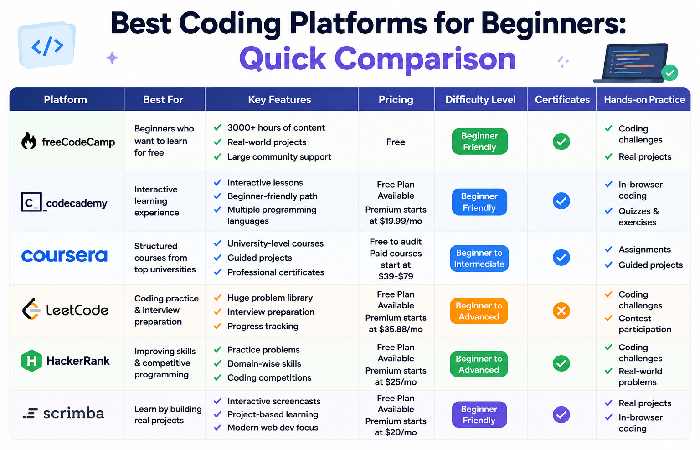
“If you desire structured learning with lesson and code on the same screen, then Codecademy will be one of the most solid bets,” he mentions. “ You’ll be taught briefly, after which you’ll type code into your web browser, save it, receive suggestions for improvement, and move to the subsequent lesson. You’ll then bypass the most barrier any learner would face : setting up a computing environment even prior to you write a program.” the top-ranked site now sells subscriptions for the service which includes unlimited access to curriculum by the ‘Pro’ program for $19.99 per month for an annualized service.
Best for: Beginners who want step-by-step guidance.
Potential drawback: Some of the more advanced learning and project features require a subscription.
2. freeCodeCamp – Best Free Interactive Coding Platform
If budget’s the major deciding factor, freeCodeCamp certainly should be high up on your list.
The platform features a mix of interactive coding challenges, multi-hour long projects, and comprehensive certifications. Their 2026 material still cites freeCodeCamp as one of the strongest free resources because of the nature of its in-browser challenges, projects, and coverage of web development, JavaScript, Python, and other databases.
The key differentiator here: there are no multiple choice questions. Instead, the user constantly writes code and applies the concepts.
Instead of being told what HTML is, you are asked to create a web page. Instead of being shown a concept in JavaScript, you do exercises where you then are asked to create projects or programs.
Best for: Anyone who’s looking for a large amount of free content with significant portfolio building opportunities.
Where the course falls short: can be far less structured if you’re brand new to coding than a platform like Codecademy.
3. HackerRank – Best for Coding Challenges and Job Preparation
2. HackerRank HackerRank is more challenge-based.
The platform is not as much a course than the others it challenges you by giving you coding problems to solve and requiring you to think, write code and submit your solution. The programming topics it currently offers cover Python, Java, SQL, algorithms and data structures, AI, and frontend.
If you’ve already learned to program already and are ready to be exposed to unknown problems HackerRank is a great option.
It’s also great for those that focus in career opportunities. Their community has over 26 million developers who use the site for coding practice, interviews, certifications, and also job opportunities. Best for: Practicing coding, tests and prep to interviews. What to avoid: total newbies may be struggling tosolve some of the problems before learning the basics of coding.
4. Khan Academy – Best for Absolute Beginners
Khan Academy takes a more visual approach to programming education.
Its computer programming curriculum includes JavaScript, HTML/CSS and SQL, with lessons that combine explanations and interactive exercises. The current programming curriculum includes units covering drawing and animation, webpages, SQL, games and visualizations, and interactive webpages.
This makes Khan Academy particularly useful for students who find traditional programming tutorials intimidating.
Instead of immediately dealing with a complex development environment, you can experiment with code and see what happens.
Best for: Students, young learners and absolute beginners.
Potential drawback: Learners looking for advanced software-engineering projects may eventually need another platform.
5. Exercism – Best for Hands-On Programming Practice
WhyExercismis different from a typical online coding course An online platform based around the practice and repetition of solving a series of coding exercises. In comparisons for 2026exercismis ranked as a practice-first free service with a huge number of supported programming languages and mentorship support. What makes Exercism stand out as the ideal practice exercise for when you know the basics in any given language It really suits people when they, like with thepython (above), already know the basic syntax and are willing to tackle an increasing level of python coding exercises without having to copy each line of a code tutorial. What It’s Best For For someone practising a coding language after having completed an introductory course What It’s Not So Good For If you want to get your feet wet in a brand new language from scratch.
Interactive Coding Platforms vs. Traditional Coding Courses
The biggest difference is what you do while learning.
| Learning method | Typical experience | Hands-on level |
|---|---|---|
| Video course | Watch → copy → practise later | Low–Medium |
| Book/tutorial | Read → understand → code separately | Medium |
| Interactive platform | Learn → code → test → correct | High |
| Coding challenge site | Problem → code → submit → improve | Very high |
| Project platform | Learn → build → debug → deploy | Very high |
Research and educational discussions around interactive programming environments consistently point to the value of allowing learners to apply concepts directly instead of relying only on passive content.
That does not mean video courses or books are bad. The strongest learning path often combines explanations with plenty of hands-on programming.
How to Choose the Right Interactive Coding Website
Before signing up, ask five questions:
1. Does it let me write real code?
A platform can call itself interactive while still relying heavily on quizzes. Look for an actual editor where you can write and execute code.
2. Does it provide immediate feedback?
Instant feedback helps you identify syntax and logic mistakes while the concept is still fresh.
3. Does it include projects?
Exercises teach individual concepts. Projects teach you how to combine those concepts.
4. Does it match your current level?
A beginner should not start with advanced algorithm challenges simply because they are popular.
5. What is actually free?
“Free” does not always mean the entire platform is free. Codecademy, for example, offers free basic access while reserving many quizzes, projects and courses for subscribers.
A Simple Learning Path for Beginners
If you are starting from zero, avoid jumping between ten different websites.
A practical path is:
The coding approach in these 6 steps:
Step 1: Select a structured platform. For instance, Codecademy, freeCodeCamp, or Khan Academy.
Step 2: select one language. For a beginner learner, Python and JavaScript would be appropriate to consider.
Step 3: Follow up practice with your lessons, all the time!
Step 4: Build a small project than always doing tutorials.
Step 5: Practice and improve with Exercism or HackerRank when your basic understanding of programming is fine.
Step 6: refer to language documentation & online developer community when encountering problems.
This series of steps will convert watching to actively practicing.
Common Problems When Using Interactive Coding Platforms
“The code works in the lesson but not in my project.”
This often happens because the platform hides configuration, dependencies or supporting code. Re-create the example in a simple project and check each dependency.
“I keep copying the solution.”
Pause before looking at the answer. Try explaining the problem in plain English, break it into smaller steps, and write pseudocode first.
“The exercises are too easy.”
Move from guided exercises to independent projects or challenge platforms such as Exercism and HackerRank.
“The exercises are too difficult.”
Go back one level. Programming skills build cumulatively, and struggling with functions, loops or variables can make advanced challenges unnecessarily frustrating.
Which Interactive Coding Platform Is Best?
There is no single winner for everyone.
Codecademy is a strong choice if you want guided, browser-based lessons. freeCodeCamp is ideal if you want a large free curriculum with projects. HackerRank works well for coding challenges and interview preparation. Khan Academy is excellent for beginners who prefer visual learning, while Exercism is particularly useful for deliberate programming practice.
The best platform is ultimately the one that matches your current ability and keeps you writing code consistently.
If your goal is to become a developer, do not judge a platform only by how polished its lessons look. Judge it by what you can build after completing them.
Frequently Asked Questions
Okay, what are interactive coding platforms? Interactive coding platforms are website’s and/or learning sites that allow students to actively write, compile, execute, and debug code as part of the learning experience, especially interactive coding lessons/quizzes, automated feedback, challenges, or projects.
What’s the best interactive coding platform for beginners? The top three recommendations generally are Codecademy, freeCodeCamp, and Khan Academy, and for good reason:
Codecademy lessons tend to be more highly structured than those of freeCodeCamp; freeCodeCamp focuses heavily on a large, project-based curriculum; and Khan Academy use’s an often preferred more visual approach to learning that can be useful for those who have never encountered programming or a computer previously.
Can I entirely rely on the websites themselves for learning to program? You can definitely get going on the interactive sites, however you will want to graduate beyond stand-alone modules. The sites above are great for providing you with basic knowledge, while the development you gain through writing real projects yourself, utilizing documentation, and/or solving actual problems is key to translating core concepts to applicable skills useful in a career setting.
Are interactive coding platforms free?
Many are completely free, though the others usually come with freemium models. Of the sites aforementioned, FreeCodeCamp has the complete curriculum available as completely free.
Sites such as Codecademy generally have the choice of either free and paid sections.
Ensure to understand the subscription terms before singing up.
Which is more effective: tutorials or coding practice?
Tutorials and practice go hand in hand and are best used in conjunction. They are ideal for showing new programming concepts, but you need to actually write code to learn how to retrieve the concepts from memory and apply them.
The aim should be to do more coding practice and less watching of tutorials.
Final Takeaway
Learning how to code no longer requires the installation of a development environment prior to your first program. Interactive online coding environments bring the ability to begin coding almost instantly, using just your browser and a curriculum geared towards learning. Select your preferred platform, practice regularly, then move from guided instruction to building projects. That journey from simply following code, to writing code, and finally building code will shape you from a student of online code to a coder in your own right.