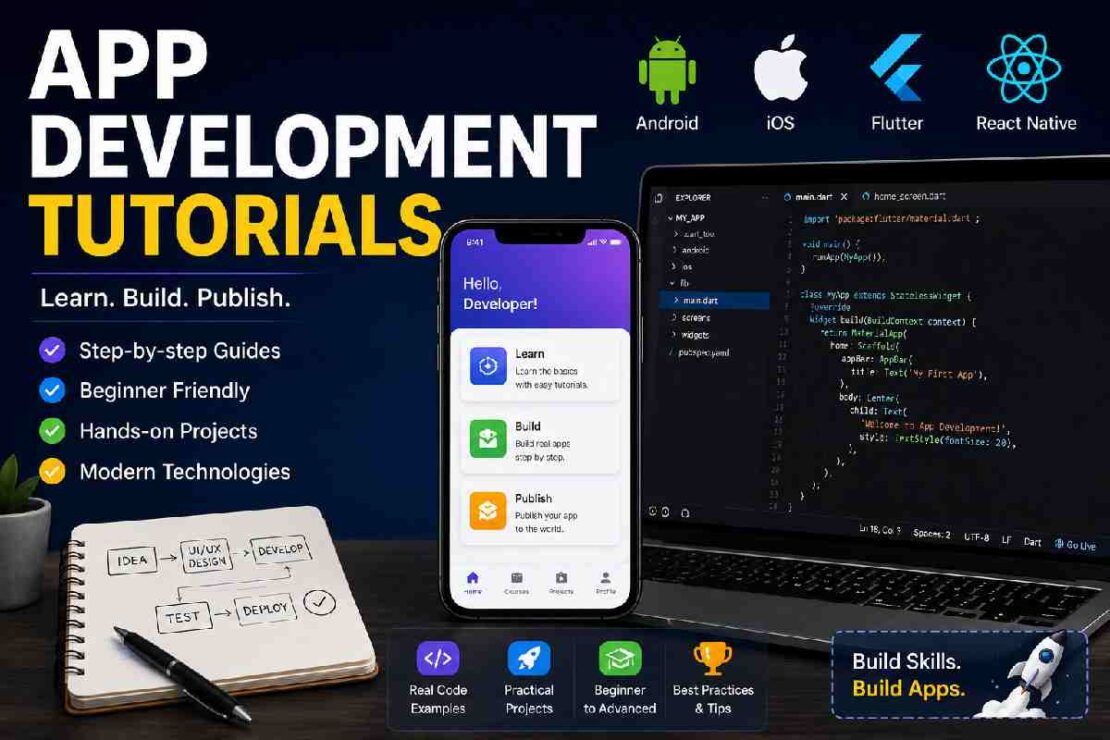
App development tutorials If you’re interested in the #1 app development tutorial you will quickly see that a dizzying array of courses, videos, websites, documentation, tutorials and learning sites are in a constant battle to grab your attention. The challenge you face now is not picking a tutorial – its picking the right tutorial for your learning style and project goals without being intimidated. You should learn native Android with Kotlin, native iOS with Swift and SwiftUI, or a framework like Flutter or React Native in 2026.
What Are the Best App Development Tutorials in 2026?
In my experience, one tutorial cannot make the perfect one. The right learning course includes explanations, coding, and practical use of code, a project, relevant technology, a path of learning for the beginner as it grows in complexity. Let’s start with the ones most suited.
| Tutorial / Platform | Best For | Cost | Main Technology | Beginner Friendly |
|---|---|---|---|---|
| Android Basics with Compose | Android beginners | Free | Kotlin + Jetpack Compose | ⭐⭐⭐⭐⭐ |
| Develop in Swift | iOS beginners | Free | Swift + SwiftUI | ⭐⭐⭐⭐⭐ |
| Flutter Learn | Cross-platform apps | Free | Dart + Flutter | ⭐⭐⭐⭐⭐ |
| Udemy courses | Structured video learning | Paid/varies | Android, Flutter, iOS | ⭐⭐⭐⭐ |
| KnowledgeHut tutorials | Topic-based learning | Free + paid | Multiple technologies | ⭐⭐⭐⭐ |
The official Android Basics with Compose course teaches Kotlin fundamentals, Jetpack Compose, Android Studio, adaptive layouts, and app development. Its beginner pathway currently lists three pathways with a 10-hour introductory unit.
For Apple development, Apple’s Develop in Swift tutorials cover app design, SwiftUI, data modeling, app development, debugging, machine learning and AI, and distribution.
If you are entirely new to programming, Flutter’s official learning roadmap also gets the learner from where you can take to the end, passing via Dart, Flutter apps, application structure, networks and best practices.
Mobile App Development for Beginners: Where Should You Start?
Before choosing a framework, decide what type of developer you want to become.
Android development
Choose Android if your primary goal is building applications for Android phones and tablets.
A modern beginner path looks like:
Kotlin → Android Studio → Jetpack Compose → Android architecture → APIs → databases → testing → publishing
Google’s current Android beginner course specifically recommends Jetpack Compose for building adaptive Android user interfaces.
Internal link: Android Development Tutorials for Beginners
iOS app development
If you want to build apps for iPhone, iPad, or other Apple platforms, start with:
Swift → Xcode → SwiftUI → data → networking → testing → App Store distribution
Apple’s current beginner curriculum starts with creating an Xcode project and progresses into SwiftUI, data modeling, app development, debugging, and distribution.
Internal link: iOS App Development Tutorials for Beginners
Flutter development
Flutter is worth considering when you want to build applications for multiple platforms from a shared technology stack.
The official Flutter learning path begins with Dart and then moves into building Flutter applications. It also includes architecture and networking resources.
Internal link: Best Flutter Development Tutorials
Native vs. Cross-Platform App Development
One of the biggest decisions beginners face is whether to learn native development or a cross-platform framework.
| Factor | Native Android/iOS | Flutter |
|---|---|---|
| Main languages | Kotlin / Swift | Dart |
| Platform focus | Android or Apple | Multiple platforms |
| Learning curve | Moderate | Moderate |
| UI control | Excellent | Excellent |
| Shared code | Limited | High |
| Best for | Platform-specific apps | Multi-platform projects |
Neither approach is automatically better. If you want deep Android or iOS expertise, native development is a sensible choice. If your goal is to build one application across multiple platforms, Flutter can be attractive.
What Should Your App Development Setup Look Like?

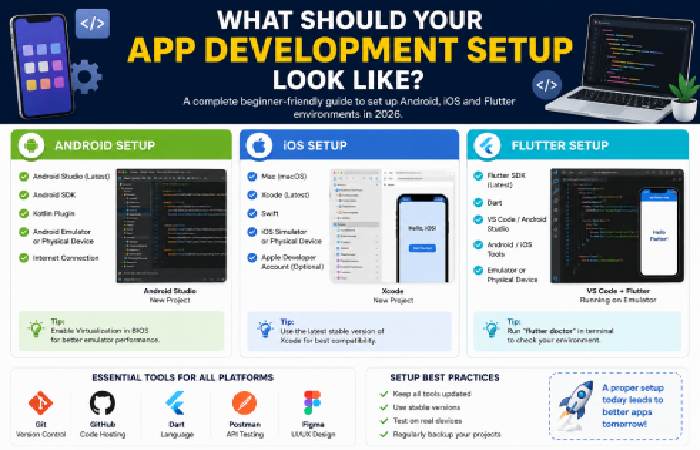
You don’t need an expensive development environment to begin.
Android setup
Install:
- Android Studio
- Android SDK
- Kotlin tools
- Android emulator or compatible Android device
iOS setup
You’ll generally need:
- A Mac
- Xcode
- Swift
- iOS Simulator
Apple’s current tutorial specifically walks beginners through downloading Xcode, creating a project, exploring the navigator and editor, and using the preview canvas.
Flutter setup
You’ll need:
- Flutter SDK
- Dart
- A compatible code editor
- Android or iOS development tools
- Emulator or physical device
Recommended article image: Add a real screenshot of Android Studio, Xcode, or VS Code showing a beginner project. Real setup screenshots provide more practical value than generic stock photography.
Beginner Mobile App Projects to Build
Don’t spend months watching tutorials without writing your own code.
Use this progression:
Tutorial → Small exercise → Mini project → Real application
Good beginner mobile app projects include:
- To-do list
- Calculator
- Notes app
- Weather app
- Quiz app
- Expense tracker
- Recipe app
- Habit tracker
- Simple shopping app
- Personal productivity app
Start with a small project and gradually introduce APIs, local storage, authentication, databases, notifications, and cloud services.
Apple’s current Develop in Swift material, for example, takes learners beyond basic screens into a complete habit-tracking application using SwiftData, PhotosUI, accessibility, localization, and debugging.
2026 App Development Learning Comparison
A useful way to choose a tutorial is to compare learning depth rather than price alone.
Official Documentation     ██████████
Project-Based Courses      █████████
Interactive Courses        █████████
Video Courses              ████████
Short Tutorial Articles    ██████
This is a qualitative comparison rather than an industry-standard score. Official documentation tends to provide the strongest technical reference, while structured courses can be easier for beginners who need a defined sequence.
Common App Development Problems Beginners Face
My emulator is extremely slow
Try reducing the emulator’s resolution or use a physical device when possible. Also check whether hardware virtualization is enabled.
My app won’t build
Start with the exact error shown by the development environment. Don’t randomly change multiple files. Check dependencies, SDK versions, imports, and configuration one at a time.
I can follow tutorials but can’t build alone
This is extremely common. After completing a tutorial, close it and rebuild the project from memory. Then change one feature yourself.
For example, if you built a to-do app, add categories, search, dark mode, or local persistence without following another tutorial.
I don’t know whether to learn Flutter or native development
Choose based on your goal. Learn Kotlin and Android if you want Android specialization, Swift and SwiftUI for Apple development, or Flutter if cross-platform development is your priority.
Frequently Asked Questions
What’s the best beginner app development tutorial?
For Android, Google’s Android Basics with Compose is a great one. For iOS, you could go through Apple’s Develop in Swift tutorials. For Flutter, an excellent place to start for app development on iOS, Android, web, etc is Flutter’s own Learn Flutter pathway.
Can I teach myself app development for free?
Yes, it’s possible! All the learning materials from Google (Android), Apple (iOS), and Flutter are full of high quality and free information about how to start development.
What Language to learn to develop an application ?
As per the official learning documents for the development of mobile application according to Android suggest using Kotlin to build android mobile native app, whereas according to Apple they suggest using Swift in order to build an iOS mobile app, And from the official learning documents for flutter they suggest using dart language.
Is Flutter the best framework for beginners?
Yes, definitely. In fact, The “Learn Flutter” pathway says “Learn Flutter the way you were intended to… for developers with even the tiniest amount of programming experience”.
What is the simplest app to make for a beginner?
To do apps, basic calculator apps, note apps, quiz apps, simple weather apps etc. Are all beginner-friendly and can give you a real head start on UI, user input, state, data and app logic basics.
Is a Mac required to build iOS apps?
In terms of Apple’s native-based iOS app development process, yes. You need macOS in order to use Xcode – Apple’s official tool for building native iOS, macOS, iPadOS, and tvOS apps. As noted above in our list of the top tutorials, they explicitly list a Mac as a requirement.
Final Verdict
The best app development tutorials in 2026 should take you from learning concepts to Shipping Apps! For Android, begin your app building journey with Kotlin and Jetpack Compose. For iOS, start your coding with Swift, Xcode and SwiftUI. Alternatively, if you want to build a cross-platform app, then opt for the Dart and Flutter combination.
As the wise say: Don’t try to learn all frameworks at the same time! Stick to one, follow the basics, build a couple of beginner mobile app development examples and then start adding advanced concepts like building API, managing Databases, understanding authentication and testing, performing app performance optimizations and eventually, publishing it into an app store!