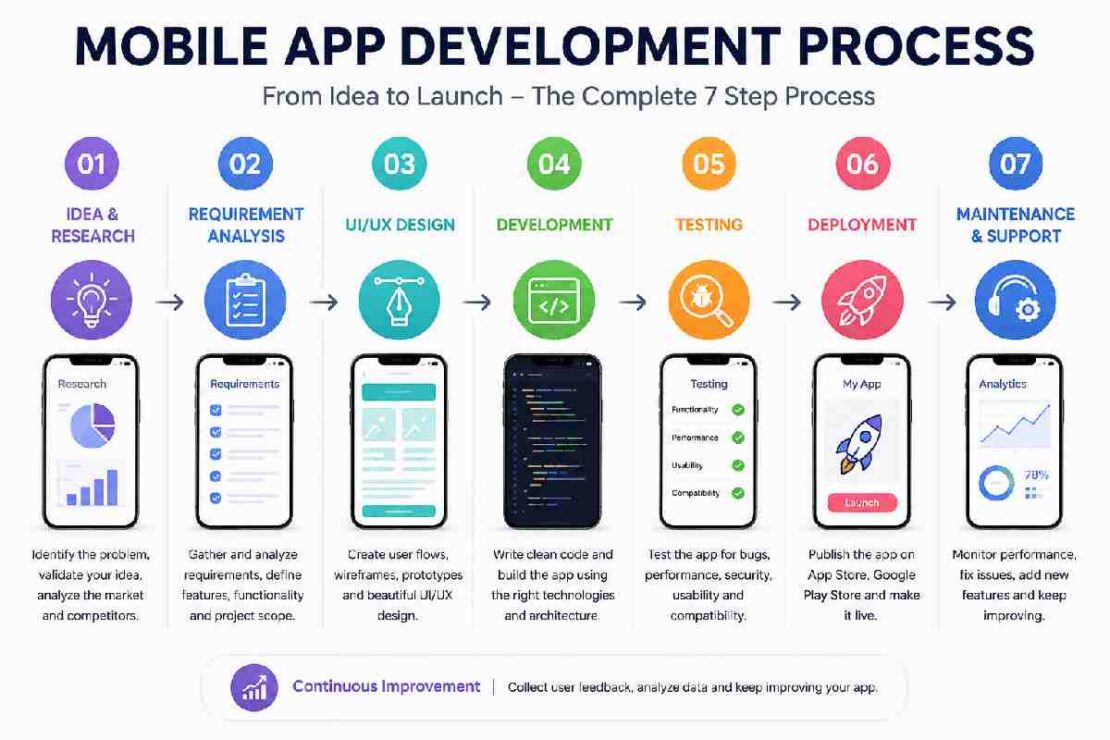
Development on a mobile app is an ordered process that takes an app from idea generation through to research, requirements, UI design, development, testing, release, and ongoing enhancements. Whether you’re the founder of a startup, the owner of a business, or just an individual who has a great app idea but doesn’t know how to code, it’s important that you understand the whole process to remain in control of scope, budget, quality and expectations.
The 2026 submission process also has new considerations concerning platform guidelines: For the Google Play Store, beginning on 31st August 2026, new apps and updates must target API level 36 or higher. If you are building for the iOS platform, begin on 28th April 2026 all new app must be submitted in App Store Connect and compiled with an iOS 26 SDK.
What Is the Mobile App Development Process?

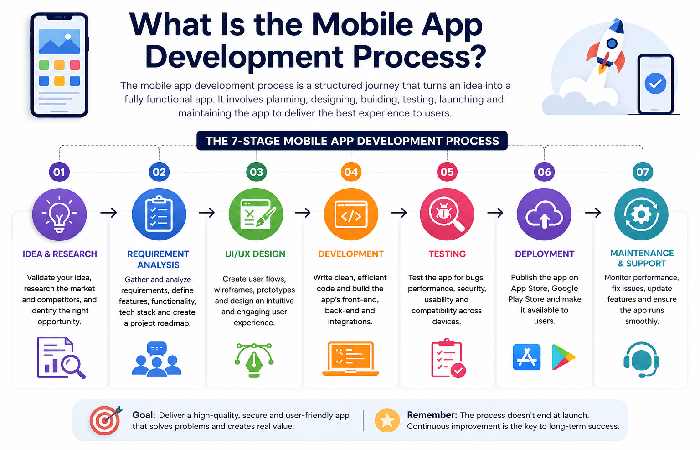
What Mobile App Development Lifecycle Looks Like Generally The mobile app development process refers to the whole lifecycle when a mobile app is researched, planned, designed, built, tested, and then published to users in all applicable app stores, maintained and improved, respectively. A basic mobile app development lifecycle commonly include: Idea Researching Requirements Planning UI/UX Design Development Testing Deployment Maintenance But as can be noticed, a mobile development lifecycle isn’t always linear. The professional mobile team will repeatedly go back and forth, switching between Design and Development and Testing stages. It should also mention A report released in2026 on mobile development concluded that the usage ofHybrid Process Models is particularly beneficial in B2X app projects given that Mobile Project possess a number of difficulties ranging across several dimensions- technical difficulty, organisational and communications difficulties which is unlikely be fully overcome by a single form of development plan alone.
Mobile App Development Life Cycle at a Glance
| Stage | Main objective | Typical deliverable |
|---|---|---|
| 1. Discovery & planning | Validate the idea | Product strategy |
| 2. Requirements | Define what to build | Requirements document |
| 3. UI/UX design | Plan the user experience | Wireframes/prototype |
| 4. Development | Build the application | Working app |
| 5. Testing | Find and fix problems | Tested release build |
| 6. Deployment | Publish the app | Live App Store/Google Play app |
| 7. Maintenance | Improve and support it | Updates and new releases |
2026 Platform Readiness Snapshot
| Platform | 2026 requirement to remember |
|---|---|
| Android / Google Play | New apps and updates must target Android 16 (API 36) or higher from Aug. 31, 2026 |
| iOS / App Store | Apps uploaded from Apr. 28, 2026 must use the iOS 26 SDK or later |
| Apple review | Apps should be complete, functional and tested on devices before submission |
Google’s current policy also states that existing apps must target Android 15 (API 35) or higher from August 31, 2026 to remain available to new users on newer Android versions. Apple similarly emphasizes completeness, stability, functional links, and device testing before App Store submission.
1. Start With App Requirements and Market Research
Before choosing a programming language or hiring developers, define the problem your application will solve.
Start with questions such as:
- Who will use the app?
- What problem does it solve?
- What alternatives already exist?
- What makes your application different?
- Which features are essential?
- Which features can wait?
This is the app requirement analysis stage.
List up functional requirements, user requirements, technical requirements, integration points, security requirements, and business goals.
At initial release, aim for a MVP (minimum viable product), rather than to produce all possible functions.
E-E-A-T trick: Document evidence to major product decisions. Research, competitor comparison, customer interviews, survey feedback, analytics reports, etc. Will make your strategy much stronger than a hypothesis.
2. Create the Product Roadmap and Technical Plan
Once requirements are clear, convert them into an actionable roadmap.
This is where the team decides:
- iOS, Android, or both
- Native or cross-platform development
- Backend architecture
- APIs and third-party integrations
- Database requirements
- Authentication
- Notifications
- Payment systems
- Analytics
- Security requirements
Your technical architecture should support the application’s expected growth rather than simply solving today’s requirements.
For example, an ecommerce app may need product management, payment processing, customer accounts, order tracking, notifications, analytics, and an administrator dashboard.
Internal link opportunity: Link this section to your detailed article on How to Choose a Mobile App Development Company.
3. Follow the Mobile App UI/UX Design Process
The UI/UX phase turns requirements into an actual user experience.
A typical workflow is:
Information ArchitectureUser FlowsWireframesVisual DesignPrototypeUsability Feedback
Wireframes are set before designers are deeply invested in visual detailing.
The prototype then allows stakeholders to experience the intended flow through navigation before development.
So Mobile Design Best practices: Clear, Consistent, Accessible, Readable and sized to function both visually to read as tactile as click targets Intuitively designed navigable for easy finger work, which Apple reiterated in their 2016 Human Interface Design guideline regarding Human first, Visuals last. Best Visual: Screenshot showing your original design (or your Work, Wireframe, Clickable prototype, and Design Handoff)
4. Develop the Mobile Application
Now the development team turns the approved design and technical plan into working software.
Development generally includes three connected areas:
Frontend
This is the part users interact with—screens, navigation, forms, buttons, animations, and other interface components.
Backend
The backend handles data, business logic, authentication, databases, permissions, and server-side processes.
APIs
APIs allow the mobile application to communicate with backend services and external platforms.
Professional teams usually build the application in smaller increments rather than waiting until every feature is complete.
This makes it easier to identify problems early and demonstrate progress to stakeholders.
5. Follow the Mobile App Testing Process
Testing shouldn’t be treated as something that happens only at the end.
A comprehensive mobile app testing process can include:
- Functional testing
- UI testing
- Usability testing
- Performance testing
- Security testing
- API testing
- Device compatibility testing
- Operating-system testing
- Accessibility testing
- User acceptance testing
Accessibility deserves particular attention. A 2026 study involving 110 mobile developers across 43 countries found that practitioners recognize accessibility as important but often perform compliance testing late in the development process.
Testing should therefore begin during development rather than becoming a last-minute release gate.
Internal link opportunity: Link to your detailed Mobile App Testing Process cluster article here.
6. Complete the App Deployment Process
Deployment is more than uploading an APK, AAB, or iOS build.
Before release, the team should verify:
- Production configuration
- App signing
- Privacy information
- Store metadata
- Screenshots
- App descriptions
- Permissions
- Analytics
- Crash monitoring
- Store compliance
If on google play store, with regard to the new android 16 required with 2026, the rule mainly applied to the new app and the upcoming update submission to Google Play after August 31, 2026.
With regarding to the Apple platform, in terms of the App Store submission requirement, applications must adhere to the guidelines on current SDK and Apple advised to test app by device and remove crash, incomplete feature, link broken or the like which caused through out the review.
7. Maintain, Measure and Improve the App
Launching the application isn’t the end of the mobile app development lifecycle.
After launch, monitor:
- Crashes
- App performance
- User retention
- Conversion rates
- Reviews and ratings
- Feature usage
- Support requests
- Security issues
Use this information to prioritize future releases.
A successful app development process is therefore better understood as a continuous loop:
Build → Release → Measure → Learn → Improve → Release again
How Long Does Mobile App Development Take?
There is no universal timeline because complexity, integrations, platforms, team size, and requirements all affect delivery.
As a practical planning model:
| App complexity | Typical development scope |
|---|---|
| Simple MVP | Core features and limited integrations |
| Medium app | Multiple user flows, backend and integrations |
| Complex app | Advanced backend, payments, real-time features, integrations and scalability |
Current 2026 competitor guides commonly place complete app projects anywhere from several months to more than a year depending on complexity. For example, Decipher Zone estimates roughly 2–4 months for simple apps, 4–8 months for medium-complexity apps, and 8–18 months for complex enterprise applications.
Treat these figures as planning ranges rather than promises.
Common Mobile App Development Problems
Requirements keep changing
Solution: Freeze the MVP scope and use a documented change-request process.
The design looks good but is difficult to use
Solution: Test prototypes with representative users before development.
Bugs appear close to launch
Solution: Introduce continuous QA throughout development.
The app passes internal testing but fails store review
Solution: Check the current Apple and Google requirements before preparing the production build.
Development costs keep increasing
Solution: Prioritize high-value features and build the MVP before expanding the product.
Mobile App Development Process FAQs
Which stages make up the core of the mobile app development lifecycle?
The four primary stages of development consist of a discovery phase, design, development itself and finally deployment and maintenance.
What is the most crucial part of developing an app?
This depends. Strong requirements, great UX, good architecture, thorough testing and iterative development all make vital contributions to an effective app.
Should I develop for iOS or Android first?
The most appropriate answer depends entirely on your potential users, market, budget and technological stack along with business aims. You should research the target audience thoroughly before choosing the initial platform.
Is the testing stage part of the mobile development process?
Yes, testing should happen throughout the entire development process and it would include a comprehensive amount of functional, performance, usability and security testing.
When the app launch is completed, is the development of the app at an end?
No. The lifecycle is continued by the following tasks: monitoring the app post-launch, bug fixing, security upgrades, analyzing metrics and analyzing user feedback that directly influence the next iterative development phase of the mobile app.
Final Takeaway
Development isn’t just the coding process itself. In fact the best development processes begin with a clear problem definition, requirements validation, a useful design, solid technical architecture selection, iterative construction, constant testing, compliance with latest store guidelines, and maintenance post launch. It’s understanding this process that can really help make the business owner able to better assess development companies when considering third party development-look beyond a resume and ask about process for requirements, UX, architecture, QA, deployment, security, ownership, communication, maintenance, and so on.