Introduction
It can be oddly hard to identify the right Python tutorials for absolute beginners-and then follow one to program meaningful projects, not just play with code. We’re flooded with video courses, doc pages, online playgrounds, online book-guides, coding books, tech bootcamps, and free interactive coding tutorials. The challenge is not a lack of resources; it is discerning which resource to rely on, in what sequence, and how to convert classroom instruction into actual development chops.
And of course, for anyone learning their first programming language, 2026 is as good a year to start with Python as any.
But you, as an aspiring new developer, would be forgiven if you still hadn’t drawn this critical difference: Anyone could read 100 pages about Python before finding oneself struggling to output more than 20 lines of working code to his or her own compiler or development environment.The more useful thing to do is learn a little bit, code a little bit, debug a little bit, read an explanation, maybe write code for a project using new instruction, rinse and repeat; maybe exercise for a bit, maybe do it at harder levels, do a bit of everything. In this guide you’ll discover: What to be aware of in Python tutorials What are the best opportunities to get Python tutorials (video as well as text) What core Python concepts you must know first What action plan you need to develop, from absolutely beginner to functional Python Developer.
Quick Answer: What Are the Best Python Tutorials for Beginners?
19. If starting at ground zero, there’s no perfect one all around the best. Learning methods differ for people.
| Learning resource | Best for | Beginner friendly | Practice | Cost approach |
|---|---|---|---|---|
| Python.org Tutorial | Official language reference and fundamentals | Medium | Medium | Free |
| W3Schools | Quick lessons and examples | High | High | Free + optional paid features |
| Programiz | Structured beginner learning | High | Medium | Free + paid options |
| GeeksforGeeks | Broad Python knowledge and practice | Medium | High | Free + paid options |
| CS50P | Structured, rigorous Python education | High | Very High | Free course + optional certificate |
| Codecademy | Interactive browser-based learning | Very High | Very High | Free/paid |
| Udacity Introduction to Python | Guided beginner course | High | High | Free course |
| CodeChef Learn Python | Lessons plus coding problems | High | Very High | Free/paid elements |
| LearnPython.org | Interactive fundamentals | High | High | Free |
You can find official documentation for Python 3.14.6 in the Python documentation repository on their main website, including: tutorial library reference language reference setup guidance HOWTOs With that said, don’t let yourself be daunted and do as little documentation-reading as possible!
Why Learn Python in 2026?

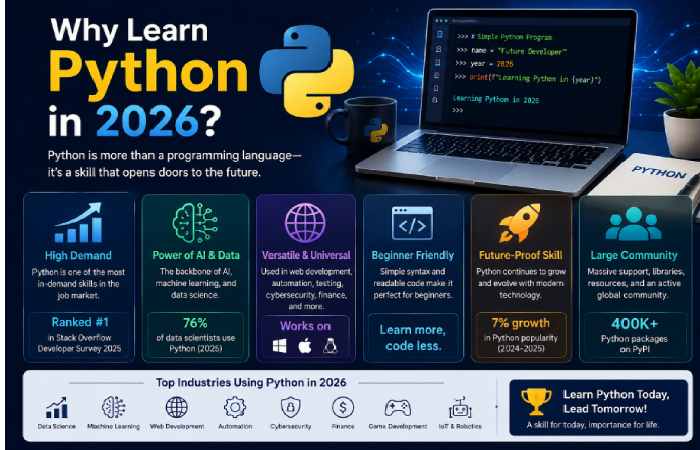
Python is no longer simply a beginner language.
It has become an important tool across software engineering, data science, automation, artificial intelligence, scientific computing and backend development.
The 2025 Stack Overflow Developer Survey reported that Python adoption increased by seven percentage points compared with 2024, with the growth associated with AI, data science and backend development.
Python’s ecosystem is another major advantage.
Instead of building every feature from scratch, developers can use libraries and frameworks for specialized tasks.
For example:
- Django and Flask for web development
- FastAPI for APIs
- Pandas for data manipulation
- NumPy for numerical computing
- Matplotlib for visualization
- scikit-learn for machine learning
- PyTorch for deep learning
- pytest for testing
- Requests for HTTP requests
- Beautiful Soup for parsing web pages
The main takeaway for beginners here is that you don’t necessarily have to learn all of this.
Just start by picking one, and it could be justPythonitself.
Python Tutorials for Beginners: What Should You Learn First?
A common mistake is jumping directly into artificial intelligence, web frameworks or advanced projects before understanding the language.
A better progression is:
Python syntax → variables → data types → conditions → loops → functions → data structures → files → exceptions → modules → OOP → projects → specialized libraries
This progression gives you a foundation that can support almost any Python career direction.
Python basics for beginners
Start by understanding:
- How Python executes code
- Variables
- Numbers and strings
- Boolean values
- Operators
- Input and output
- Conditional statements
- Loops
- Functions
- Lists
- Tuples
- Dictionaries
- Sets
- File handling
- Exceptions
- Modules and packages
You shouldn’t try to memorize everything. Programming is also more about learning where and how to get what you need rather than retaining that information.
How to Install Python
The present Python documentation: This document is for Python 3.14.6, the most recent supported stable version. It documents Python 3.14, a currently supported branch of the major release series for Python 3. The first Python 3.14 maintenance release came out October 7, 2025, closely followed by further maintenance releases.
As a beginner: do not use a Python 2 tutorial, and be aware that this version of the documentation you’re currently looking at is likely not up to date, unless you’re looking at some recent release.
Windows
- Visit the official Python website.
- Download the current Python 3 release.Start the installer.
- Enable the option to add Python to PATH when available.
- Complete the installation.
- Open Command Prompt.
- Run:
python --version
You should receive a Python version number.
If python doesn’t work, try:
py --version
macOS or Linux
Open Terminal and try:
python3 --version
The exact installation process can vary by operating system.
Recommended screenshot for this section
Original screenshot to add: Python installer showing the Python version and the “Add Python to PATH” option.
Alt text: Python installation setup for beginners showing Add Python to PATH
Using your own setup screenshots is preferable to stock images because readers can see exactly what your current tutorial looks like.
Your First Python Program
Once Python is installed, your first program can be extremely simple.
print("Hello, world!")
Run it and Python should display:
Hello, world!
This tiny program teaches an important concept: instructions written in Python can be executed by the Python interpreter.
Now try:
name = input("What is your name? ")
print("Hello,", name)
This introduces three important ideas:
- storing information in a variable
- receiving user input
- displaying output
Don’t underestimate these simple examples.
Programming capabilities can be built from building-blocks or small concepts that develop into larger systems for the program .
Python Coding Lessons: The Fundamentals
1. Variables
Variables allow your program to store information.
name = "Alex"
age = 25
Python determines the type of value automatically.
You can inspect it with:
print(type(name))
print(type(age))
Understanding variables is essential because almost every useful program needs to store and manipulate information.
2. Data Types
Common Python data types include:
| Type | Example | Typical use |
|---|---|---|
str |
"Python" |
Text |
int |
25 |
Whole numbers |
float |
19.99 |
Decimal numbers |
bool |
True |
Logical conditions |
list |
[1, 2, 3] |
Collections |
tuple |
(1, 2, 3) |
Fixed collections |
dict |
{"name": "Alex"} |
Key-value data |
set |
{1, 2, 3} |
Unique values |
Don’t simply memorize this table.
Write small programs using each type.
3. Conditional Statements
Conditional statements allow programs to make decisions.
age = 20

if age >= 18:
    print("Adult")
else:
    print("Minor")
The crucial thing to understand is not syntax. It’s the meaning – If true, do that. Else, do the other. This programming pattern will follow you.
4. Loops
Loops allow Python to repeat instructions.
For loop
for number in range(5):
    print(number)
While loop
count = 0

while count < 5:
    print(count)
    count += 1
Beginners often struggle with loops because the code runs repeatedly and changes state.
The best solution is practice.
Don’t watch five more videos about loops.
Write five small programs.
5. Functions
def greet(name):
    return f"Hello, {name}!"

message = greet("Alex")
print(message)
A good beginner should understand:
- parameters
- arguments
- return values
- local variables
- scope
- default arguments
6. Lists and Dictionaries
Lists are useful for collections of values.
languages = ["Python", "JavaScript", "Java"]

for language in languages:
    print(language)
Dictionaries store information using key-value pairs.
person = {
    "name": "Alex",
    "age": 25,
    "language": "Python"
}

print(person["name"])
These data structures appear everywhere in Python programming.
The Best Way to Learn Python Programming
The most effective approach isn’t simply completing tutorials.
Use a cycle:
Learn → Code → Break → Debug → Improve → Build
For example:
Step 1: Learn
Spend 20–30 minutes understanding a concept.
Step 2: Code
Write examples yourself.
Step 3: Modify
Change the examples.
If a tutorial creates a calculator that adds two numbers, make yours calculate:
- addition
- subtraction
- multiplication
- division
- percentage
Step 4: Break it
Intentionally change something.
Step 5: Debug
Read the error and determine why the program failed.
Step 6: Build
Use the concept in a small independent project.
This approach prevents what programmers commonly call tutorial hell—the cycle of consuming tutorial after tutorial without developing the ability to create something independently.
Best Python Tutorials and Learning Platforms Compared
1. Python.org
The official python tutorial ( python.org/tutorial) The strongest option is this as its part of the python documentation. However the tutorial guide does indicate this one as better for developers with some prior programming knowledge not beginners to development as a whole, and there are less difficult introductory resources available to beginners. Appropriate if: Learning for a developer already comfortable with some programming.
Positives: Extremely authorative and technically accurate.
Downsides: Might be somewhat to steep of a learning curve for a first time programmer.
2. W3Schools
W3Schools is very helpful especially for learners with short explanations and instant examples, available to view.
Its tutorial of Python coverssyntax, variables, data types, strings, conditions, loops and a wide range of other topics. It also offers an interactive editor as well as quizzes, exercises and reference materials.
Best suited for: Fast reference, fast learning.
Strength: Easy navigation, interactive examples.
Weakness: You lack the project-based practice you need for further development.
3. GeeksforGeeks
2. GeeksForGeeks: Possibly the most expansive python ecosystem available learning from GeeksforGeeks.
3. Current version of Python tutorial:fundamentals,functions,datastructures,file IO,databases,packages,datascience,webdev,practice.
“Best for”: Beginners will a to be able to follow with you as they improve to become Intermediate.
“”Strength”:Breadth, practice.
“”Weakness”: Huge amount of content”
4. Programiz
Programiz provides a more structured beginner route.
The Python-focused part of it covers introduction, first programs, variables, type conversion, input/output, operators and control flow. It will do very well to introduce coding to absolutely anyone but is most beneficial for absolute beginners as it is clear and concise. Who this will work for. Anyone who likes concise introductions to topics.
5. Harvard CS50P
CS50’s Introduction to Programming with Python is a better option than a collection of short snippets or tutorials if the students seeking a difficult programming course. The coursework will cover concepts such as variables, loops, functions,conditionals, exemptions,libraries,unit test and file and read I/O as well as regular expressions as object-oriented development before culminate with a project that serve as introduction into the programming life cycle. Best for: anyone that would prefer college-degree kind class. Key Strength: Ability to teach students the basics of solving problems and the basics of programming skills Key Weakness: A lot of commitment is need here as it morethan quick course tutorial.Best Free Python Programming Courses in 2026
If budget is your main concern, you don’t need to spend hundreds of dollars to start learning Python.
Several reputable options are available without an upfront course fee.
Strong free options
CS50P – Access it free via the Harvard website (through similar process to OpenCourseWare access), with optional certifications available.
LearnPython.org – Very intuitive beginner lessons; covering everything from variables to classes and dict/list type data structures with a good introduction to modules, classes, and I/O, as well.
Udacity Introduction to Python – Described as, “a beginner friendly introduction to the Python language…requiring no prior coding experience. Nine lessons cover everything from data types to arithmetic operators and fundamental data structures.”
CodeChef Learn Python – Beginner friendly, a Python 3 course composed of lessons, exercises, and challenges. It currently appears to have 37 lessons totaling about 10 hours of material and more than 239 coding problems to work through.
The trick is that you dont want all 4. Pick the one course you’ll run with most consistently, let the other three act primarily as guides/references.
Python Learning Path: Beginner to Developer
Here is a practical roadmap.
| Stage | Topics | Suggested outcome |
|---|---|---|
| Stage 1 | Syntax, variables, types | Write basic programs |
| Stage 2 | Conditions, loops | Build logic |
| Stage 3 | Functions | Organize code |
| Stage 4 | Lists, dictionaries, sets | Work with data |
| Stage 5 | Files, exceptions | Build useful scripts |
| Stage 6 | Modules, packages | Structure projects |
| Stage 7 | OOP | Understand larger applications |
| Stage 8 | Testing and debugging | Write reliable code |
| Stage 9 | Projects | Demonstrate ability |
| Stage 10 | Specialization | Move into a career direction |
Don’t rush through the stages.
A learner who spends two weeks understanding fundamentals may progress faster later than someone who tries to learn advanced frameworks immediately.
Beginner Python Projects
Projects are where Python starts becoming real.
Here are progressively harder ideas.
Level 1
Build:
- calculator
- number guessing game
- temperature converter
- age calculator
- simple quiz
- unit converter
Level 2
Try:
- password generator
- contact book
- expense tracker
- to-do list
- text-based adventure game
- file organizer
Level 3
Move into:
- weather application
- web scraper
- API-based application
- personal finance tracker
- data visualization dashboard
- automation script
Level 4
For more advanced learners:
- REST API
- Django application
- FastAPI backend
- machine-learning project
- data-analysis project
- automated testing project
The goal is not to build something huge.
A small finished project is more valuable for learning than an ambitious project that remains unfinished.
How to Escape Tutorial Hell
If you’ve watched several Python courses but still can’t code independently, stop starting new courses.
Instead, use the 30/70 rule.
Spend roughly:
30% learning + 70% coding
For example, during a two-hour study session:
- 30–40 minutes: tutorial
- 60–70 minutes: exercises
- 10–20 minutes: debugging/review
Once you understand a concept, close the tutorial and reproduce it from memory.
Then change it.
Then build something without the tutorial.
That final step is where real learning happens.
Common Python Beginner Mistakes
Mistake 1: Watching instead of coding
A tutorial can make programming look easier than it actually feels.
The solution is simple: type the code yourself.
Mistake 2: Learning too many resources
Jumping between YouTube, Udemy, Codecademy, documentation and ten blogs creates cognitive overload.
Pick:
- one primary course
- one reference
- one practice platform
That’s enough.
Mistake 3: Avoiding errors
Errors are not proof that you are bad at programming.
They are feedback.
Learn to read:
Traceback
Look at:
- error type
- file
- line number
- message
Then investigate.
Mistake 4: Copying code without understanding it
Copying a solution can be useful temporarily.
But after copying, explain every line in your own words.
If you can’t, you haven’t learned it yet.
Mistake 5: Building projects that are too difficult
Don’t start with an AI chatbot or full-stack social network.
Build a calculator first.
Then a file organizer.
Then something that uses an API.
Difficulty should increase gradually.
Python Troubleshooting Guide
“Python is not recognized”
Try:
python --version
If Windows doesn’t recognize it, try:
py --version
If neither works, check whether Python was installed correctly and whether the executable is available through PATH.
“SyntaxError”
Check the line identified by Python.
Common causes include:
- missing brackets
- missing quotes
- incorrect indentation
- misspelled keywords
- missing colon
“IndentationError”
Python uses indentation as part of its syntax.
This:
if age >= 18:
print("Adult")
is invalid.
Use:
if age >= 18:
    print("Adult")
“NameError”
This often means Python cannot find the variable or function you referenced.
For example:
print(username)
will fail if username hasn’t been defined.
“ModuleNotFoundError”
This usually means Python cannot find the module you’re trying to import.
Check:
- The module name is spelled correctly.
- The package is installed in the environment you’re using.
- You’re running the correct Python environment.
Don’t immediately copy a random installation command from a forum. Check the package’s official documentation first.
Should You Use AI While Learning Python?
Yes—but carefully.
AI can be useful for:
- explaining error messages
- simplifying difficult concepts
- generating practice questions
- reviewing your code
- suggesting project ideas
- explaining documentation
- helping you compare different approaches
But don’t turn AI into an automatic answer machine.
A better prompt is:
“Don’t give me the solution yet. Explain what this error means and give me a hint so I can fix it myself.”
That forces you to think.
The goal is not to make AI write Python for you.
The goal is to use AI as a programming tutor while you develop your own problem-solving ability.
What Should Developers Learn After Python Basics?
Once you’ve mastered the language fundamentals, choose a direction.
Web development
Learn:
Python → HTTP → HTML/CSS basics → Flask/FastAPI or Django → databases → APIs → deployment
Data science
Learn:
Python → NumPy → Pandas → visualization → statistics → SQL → machine learning
AI and machine learning
Learn:
Python → NumPy → Pandas → mathematics/statistics → scikit-learn → deep learning → PyTorch
Automation
Learn:
Python → files → APIs → web requests → automation libraries → scheduling → testing
Backend development
Learn:
Python → HTTP → APIs → FastAPI/Django → SQL → authentication → testing → deployment
The common foundation is Python itself.
That’s why learning Python properly before specializing is worthwhile.
A 30-Day Python Learning Plan
If you can study consistently, use this structure.
| Days | Focus |
|---|---|
| 1–3 | Installation, syntax and variables |
| 4–6 | Data types and operators |
| 7–9 | Conditions |
| 10–12 | Loops |
| 13–15 | Functions |
| 16–18 | Lists, tuples and sets |
| 19–21 | Dictionaries and strings |
| 22–23 | Files |
| 24–25 | Exceptions |
| 26–27 | Modules |
| 28 | Testing and debugging |
| 29 | Mini project |
| 30 | Independent project |
Don’t treat the schedule as a race.
If loops take five days instead of three, that’s fine.
The objective is competence, not completing a calendar.
How to Choose the Right Programming Tutorial
Before enrolling in any Python course, ask these questions:
Does it teach fundamentals?
A good beginner course should explain why code works—not just show syntax.
Does it include exercises?
Passive watching isn’t enough.
Does it include projects?
Projects help bridge the gap between tutorials and real programming.
Is it current?
Python changes over time. Avoid tutorials that rely heavily on obsolete Python versions.
Can you practice immediately?
Browser-based environments can reduce setup friction for absolute beginners.
Does the teaching style suit you?
Some people prefer video.
Others learn faster from written explanations.
Some need interactive exercises.
There is no universally superior format.
Comparison: Which Python Learning Style Is Best?
| Learning style | Best for | Main advantage | Main weakness |
|---|---|---|---|
| Video courses | Visual learners | Easy explanations | Passive learning risk |
| Written tutorials | Self-directed learners | Easy to search/reference | Less guided |
| Interactive courses | Beginners | Immediate feedback | Can encourage dependency |
| University courses | Serious learners | Strong fundamentals | Higher commitment |
| Documentation | Developers | Authoritative information | Can be difficult initially |
| Projects | Everyone | Builds real ability | Can feel difficult without fundamentals |
The strongest approach combines several.
For example:
Interactive course + written reference + coding exercises + projects
The Best Python Tutorial Strategy for 2026
Based on the current resources and the way modern programming education is structured, I recommend this combination for most beginners:
Phase 1: Start with a beginner-focused course
Use something structured such as CS50P, Programiz, W3Schools or another course whose teaching style you enjoy.
Phase 2: Practice immediately
After each lesson, write several variations of the examples.
Phase 3: Use documentation as a reference
Once you’re comfortable with the basics, start using the official Python documentation. Python’s current documentation includes tutorials, the standard library reference, language reference, setup instructions and HOWTOs.
Phase 4: Build projects
Start with small programs and gradually increase complexity.
Phase 5: Specialize
Choose web development, automation, data, AI/ML or another direction.
This approach is much more sustainable than trying to complete every Python tutorial available online.
E-E-A-T: What Makes a Python Tutorial Trustworthy?
For a programming education article, E-E-A-T should mean more than adding an author bio.
A trustworthy tutorial should:
- identify the Python version being discussed
- link to official documentation
- distinguish beginner advice from advanced recommendations
- explain limitations
- avoid promising that someone will become “job-ready in 30 days”
- show working code
- test code examples before publication
- provide troubleshooting guidance
- disclose when recommendations are subjective
- update outdated instructions
- use original screenshots where possible
The official Python documentation should be your primary authority for Python language behavior.
For course recommendations, compare the actual curriculum, practice model, prerequisites, cost structure and intended audience rather than relying solely on ratings.
Frequently Asked Questions
Is Python easy to learn for beginners?
Python is generally considered accessible to beginners because its syntax is relatively readable and its ecosystem is extensive. However, learning programming itself still requires practice. A beginner should expect to make mistakes and debug code regularly.
What is the best Python tutorial for beginners?
There is no single best tutorial for everyone. CS50P is strong for structured learning and problem-solving, W3Schools is useful for interactive examples, Programiz provides a concise progression, and Python’s official tutorial is valuable as a technical reference.
Can I learn Python for free?
Yes. Several high-quality resources provide free learning material, including CS50P, LearnPython.org and parts of other major learning platforms.
How long does it take to learn Python?
It depends on what “learn Python” means. Basic syntax can be learned relatively quickly, but becoming comfortable building independent applications takes considerably longer. Consistent practice matters more than completing a course quickly.
Should I learn Python before AI?
For most beginners, yes. Understanding Python fundamentals makes it much easier to work with data libraries and machine-learning frameworks later.
Is Python still worth learning in 2026?
Yes. Current developer-survey data shows Python adoption continued to grow in 2025, particularly alongside AI, data science and backend development.
Can I learn Python without a programming background?
Absolutely. Beginner-focused courses such as CS50P are designed for people with or without prior programming experience.
Should I learn Python from YouTube or a course platform?
Either can work. The more important factor is whether you actively write code, solve exercises and build projects. A structured course may be easier for someone who needs a defined path.
What projects should a Python beginner build?
Start with small projects such as a calculator, quiz, number guessing game, expense tracker or to-do list. Once you understand APIs and files, move toward applications that interact with external data.
How do I avoid tutorial hell?
Stop switching courses constantly. Pick one primary learning path, practice every lesson, build projects without copying tutorials and use documentation or another course only when you need clarification.
Final Takeaway
The best Python tutorials for beginners aren’t necessarily the longest or most expensive ones.
The best resource is the one that helps you move from understanding code to writing code independently.
For most learners, the winning formula is simple:
Choose one structured tutorial → practice every concept → learn to debug → build small projects → consult official documentation → specialize.
Python’s ecosystem continues to make it useful across software development, automation, data science and AI, while current learning resources range from interactive beginner tutorials to rigorous university-level courses.
If you’re starting today, don’t spend another week searching for the “perfect” course.
Choose one good Python tutorial, open your editor, and write your first program.
The real learning begins when the tutorial ends.