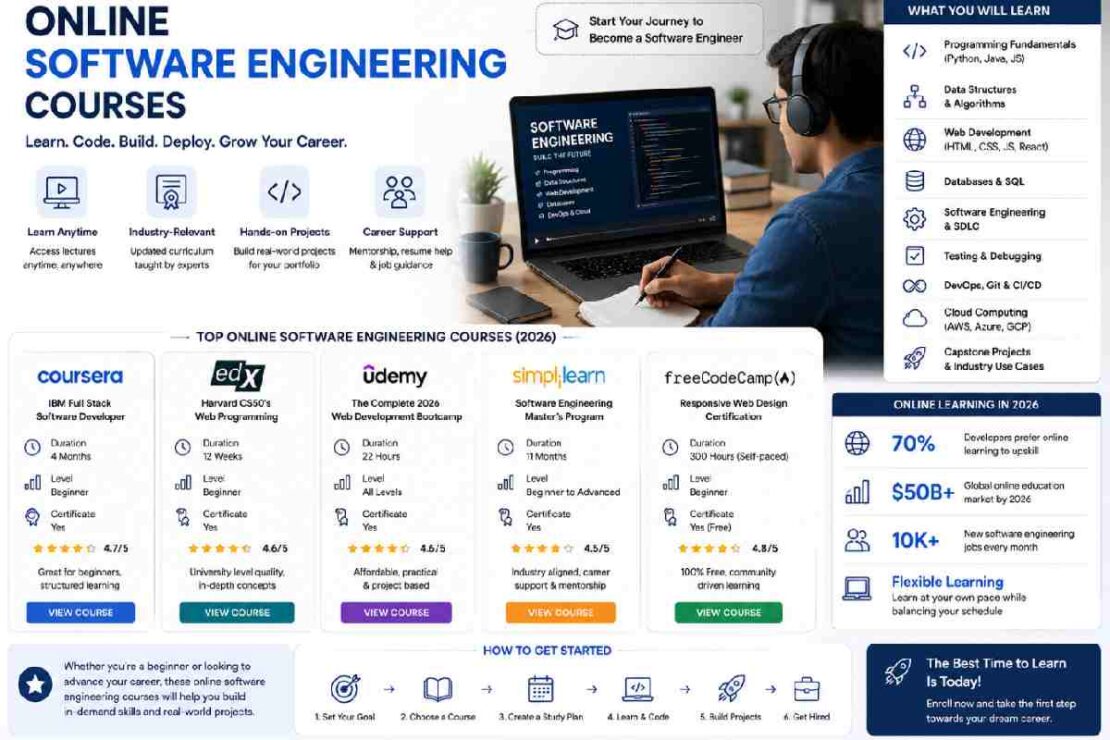
So if you are after a beginning software engineering course, chances are you’re looking for more than simply a link to a bunch of coding videos; you are looking for somewhere to start, the tools and software that you are going to require to start working and a learning road that not only helps you get started but at no time leaves you questioning exactly what it is that you are supposed to be doing next in order to become proficient in software development.
The good thing, it is not necessary that you hold an honors degree in computer science in order to embark on a journey into software engineering. A properly designed beginners course in software engineering should take you from programming basics to version control, software development and software engineering practices and tests and a whole set of project work culminating in topics such as APIs, databases, cloud development, system design and everything that involves developing software; the list is endless…
What Is Software Engineering?
So, what exactly IS Software Engineering?
Software engineering can be defined as the design, construction, testing, deployment and support of software in a formal and disciplined manner. It’s more than just writing code (though there’s plenty of that to be done!)
Software engineers need to also have a working understanding of: requirement management; version control; debugging and testing; automated test; software documentation; team collaboration and communication; system design and infrastructure and software maintenance.
This distinction is very important when deciding on beginner software course, because while a course teaching the syntax for an IT language will certainly enable you to write code, it is not going to teach you how real software applications are managed.
What Should Beginners Learn First?
A practical beginner path looks like this:
- Programming fundamentals
- Git and GitHub
- Data structures and problem solving
- Databases and SQL
- APIs and web fundamentals
- Software testing
- Software development lifecycle
- Real-world projects
- Deployment and basic cloud concepts
- System design fundamentals
You don’t need to master everything immediately. The goal is to build one layer at a time.
Today’s programming beginner’s learning guidance also has a main point: one language, one git and command-line, and build projects that can show your strength, not blindly copying code.
Best Programming Language for a Beginner

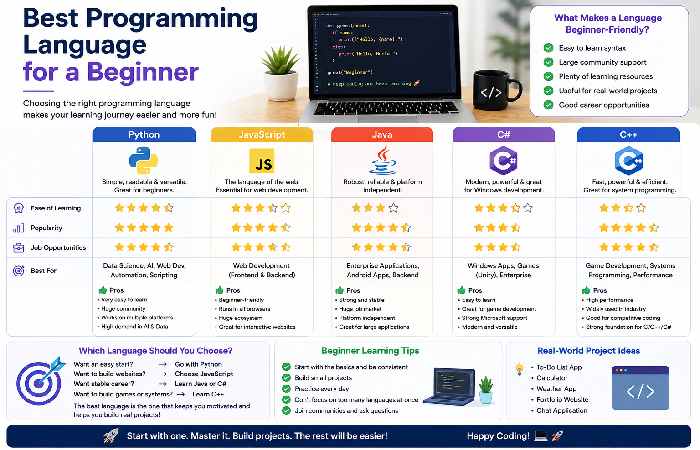
There isn’t one universally correct language.
| Language | Beginner difficulty | Good starting use |
|---|---|---|
| Python | Easy | Automation, backend, AI/data |
| JavaScript | Easy–Moderate | Web development |
| Java | Moderate | Enterprise applications, Android/backend |
| C++ | Moderate–Hard | Systems, competitive programming, performance |
| C# | Moderate | .NET applications and game development |
For someone starting completely from zero, Python or JavaScript is usually a practical starting point because you can begin building useful applications relatively quickly.
Don’t make the common mistake of learning five languages simultaneously. Become comfortable with one first.
Software Engineering Courses: What Should You Compare?
The number of available courses is enormous. Class Central currently lists thousands of software engineering courses, with options ranging from free university content to paid professional programs.
When comparing courses, look beyond the certificate.
| Feature | Beginner course | Strong beginner course |
|---|---|---|
| Programming fundamentals | ✓ | ✓ |
| Git/GitHub | Sometimes | ✓ |
| Software engineering concepts | ✓ | ✓ |
| Projects | Sometimes | ✓✓ |
| Testing | Limited | ✓ |
| APIs/databases | Limited | ✓ |
| Deployment | Rare | Useful |
| Mentorship | Optional | Valuable |
| Portfolio work | Sometimes | ✓ |
| AI-assisted development | Increasingly common | Useful in 2026 |
For example, current course listings include programs focused on software engineering fundamentals, Git, Linux, cloud, Agile and practical capstone work. Other beginner courses combine programming with software engineering concepts and real-world projects.
A Simple Software Engineering Learning Path
If I were starting from zero today, I would avoid jumping directly into advanced frameworks.
Phase 1: Learn to Code
Start with variables, conditions, loops, functions, data structures and basic error handling.
Build tiny programs such as:
- Calculator
- To-do list
- Number guessing game
- Expense tracker
- Simple API client
Phase 2: Learn the Developer Workflow
Install a code editor such as VS Code and learn:
- Terminal basics
- Git
- GitHub
- Debugging
- Reading documentation
- Basic project organization
This is where learning starts to feel more like actual software development.
Phase 3: Build Real Projects
Don’t build 30 copy-and-paste tutorial projects.
Build three or four projects that progressively become harder.
For example:
Project 1: Personal portfolio
Project 2: Task management application
Project 3: REST API connected to a database
Project 4: Full-stack application with authentication
Document each project on GitHub.
Phase 4: Learn Professional Engineering Practices
Once you’re comfortable coding, learn:
- Unit testing
- Integration testing
- Code reviews
- Clean code
- Agile/Scrum
- CI/CD
- Basic cloud deployment
- Security fundamentals
NPTEL’s software engineering curriculum, for example, covers lifecycle models, requirements, design, UML and testing, demonstrating the more formal engineering side of the discipline.
Do You Need a Degree to Learn Software Engineering?
No.
A degree can be valuable for many careers, but you can learn software engineering through online courses, university materials, bootcamps, documentation and practical projects.
The important distinction is between learning software engineering and getting hired as a software engineer.
For employment, you’ll usually need evidence that you can solve problems and build software. A portfolio, GitHub projects, technical fundamentals and interview preparation can therefore become important complements to your coursework.
How Long Does It Take to Learn Software Engineering?
There is no fixed timeline.
A learner studying around 10–15 hours per week could reasonably spend the first few months building programming fundamentals and then several additional months developing projects and professional engineering skills.
For comparison, current programs range from short self-paced courses to intensive programs lasting several months. Class Central currently lists beginner-level courses alongside programs requiring hundreds of hours.
Suggested 6-Month Beginner Roadmap
| Month | Main focus | Output |
|---|---|---|
| 1 | Programming fundamentals | 3–5 mini projects |
| 2 | Git, GitHub + data structures | GitHub portfolio |
| 3 | SQL + APIs | Database/API project |
| 4 | Testing + software engineering | Tested application |
| 5 | Full-stack/project development | Major project |
| 6 | Deployment + interview preparation | Portfolio-ready project |
Think of this as a framework rather than a rigid schedule.
What About AI in Software Engineering Courses?
AI has slowly been integrated into standard development workflows today; however beginner programmers shouldn’t utilize it as a crutch in understanding code.
Utilize AI tools in your workflows to:
Help comprehend and understand new and unfamiliar code
Generate test cases for your own and other code
Identify likely bugs within your code
Suggest code documentation
Help explore implementation methods for functionality
Discuss potential implementation alternatives
Make sure to always test the output.
Contemporary programs in 2026 often integrate use of AI into software engineering curricula rather than as an entirely distinct course.
Common Beginner Problems
“I understand tutorials but can’t build anything.”
Stop watching tutorials and recreate one project without looking at the original code.
“I keep changing programming languages.”
Pick one language and stick with it for several months.
“I don’t understand Git.”
Start with four commands: clone, add, commit, and push. Expand from there.
“Software engineering feels overwhelming.”
You don’t need to learn everything at once. Follow the sequence: code → projects → engineering practices → deployment → advanced concepts.
“Should I buy an expensive bootcamp?”
Not automatically. Compare curriculum, project quality, instructor support, mentoring, outcomes, flexibility and total cost before paying.
Frequently Asked Questions
Is it possible for a complete beginner to learn software engineering?
Yes. A beginner must understand programming concepts thoroughly before moving to Git, databases, APIs, testing and then building projects.
Which software engineering course is suitable for a beginner?
A good software engineering course is defined by aligning with your skill level, budget and objective, and providing structured learning modules, and hands-on projects, not the certificate itself.
Is software engineering harder than programming?
Software engineering is wider than the scope of programming. In programming one predominantly focuses on writing code whereas in software engineering one gets involved in requirement analysis, designing, planning the project and its life cycle, testing, management, and maintenance.
Can I pursue my software engineering education for free?
Yes. Free university websites with lecture materials like NPTEL/IIT Kharagpur and free documented websites can give you good knowledge and training. Although the certificate might have different criteria or charges.
What should I build after a software engineering beginner’s course?
After completing a beginner’s course, you should aim to build something small (like a calculator app), then a database related one (like a to-do list), and an API, eventually leading up to building a full-stack application.
Final Takeaway
A great software engineering for beginners curriculum will not only teach how to code but also software design, software construction, testing, documentation, and enhancement. Beginning with one language, then covering core concepts and utilizing Git to complete real projects, with emphasis placed upon testing and software development practices, before proceeding to databases and APIs, will leave you with a more solid grasp of the subject matter than sifting through numerous unrelated tutorials.