Last Updated: June 9, 2026
Introduction
Choosing the right productivity software is no longer as simple as buying Microsoft Office and installing it on your computer. In 2026, users have more options than ever before, including Microsoft Office 2021, Microsoft 365, LibreOffice, Google Docs, and even older versions like Office 2019.
For students, freelancers, business owners, and home users, selecting the right office suite can save money, improve productivity, and ensure long-term compatibility with documents. However, many people struggle to understand the differences between subscription-based software and one-time purchase licenses.
This Office 2021 comparison guide explains the key differences between Office 2021 and its major competitors. By the end of this guide, you’ll know which solution best matches your needs and budget.
What Is Microsoft Office 2021?

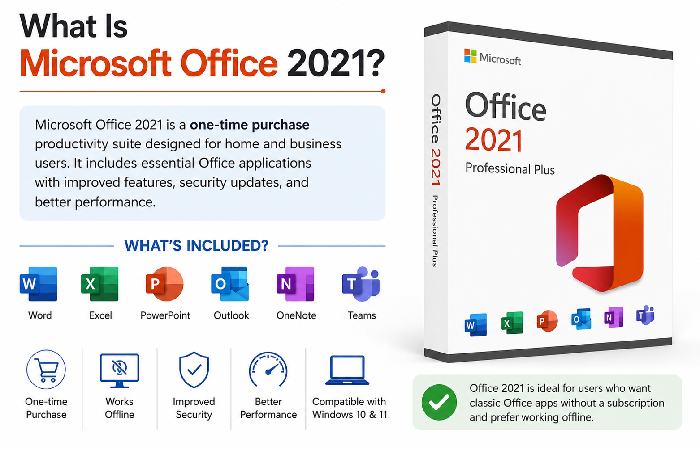
Microsoft Office 2021 is the standalone version of Microsoft’s productivity suite. Unlike Microsoft 365, it requires a one-time payment and does not involve recurring subscription fees.
Office 2021 includes:
- Microsoft Word
- Microsoft Excel
- Microsoft PowerPoint
- Microsoft Outlook
- OneNote
- Teams integration
Once purchased, you can use it indefinitely on supported devices without monthly payments.
Key Advantages
- One-time purchase
- No recurring subscription costs
- Familiar Microsoft interface
- Full offline functionality
- Ideal for users who don’t need cloud-based collaboration
Limitations
- No continuous feature updates
- Limited cloud storage
- Single-license restrictions
- No access to premium Microsoft 365 services
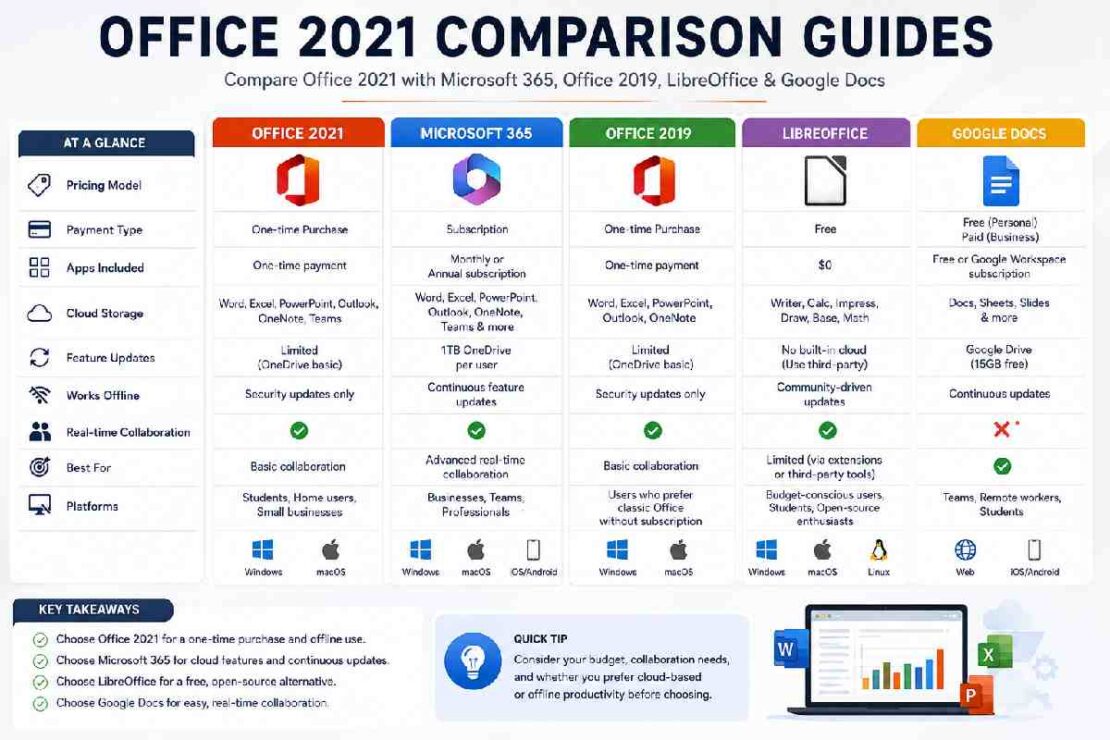
Office 2021 vs Microsoft 365
This is one of the most searched comparisons because both products come from Microsoft but operate differently.
| Feature | Office 2021 | Microsoft 365 |
|---|---|---|
| Payment Model | One-time purchase | Monthly or annual subscription |
| Feature Updates | Security updates only | Continuous feature updates |
| Cloud Storage | Limited | 1TB OneDrive included |
| Device Support | One PC | Multiple devices |
| AI Features | Limited | Latest AI-powered tools |
| Collaboration | Basic | Advanced real-time collaboration |
Who Should Choose Office 2021?
Office 2021 is ideal for:
- Home users
- Offline workers
- Small businesses
- Users who dislike subscriptions
Who Should Choose Microsoft 365?
Microsoft 365 is better for:
- Teams and organizations
- Remote workers
- Students collaborating on projects
- Users wanting the latest features
Cost Comparison
At first glance, Office 2021 appears cheaper because it requires only a single payment.
However, Microsoft 365 becomes cost-effective if:
- Multiple family members need access
- Several devices are used
- Cloud storage is important
- Regular upgrades are desired
Verdict
Choose Office 2021 if you want long-term ownership without subscriptions.
Choose Microsoft 365 if you prioritize cloud features, collaboration, and regular updates.
Office 2021 vs Office 2019
Many users still operate Office 2019 and wonder whether upgrading is worthwhile.
Similarities
Both versions offer:
- Word
- Excel
- PowerPoint
- Outlook
- Offline productivity tools
Major Improvements in Office 2021
Enhanced Collaboration
Office 2021 introduces better co-authoring capabilities that improve teamwork.
Improved Performance
Applications launch faster and handle large documents more efficiently.
Modern Visual Experience
Microsoft refreshed the interface to better align with Windows 11.
New Excel Functions
Office 2021 includes advanced Excel functions such as:
- XLOOKUP
- Dynamic Arrays
- LET Function
These features significantly improve data analysis workflows.
Better PowerPoint Features
Users gain access to:
- Record Slide Show improvements
- Ink Replay
- Improved presentation tools
Upgrade Recommendation
Upgrade if:
- You frequently use Excel
- You work with large datasets
- You need modern collaboration features
Stay with Office 2019 if:
- Your current setup meets your needs
- You rarely use advanced functions
- Budget is a concern
LibreOffice vs Microsoft Office 2021
LibreOffice is one of the most popular free Microsoft Office alternatives.
What Is LibreOffice?
LibreOffice is an open-source office suite developed by a global community.
Applications include:
- Writer
- Calc
- Impress
- Base
- Draw
It is completely free to download and use.
Comparison Table
| Feature | Office 2021 | LibreOffice |
|---|---|---|
| Price | Paid | Free |
| Compatibility | Excellent | Good |
| User Interface | Modern | Traditional |
| Support | Microsoft | Community |
| Cloud Integration | Limited | Minimal |
| Updates | Official | Community-driven |
Advantages of LibreOffice
- No cost
- Open-source
- Lightweight
- Works on older computers
Advantages of Office 2021
- Superior document compatibility
- Better formatting preservation
- Familiar business standard
- Professional support
Which One Should You Choose?
LibreOffice is excellent for budget-conscious users.
Office 2021 remains the better choice for professionals who exchange documents regularly with clients and businesses.
Google Docs vs Microsoft Word
Cloud-based productivity tools continue to grow in popularity.
Google Docs is often considered Microsoft’s biggest competitor for document creation.
Key Differences
| Feature | Microsoft Word | Google Docs |
|---|---|---|
| Offline Access | Excellent | Limited |
| Advanced Formatting | Excellent | Moderate |
| Collaboration | Good | Excellent |
| Installation Required | Yes | No |
| Cloud-Native | No | Yes |
Why Users Love Google Docs
Real-Time Collaboration
Multiple users can edit a document simultaneously.
Accessibility
Access documents from:
- Desktop
- Tablet
- Smartphone
- Web browser
Automatic Saving
Documents save automatically without user intervention.
Why Professionals Still Prefer Word
Advanced Formatting
Word provides superior control over:
- Page layouts
- Headers and footers
- Citations
- Academic formatting
Industry Standard
Many businesses continue to use Word as the default document format.
Better Compatibility
Complex documents usually maintain formatting better in Word.
Best Microsoft Office Alternatives in 2026
If you’re exploring alternatives, these options deserve consideration.
LibreOffice
Best for:
- Personal users
- Budget-conscious users
- Open-source enthusiasts
Google Workspace
Best for:
- Teams
- Remote collaboration
- Cloud-first organizations
WPS Office
Best for:
- Students
- Lightweight installations
- Microsoft Office-like experience
OnlyOffice
Best for:
- Business collaboration
- Document sharing
- Self-hosted environments
Apple iWork
Best for:
- Mac users
- Apple ecosystem integration
Applications include:
- Pages
- Numbers
- Keynote
Troubleshooting Common Office 2021 Comparison Questions
Why Does Office 2021 Not Include New Features?
Office 2021 is a perpetual license product. Microsoft mainly delivers security and stability updates rather than major feature additions.
Can Office 2021 Work Without Internet?
Yes.
After activation, most Office 2021 applications function completely offline.
Is Office 2021 Compatible with Windows 11?
Yes.
Office 2021 is fully compatible with Windows 11 and receives ongoing security updates.
Yes.
You can switch to Microsoft 365 at any time without losing your documents.
Will Office 2021 Eventually Stop Receiving Updates?
Yes.
Like all software products, Office 2021 has a support lifecycle. Users should monitor Microsoft’s official lifecycle announcements.
Frequently Asked Questions
Is Office 2021 better than Microsoft 365?
Not necessarily. Office 2021 is better for users wanting a one-time purchase, while Microsoft 365 is better for users needing cloud services and ongoing updates.
Is Office 2021 worth buying in 2026?
Yes, especially for users who prefer offline productivity and want to avoid subscription costs.
Which is better: LibreOffice or Office 2021?
Office 2021 offers better compatibility and professional support, while LibreOffice provides a free alternative.
Can Google Docs replace Microsoft Word?
For basic document creation and collaboration, yes. For advanced formatting and professional workflows, Word remains stronger.
Reference Source
https://en.wikipedia.org/wiki/Microsoft_Office_2021?