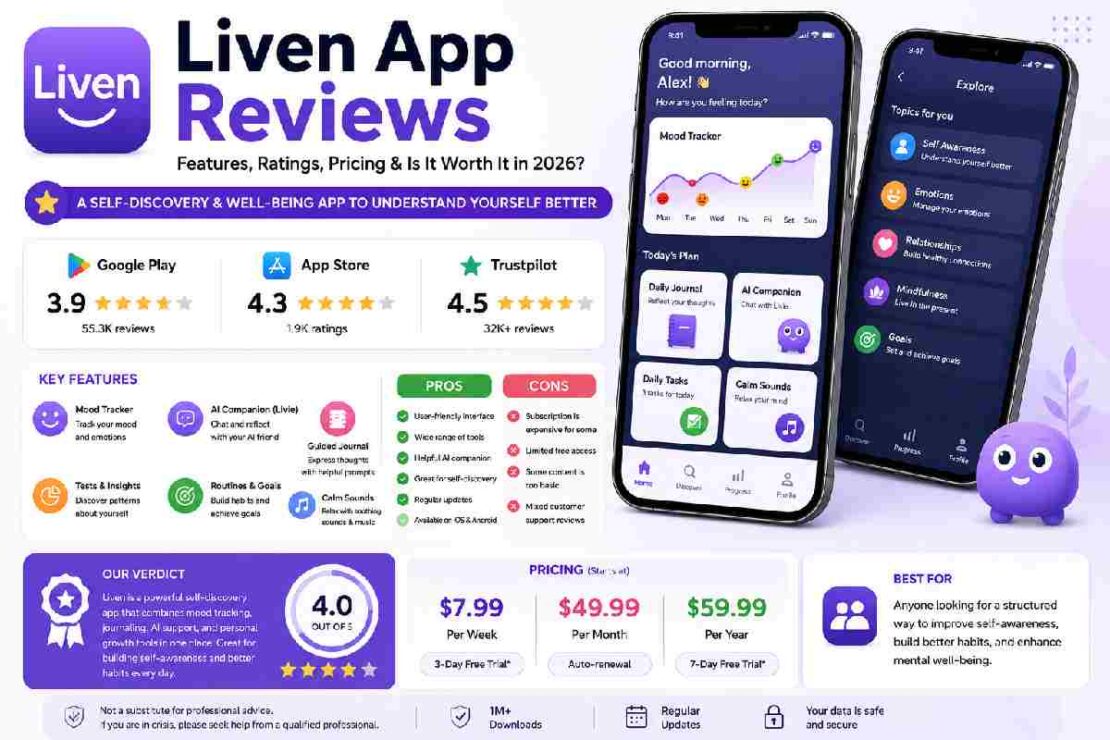
If you’ve been searching for Liven app reviews, you’ve probably seen very different opinions about the platform. Some users praise its mood tracking, guided journaling, AI companion, and short daily exercises, while others complain about subscriptions, pricing, or expecting something different from the app.
So, what is the Liven app actually?
Liven: Discover yourself is a self-discovery and well-being app designed to help users understand personal patterns, reflect on their experiences, build routines, track moods, and work through short educational activities. It is available on iOS and Android and is positioned as a self-discovery companion rather than a replacement for professional healthcare.
This guide looks at what Liven does, how it works, what users say about it, how much it costs, its strengths and weaknesses, subscription concerns, and who may or may not find it useful.
Important: Liven states that it is not intended to diagnose, treat, cure, or prevent health conditions and that its AI companion is not a substitute for professional advice. If you need diagnosis, treatment, medication guidance, or urgent mental-health support, speak with an appropriately qualified professional.
Quick Liven App Review
| Category | Liven in 2026 |
|---|---|
| App type | Self-discovery & well-being |
| Platforms | iOS & Android |
| Developer | LivenTech / Chesmint Limited |
| Main audience | Adults interested in self-reflection and personal growth |
| Core tools | Mood tracking, journaling, routines, tests, lessons, AI companion and sounds |
| AI companion | Livie |
| Free access | Trial may be available depending on plan/platform |
| Weekly pricing | Starting around $7.99/week |
| Monthly pricing | Starting around $49.99/month |
| Annual pricing | Starting around $59.99/year |
| Google Play rating | 3.9/5, 55.3K reviews at time of research |
| India App Store rating | 4.3/5, 1.9K ratings at time of research |
| Trustpilot | 4.5/5, 32K+ reviews |
| Best for | Guided self-reflection and structured personal-growth activities |
Pricing and ratings can change by country, device, promotion, and date, so treat the figures above as a 2026 snapshot rather than permanent values.
What Is the Liven App?
Liven is a mobile self-discovery companion that brings several personal-reflection tools into one app.
Instead of focusing on just one function, such as meditation or task management, Liven combines different activities designed around self-awareness and everyday habits.
The official product currently highlights tools such as:
- Mood tracking
- Guided journaling
- Short educational lessons
- Personal tests
- Daily tasks and routines
- Goal tracking
- Calming sounds
- Livie, an AI companion
- Personalized content and exercises
The idea is straightforward: you check in with yourself, notice patterns, reflect on what happened, and use small exercises to decide what you want to do next.
Liven describes its approach as helping users see their patterns more clearly and build small habits that can fit into everyday life.
Is Liven a Mental Health App?

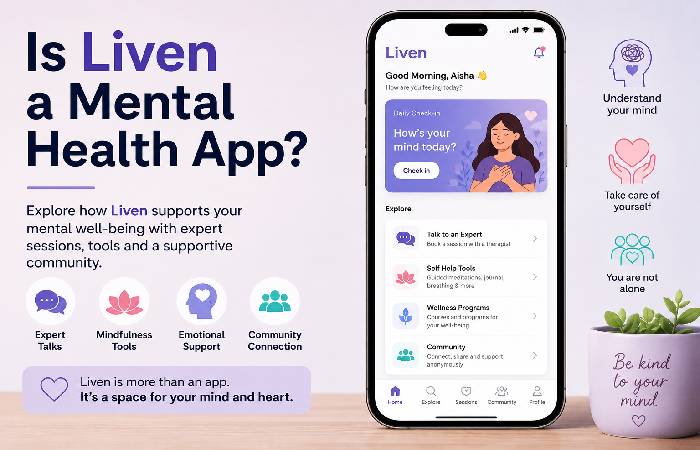
This is where terminology matters.
Liven sits in the well-being and self-discovery space, but it should not be treated as a substitute for therapy, diagnosis, or medical care.
Its Google Play description explicitly says that Livie is not a substitute for professional advice and that the app is not intended to diagnose, treat, cure, or prevent health conditions.
That distinction matters when comparing Liven with therapy platforms or clinical services.
A useful way to think about it is:
Liven = self-guided reflection and well-being tools
rather than:
Liven = professional mental-health treatment
How Does the Liven App Work?
The basic experience follows a relatively simple cycle.
Step 1: Complete the onboarding
When you first start using Liven, you answer questions about your goals, habits, experiences, and what you want to work on.
This information helps determine what content and tools the app presents.
Step 2: Choose an area to explore
Depending on your experience and current version of the app, you may encounter topics related to areas such as:
- Focus
- Procrastination
- Self-image
- Boundaries
- Emotional awareness
- Routines
- Personal goals
- Stress management
The exact content can change as the product develops.
Step 3: Check in
Liven’s Mood Tracker lets you record how you’re feeling and look for patterns over time.
The goal isn’t simply to answer “How do I feel?”
It is to create a record that you can reflect on later.
Step 4: Learn through short activities
The app offers short lessons and practical exercises rather than requiring you to sit through lengthy courses.
Liven’s official site describes its current model as bringing a challenge into the app, selecting a topic, working through a practical micro-course, and leaving with a skill or exercise to apply.
Step 5: Reflect with Livie
Livie is Liven’s AI companion.
You can use it as a conversational interface for reflection and exploring thoughts.
The company describes Livie as a companion for daily reflection rather than professional healthcare.
Step 6: Track progress
The app can connect mood check-ins, goals, routines, and other activities so you can look back at your progress.
Its current goal-tracking experience, for example, lets users set a goal, check in periodically, and review progress.
Liven App Features Explained
1. Mood Tracker
The Mood Tracker is one of the core Liven features.
You can record how you’re feeling and use those entries to identify recurring patterns.
This is particularly useful for someone who tends to think, “I don’t know why today felt so difficult.”
Having a record can make it easier to look back and ask:
- What happened before I felt this way?
- Does this happen at particular times?
- Are certain situations repeated?
- What changed between good and difficult days?
It is still self-tracking, not a medical assessment.
2. Guided Journaling
Traditional journaling can be difficult when you don’t know what to write.
Liven attempts to solve that problem with prompts.
Instead of opening a blank page, you receive a starting point for reflection.
That can make journaling feel more approachable for beginners.
3. Livie AI Companion
Livie is one of Liven’s more distinctive features.
The idea is to give users a conversational space where they can put thoughts into words and receive reflective prompts.
Some user reviews specifically praise the AI companion and say it helps them think through situations or identify feelings.
However, users should remember that conversational AI is not equivalent to a licensed therapist.
If a situation involves serious symptoms, safety concerns, diagnosis, or treatment decisions, professional care is more appropriate.
4. Tests
Liven includes various self-assessment-style tests designed to help users explore aspects of their habits, emotions, or personal patterns.
These can be useful as conversation starters with yourself, but they shouldn’t automatically be interpreted as clinical diagnoses.
5. Routines and Tasks
The app also includes practical tools for everyday structure.
The goal is not necessarily to create an enormous productivity system.
Instead, users can create smaller routines and tasks.
This can appeal to people who find complicated productivity apps overwhelming.
6. Goals
Liven’s current goal-tracking system connects goals with check-ins and reflection.
Rather than simply marking a goal as complete, the app encourages users to look at progress alongside how they feel.
7. Sounds
Liven also includes audio content for activities such as relaxation, focus, sleep, and mindful moments.
What Do Liven App Reviews Say in 2026?
This is probably the most important part of the article if you’re researching the app before paying.
The review picture is mixed rather than uniformly positive or negative.
Different platforms show different scores and different complaint patterns.
Current rating snapshot
| Source | Rating | Review Volume |
|---|---|---|
| Google Play | 3.9/5 | 55.3K+ |
| India App Store | 4.3/5 | 1.9K+ |
| Trustpilot | 4.5/5 | 32K+ |
These figures were checked during this research and can change continuously. The Google Play listing was updated August 27, 2026.
One reason it is useful to check several sources is that a single rating doesn’t tell the whole story.
What Positive Reviews Tend to Mention
Across positive reviews, several themes appear repeatedly.
Easy-to-use interface
Some users describe the app as intuitive and easy to navigate.
Short daily activities
People who don’t want long sessions often appreciate the shorter format.
Mood tracking
Users frequently mention the Mood Tracker as a useful way to notice patterns.
AI conversations
Livie receives positive comments from users who enjoy conversational reflection.
Structured learning
Some reviewers like having lessons, journaling, tasks, and other tools together rather than switching between several apps.
The Everygirl’s hands-on review, for example, highlighted the manageable daily commitment, Mood Tracker, and routine-building experience.
Independent video reviewers have also discussed the app’s onboarding, AI companion, mood graph, mini-courses, routine builder, and soundscapes.
What Do Negative Liven App Reviews Say?
The negative feedback deserves equal attention.
The most important complaints aren’t necessarily about the basic idea of self-reflection.
Instead, recurring concerns include:
- Subscription expectations
- Auto-renewal
- Pricing
- Confusion about trial terms
- Expectations created by advertising
- Some users finding content too basic
- Technical issues reported by individual users
- Differences between what users expected and what the app delivered
Recent App Store reviews include complaints about perceived value and billing, while other users report technical or cancellation-related problems.
This doesn’t mean every Liven subscriber experiences these issues.
It means you should understand the subscription before starting a trial.
Is Liven Legit?
Based on the available evidence, Liven is a real, functioning commercial app rather than a fake app or nonexistent service.
It has active listings on Apple’s App Store and Google Play, a large volume of user ratings, an official website, a help center, and published subscription information.
The more useful question is therefore not “Is Liven real?”
It is:
Is Liven the right product for what you need?
Those are two very different questions.
A legitimate app can still be a poor fit for an individual user.
How Much Does Liven Cost?
Liven’s pricing is one of the areas you should check carefully before subscribing.
The company’s current pricing information says plans can vary according to device, location, and purchase flow.
As of the July 2026 pricing update, Liven lists starting prices of approximately:
| Plan | Starting Price |
|---|---|
| Weekly | $7.99/week |
| Monthly | $49.99/month |
| Annual | $59.99/year |
Liven also states that a three-day trial may be available for the weekly plan, while yearly plans can have a seven-day trial depending on the platform.
Important: Don’t assume these exact prices will appear in your country.
The company says the App Store or Google Play listing is the most reliable source for the price shown to you.
Does Liven Have a Free Trial?
It can.
According to Liven’s current help documentation:
- Weekly App Store/Google Play plans may include a 3-day trial.
- Yearly plans may include a 7-day trial.
- Website subscriptions may instead use a discounted first billing period rather than a free trial.
Trials are automatically converted into paid subscriptions unless canceled according to the applicable terms.
This is one of the most important things to check before starting.
My recommendation
Before confirming a subscription, take a screenshot showing:
- Trial duration
- Price
- Billing frequency
- Renewal price
- Renewal date
- Cancellation instructions
That gives you a record of what you actually agreed to.
Why Do Some People Complain About Liven Charges?
Subscription complaints are a recurring theme in the available review data.
Liven’s own help center explains that subscriptions can auto-renew after a trial or billing period. It also says users can manage subscriptions through the Membership section or, for store purchases, through their App Store or Google Play subscription settings.
So there are two separate questions:
Was a charge authorized under the subscription terms?
and
Did the user understand that the subscription would renew?
Those aren’t always the same thing.
That distinction is important when reading negative reviews.
How to Cancel Liven
The exact cancellation route depends on where you subscribed.
If you subscribed through Liven’s website
Liven’s support information says you can manage the membership through the app’s Membership section.
If you subscribed through Apple or Google
Use the subscription-management settings associated with your Apple or Google account.
Liven says cancellation stops future renewals while access generally continues through the current billing period.
Don’t simply delete the app and assume that cancels your subscription.
Deleting an app is not the same as canceling an active subscription.
Liven App Pros and Cons
Pros
- Easy-to-understand concept
- Several self-reflection tools in one app
- Mood tracking
- Guided journaling
- Short educational activities
- AI companion
- Goal and routine tools
- Available on iOS and Android
- Large volume of public user reviews
- Useful for people who prefer structured self-reflection
Cons
- Subscription pricing can be expensive depending on the plan
- Trial and renewal terms require attention
- User experiences vary considerably
- Some users find certain content too basic
- AI should not be treated as a professional therapist
- Features and pricing can change
- Some negative reviews report billing or technical problems
- The app may not suit people who prefer simple, single-purpose tools
Who Is the Liven App For?
Liven may be a good fit if you:
- Want to understand your daily patterns
- Enjoy guided rather than completely open-ended journaling
- Prefer short activities
- Want mood tracking and reflection in one place
- Like conversational AI tools
- Want help creating small routines
- Prefer a mobile-first experience
- Are comfortable paying for a subscription if the product proves useful
It may be less suitable if you:
- Want professional therapy
- Need a clinical diagnosis
- Want medication or treatment advice
- Prefer a simple mood tracker without extra features
- Don’t want subscription-based apps
- Prefer desktop software
- Expect an AI companion to replace a human professional
Liven itself states that it is not a substitute for professional advice or treatment.
Liven vs a Simple Mood Tracker
One useful comparison is with a basic mood-tracking app.
| Feature | Liven | Basic Mood Tracker |
|---|---|---|
| Mood logging | Yes | Usually |
| Journaling | Yes | Sometimes |
| AI companion | Yes | Usually no |
| Educational content | Yes | Usually limited |
| Routines | Yes | Sometimes |
| Goals | Yes | Sometimes |
| Sounds | Yes | Varies |
| Guided activities | Yes | Limited |
| Subscription | Yes | Varies |
| Complexity | Higher | Lower |
If all you want is a daily mood diary, Liven may offer more functionality than you need.
If you want several tools in one place, the broader feature set may be an advantage.
Liven vs. Calm
Liven and Calm overlap in the broad well-being category, but their approaches are different.
Calm is widely associated with meditation, sleep, relaxation, and audio content.
Liven puts more emphasis on self-discovery, reflection, mood tracking, routines, tests, and conversational support.
| Category | Liven | Calm |
|---|---|---|
| Main focus | Self-discovery | Meditation & relaxation |
| Mood tracking | Yes | Less central |
| Journaling | Yes | Available through selected features |
| AI companion | Livie | Different AI/product features may vary |
| Meditation library | Not its main focus | Major focus |
| Sleep content | Available | Major focus |
| Personal reflection | Strong focus | Secondary |
| Best for | Structured self-reflection | Meditation, sleep and relaxation |
The better choice depends on what you actually want from the app.
Liven vs. Wisey
Liven and Wisey are closer comparisons because both position themselves around personal growth and everyday self-management.
Wisey is more focused on structure and helping users start and complete tasks.
Liven’s own 2026 comparison makes a similar distinction: Wisey emphasizes completing tasks, while Liven focuses more on understanding patterns behind procrastination and overwhelm.
Liven App for Beginners: How to Get Started
If you’re completely new to self-discovery apps, don’t try to use every feature on day one.
A simpler approach is:
Day 1: Explore
Complete onboarding and look through the main sections.
Days 2–3: Check in
Use the Mood Tracker and try one short activity.
Days 4–7: Add reflection
Try journaling or Livie after something noticeable happens during your day.
Week 2: Build a routine
Choose one or two tools you genuinely like.
Week 3+: Review
Look at which features you actually use.
This matters because an app can have dozens of features and still provide little value if you don’t use them consistently.
Troubleshooting Common Liven Problems
Liven won’t open
Try:
- Check your internet connection.
- Close and reopen the app.
- Update the app.
- Restart your phone.
- Reinstall the app if necessary.
If the problem continues, contact Liven support.
I was charged after my trial
First check your subscription details and trial end date.
If you subscribed through Apple or Google, check the relevant subscription settings.
Liven says charges can occur automatically when a trial or billing period ends because subscriptions renew automatically.
I canceled but was still charged
Check whether cancellation was completed before the renewal date.
Also check whether the subscription was purchased through the website, Apple, or Google because the management route differs.
If the charge still appears incorrect, contact the relevant platform and Liven support with your receipt and subscription information.
I don’t want the subscription anymore
Cancel future renewal rather than simply deleting the app.
Keep your cancellation confirmation for your records.
Is the Liven App Safe to Use?
“Safe” has several meanings.
From a product perspective, Liven is an established app available through major app stores.
From a privacy perspective, users should read the current privacy policy and the data-safety disclosures associated with their device’s app store before entering sensitive personal information.
Google Play’s current listing provides a Data Safety section and notes that data practices can vary based on usage, region, and age.
Because Liven involves personal reflections, mood information, and potentially sensitive conversations, it’s sensible to think carefully about what you choose to enter into any digital wellness or AI service.
A good rule is:
Don’t enter information into an AI or wellness app that you would be uncomfortable storing with a third-party digital service.
Is Liven Worth It?
There isn’t a universal yes or no.
Liven may be worth considering if:
You want several self-reflection tools in one app and you know you’ll use them regularly.
The short daily format can make it easier to build a consistent routine, especially if you don’t enjoy traditional journaling.
Liven may not be worth it if:
You only want a basic mood tracker, don’t like subscriptions, or expect professional mental-health care.
The price also matters. At the starting rates published by Liven, the annual plan can look dramatically cheaper than paying the published monthly starting rate for twelve months, but your actual offer may differ by location and platform.
So don’t compare only the headline price.
Compare:
trial → first payment → renewal price → billing frequency → cancellation terms
Our Liven App Verdict for 2026
After looking across official product information, current app-store listings, Trustpilot, independent reviews, and user complaints, the fairest conclusion is:
Liven is a legitimate, feature-rich self-discovery app that can be useful for people who enjoy guided reflection, mood tracking, routines, short lessons, and AI-assisted journaling—but it isn’t the right choice for everyone.
The biggest strength is its all-in-one approach.
You don’t need one app for journaling, another for mood tracking, another for routines, and another for conversational reflection.
The biggest weakness is that the subscription model requires careful attention, and individual users report very different experiences with the content and value.
The ratings also show why you shouldn’t rely on a single review site. Google Play, Apple’s App Store, and Trustpilot currently show noticeably different scores.
Our simple rating
| Category | Rating |
|---|---|
| Ease of use | ⭐⭐⭐⭐☆ |
| Feature variety | ⭐⭐⭐⭐⭐ |
| Self-reflection tools | ⭐⭐⭐⭐☆ |
| AI companion | ⭐⭐⭐⭐☆ |
| Beginner friendliness | ⭐⭐⭐⭐☆ |
| Pricing transparency | ⭐⭐⭐☆☆ |
| Value for money | ⭐⭐⭐½☆ |
| Professional-care replacement | ❌ No |
Overall: 4/5 for the right user
The key phrase is right user.
If you’re looking for a structured self-discovery companion, Liven is worth investigating.
If you’re looking for therapy, diagnosis, or medical treatment, it isn’t the product you should rely on.
Frequently Asked Questions About Liven
What is the Liven app used for?
Liven is designed for self-discovery and everyday well-being. It includes tools such as mood tracking, journaling, educational content, routines, goals, tests, sounds, and an AI companion called Livie.
Is Liven a free app?
Liven isn’t completely free. Depending on the platform and plan, it may offer a free trial before a subscription begins. Current Liven documentation lists different trial arrangements for weekly and yearly app-store plans.
How much does the Liven app cost?
Liven’s published 2026 starting prices include approximately $7.99 per week, $49.99 per month, and $59.99 per year. Actual prices can vary by region, platform, and promotional offer.
Is Liven a therapy app?
Liven is a self-discovery and well-being app, not a replacement for professional therapy. Its Google Play listing explicitly states that it is not intended to diagnose, treat, cure, or prevent health conditions.
Is the Liven AI companion a real person?
No. Livie is an AI companion. It is designed to provide conversational reflection and support inside the app.
Can I cancel Liven?
Yes. Liven says subscriptions can be canceled, with the exact process depending on whether you subscribed through its website, Apple, or Google.
Why are there different Liven app ratings?
Ratings differ because Apple, Google Play, and Trustpilot collect reviews from different audiences and regions. They also update at different times. For example, the current Google Play listing shows 3.9/5 from more than 55,000 reviews, while the India App Store listing shows 4.3/5 from around 1,900 ratings.
Is Liven worth paying for?
It depends on how much you use its tools. Someone who regularly uses the mood tracker, journaling, lessons, routines, and AI companion may get more value than someone who only opens the app occasionally.
Can Liven replace a therapist?
No. Liven itself says it isn’t a substitute for professional advice or treatment. Anyone needing diagnosis, treatment, or professional mental-health care should seek appropriate qualified support.
Final Takeaway
The simplest way to understand Liven is this:
It’s a self-discovery toolkit, not a therapist in your pocket.
It combines mood tracking, guided journaling, short lessons, routines, goals, sounds, tests, and an AI companion into one mobile experience.
For beginners, that can make personal reflection easier because you don’t have to figure out where to start.
For experienced users, the value depends more on whether Liven’s particular approach and tools offer something you aren’t already getting elsewhere.
And before starting a paid plan, always check the trial length, renewal price, billing frequency, and cancellation terms.
That is the single most practical lesson from the current mix of Liven app reviews.