Last Updated: August 19, 2026
https://www.freetechweb.com/top-programming-tutorials-cpp-tutorials-for-beginners/The trickiest part of looking for web development tutorials is often finding what to take and in what order; there are so many options out there it can quickly become overwhelming. Fortunately, for complete beginners the path to becoming a web developer is largely laid out for you in the forms of documentation, tutorials, interactive tutorials, courses and bootcamps and there’s quite a bit to choose from.
You are also fortunate in that there is no need to memorize everything about web development before jumping in. In most of the recommended paths the advice is the same: learn HTML and CSS, next learn javascript and then build projects before considering what you want to get serious about: be that becoming a frontend-focused developer or on the road to becoming a full-stack developer.
What Are the Best Web Development Tutorials in 2026?
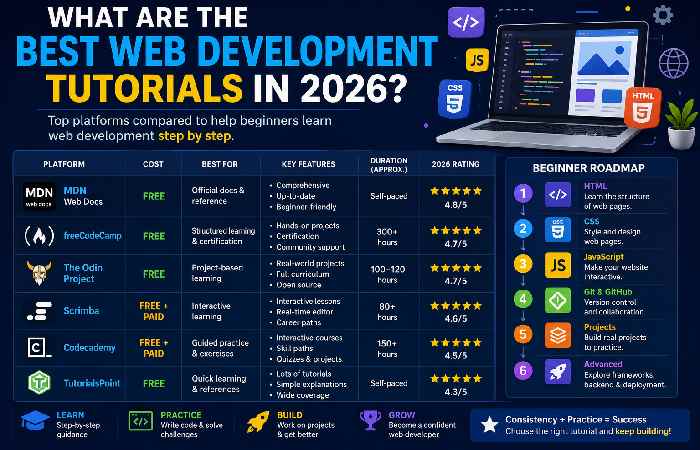
The most powerful learning resources in 2026 can be divided into some groups: authoritive documentations, interactive coding environment, course curriculum built upon projects and courses designed for careers.
In comparison, freeCodeCamp and The Odin Project are powerful free learning resources, and Scrimba, Codecademy will also provide you some great experiences if you like to code in an interactive way. For an authoritive source to learning HTML, CSS, JavaScript and Web APIs, MDN is unparalleled.
Top Web Development Tutorials Compared
| Tutorial / Platform | Cost* | Learning Style | Main Skills | Best For |
|---|---|---|---|---|
| MDN Web Docs | Free | Documentation + tutorials | HTML, CSS, JavaScript | Authoritative reference |
| freeCodeCamp | Free | Lessons + challenges | HTML, CSS, JS, React, backend | Budget-conscious beginners |
| The Odin Project | Free | Projects + guided curriculum | HTML, CSS, JS, React, Node | Learning by building |
| Scrimba | Free + paid | Interactive lessons | HTML, CSS, JS, React | Hands-on learners |
| Codecademy | Free + paid | Interactive exercises | HTML, CSS, JS, React, Node, SQL | Structured practice |
| TutorialsPoint | Free | Tutorials + references | Frontend and backend technologies | Topic-based learning |
*Pricing and plans can change, so verify the current offer before purchasing.
Some of Scrimba’s 2026 comparison reports may list freeCodeCamp and The Odin Project as having free courses but identify Scrimba’s Frontend Career Path, with its built-in interactive course lessons. Codecademy’s Full-Stack Engineer path is built around interactive exercises that you’ll do directly in your web browser. MDN has the standards the web browser developers and the people who write the websites rely on and the material is free.
What Is the Search Intent for “Web Development Tutorials”?
The keyword has informational + commercial investigation intent.
Informational intenttut
A beginner searching this keyword may want to:
- Understand how web development works
- Learn HTML and CSS
- Find JavaScript tutorials
- Build a first website
- Discover beginner projects
- Learn frontend or full-stack development
Commercial investigation intent
Some searchers are already comparing:
- Free vs. paid courses
- Interactive platforms
- Certificates
- Career programs
- Full-stack courses
- Learning duration
- Project-based curricula
This means a page targeting the keyword should teach first and recommend second. A simple list of course names is unlikely to satisfy the entire journey.
Best Learning Path for Web Development Beginners
If you are a brand new programmer do not skip into building react applications, next.js applications or backend frameworks do not follow this way. Your way should be this one.
HTML → CSS → JavaScript → Git/GitHub → Projects → React → Backend → Database → Deployment
1. Learn HTML
HTML provides the structure of a webpage.
Start with:
- Headings and paragraphs
- Links
- Images
- Lists
- Tables
- Forms
- Semantic HTML
- Accessibility basics
MDN’s beginner material starts with creating and publishing a basic webpage, while its HTML curriculum teaches structure from the ground up.
Internal link opportunity:
Link to your upcoming HTML Tutorials for Beginners article here.
2. Learn CSS
Once you understand HTML, learn how to control presentation and layout.
Focus on:
- Selectors
- Box model
- Colors and typography
- Flexbox
- CSS Grid
- Responsive design
- Media queries
- Transitions and animations
Don’t spend weeks memorizing CSS properties. Build pages while learning.
3. Learn JavaScript
JavaScript makes webpages interactive.
Your beginner JavaScript tutorials should cover:
- Variables
- Data types
- Conditions
- Loops
- Functions
- Arrays and objects
- DOM manipulation
- Events
- Fetch API
- Async/await
- Modules
MDN’s JavaScript learning material progresses from fundamentals such as conditions, loops, functions, and events toward more advanced topics.
Internal link opportunity:
Link to JavaScript Tutorials for Beginners.
Frontend Development vs. Full-Stack Development
You don’t have to become a full-stack developer immediately.
| Path | What You Learn | Difficulty | Suitable For |
|---|---|---|---|
| Frontend | HTML, CSS, JavaScript, React | Beginner → Intermediate | Building interfaces |
| Backend | Node.js, APIs, databases | Intermediate | Server-side development |
| Full-stack | Frontend + backend + database | Intermediate → Advanced | Complete applications |
If your immediate goal is to create websites, start with frontend development. After you are comfortable with JavaScript, you can move toward React and backend technologies.
For learners who want a complete path, current 2026 course comparisons commonly include React, Node.js, SQL, and other backend technologies in full-stack curricula.
Beginner Web Development Projects You Should Build
Watching tutorials isn’t enough.
A better learning cycle is:
Learn → Code → Break → Debug → Rebuild → Publish
Start with small projects such as:
- Personal portfolio page
- Responsive landing page
- Restaurant website
- To-do list
- Calculator
- Weather application
- Quiz application
- Blog interface
- Product page
- Full-stack CRUD application
Project-based learning helps prevent “tutorial hell,” where learners can follow someone else’s code but struggle to build independently. A 2026 guide on beginner web development projects similarly recommends moving from guided learning into progressively harder practical builds.
Real Setup: What Do You Need to Start?
You don’t need an expensive computer or complicated development environment.
For a basic setup, install:
- A modern web browser
- Visual Studio Code or another code editor
- Git
- GitHub account
- Node.js when you begin JavaScript tooling or backend development
Recommended screenshot: Add a real screenshot showing a beginner’s VS Code workspace with index.html, style.css, and script.js open.
Recommended second screenshot: Show the webpage running in Chrome beside the code editor.
These real setup screenshots can make the tutorial considerably more useful than generic stock images because readers can visually compare their own environment with the guide.
2026 Web Development Learning Snapshot
A useful way to compare learning resources is by cost versus learning depth rather than assuming the most expensive course is the best.
| Resource Type | Typical Cost | Hands-On Practice | Structured Path |
|---|---|---|---|
| Free documentation | $0 | Low–Medium | Medium |
| Free coding curriculum | $0 | High | Medium–High |
| Interactive platforms | Free–$40+/month | High | High |
| Career programs | Hundreds–thousands | High | Very High |
For instance, Scrimba comparing an article dated March 2026 puts freeCodeCamp on 300+ hours, its frontend course on 81.6, MDN a free completely self-paced resource, or the Full-Stack Engineer program by Codecademy at approximately 150 hours. This kind of data helps learners realize the need to compare, for instance, the format and depth and not just amount.
Simple Value Graph
Learning value for a beginner
Free project-based resources   ██████████
Interactive courses            █████████
Official documentation         ████████
Paid structured courses       ████████
Bootcamp-style programs       ███████
This is a qualitative comparison, not a standardized industry score. The best resource depends on how much structure, feedback, mentorship, and project practice you need.
How to Choose the Right Web Development Tutorial
Before choosing a course, ask five questions:
1. Does it start at my level?
Absolute beginners should avoid courses that assume JavaScript knowledge.
2. Does it include projects?
Projects turn passive knowledge into practical skill.
3. Is the content current?
Look for modern JavaScript, responsive CSS, accessibility, Git, APIs, and current frameworks where appropriate.
4. Can I practice while learning?
Interactive exercises or coding assignments are preferable to watching hours of videos without writing code.
5. Does it match my goal?
Choose frontend resources if you want to build interfaces and a full-stack path if you want to develop complete applications.
Common Problems Beginners Face
“I understand tutorials but can’t code alone.”
Stop copying the instructor line by line. After finishing a lesson, close the tutorial and rebuild the project from memory.
“There are too many technologies.”
Ignore most frameworks initially. Master HTML, CSS, and JavaScript first.
“My CSS isn’t working.”
Check:
- Is the stylesheet linked correctly?
- Is the selector correct?
- Is another CSS rule overriding it?
- Are you missing a semicolon or bracket?
- Are you viewing the latest version of the page?
“My JavaScript doesn’t run.”
Open the browser’s Developer Tools and check the Console for errors. A missing bracket, incorrect selector, or JavaScript file path can stop your script from executing.
Frequently Asked Questions
What is the best web development tutorial for beginners?
The ultimate, one, truth “god tier” tutorial is difficult to pick, but in general: MDN is great for authoritative sourcing of the underlying fundamental web knowledge. FreeCodeCamp is excellent for free, structured practice.
The Odin Project is also good, specifically for project based learning.
And Scrimba or Codecademy are very suitable for visual learning of single concepts.
Can I learn web development for free?
Absolutely! Mdn, freeCodeCamp, and The Odin Project are all excellent free resources to start your journey learning web development.
Should I learn HTML or CSS first?
Learn HTML first.HTML provides the building blocks which your CSS can dress up. Learn CSS before starting with javascript.
How long will take to learn web development?
You will grasp the core concepts within months, with consistent and relentless practice, however getting job-ready will require extensive practice and a couple of large projects. Your personal mileage may vary depending on your prior computer experience and hours you’ll dedicate to learning each week.
Is frontend development easier than full-stack?
Frontend is generally considered easier for a beginner because full-stack requires learning concepts related to backend programming (APIs, databases, backend concepts, authentication) in addition to the entire frontend setup.
What projects can I build as a beginner?
Beginners can start building simple things such as portfolios, a landing page,a calculator,a to-do list,a quiz app, or a simple weather app, scaling to more complex web apps.
Final Verdict
The best tutorials for web development are neither the most lengthy nor expensive; rather, the best tutorial is one where there is clear teaching path for you, a regular stream of opportunities for practice coding, and a learning method that encourages building projects without having the tutorial always in front of you.
For the beginner most appropriate to today, the optimal path for 2026 is: HTML CSS JavaScript Git/GitHub beginner projects React backend databases deployment.
If your goals of reaching that of the average web developer is about wanting to master every aspect, you will want to utilize some free learning platforms, possibly supplement with interactive training environments if you crave guidance throughout your endeavors, and rely on MDN as the ultimate web development authority whenever there is a web based topic that you do not quite understand.