
Last Updated: June 22, 2026
Best Productivity Apps for Every User Type in 2026
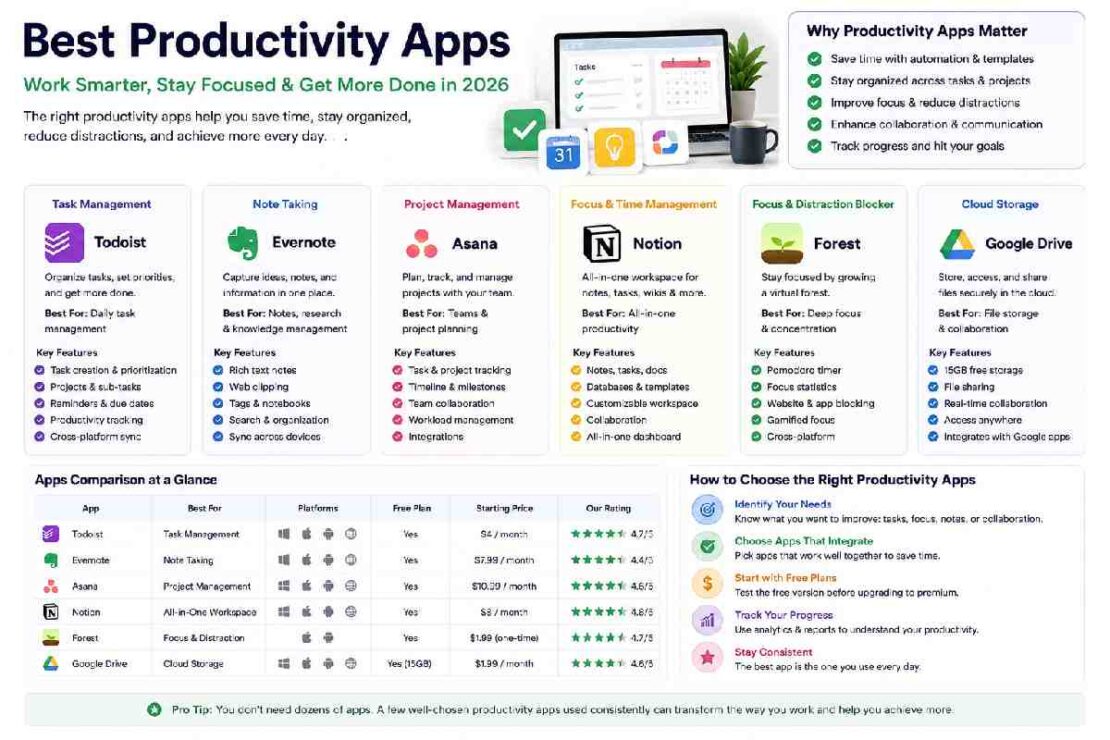
Productivity apps have become essential tools for managing work, studies, projects, and personal life. Whether you’re a student trying to stay organized, a remote worker managing tasks across multiple projects, or an entrepreneur running a growing business, the right productivity app can save time and improve efficiency.
The challenge is that there are thousands of productivity tools available today. Some focus on task management, while others specialize in note-taking, collaboration, scheduling, or automation. Choosing the right one depends on your specific needs and workflow.
In this guide, we’ll explore the best productivity apps for different user types and devices, helping you find the perfect tool to boost your daily productivity.
Why Productivity Apps Matter in 2026
The modern workplace is more digital than ever. Professionals often juggle multiple devices, communication channels, and responsibilities throughout the day.
A good productivity app can help you:
- Organize tasks efficiently
- Reduce distractions
- Improve collaboration
- Track deadlines
- Automate repetitive work
- Centralize information
- Improve work-life balance
Instead of relying on sticky notes or memory, productivity apps provide structured systems that keep everything organized.
Best Productivity Apps for Students
Students need tools that help manage classes, assignments, research, and exam preparation.
1. Notion
Notion has become one of the most popular productivity platforms for students.
Key Features
- Note-taking
- Project management
- Study planners
- Database creation
- Templates for assignments
Pros
- Highly customizable
- Free student-friendly plan
- Works across devices
Cons
- Learning curve for beginners
Best For
Students managing multiple courses and projects.
2. Microsoft OneNote
OneNote remains one of the best note-taking apps available.
Key Features
- Handwritten notes
- Audio recording
- Cloud syncing
- Notebook organization
Best For
Students who prefer traditional note-taking with digital flexibility.
3. Google Keep
Google Keep offers a simple way to capture ideas quickly.
Key Features
- Color-coded notes
- Checklists
- Voice notes
- Google integration
Best For
Students needing a lightweight note-taking solution.
Best Productivity Apps for Remote Workers
Remote work continues to grow, making communication and organization more important than ever.
1. Slack
Slack remains a leading workplace communication platform.
Features
- Team messaging
- File sharing
- Channels
- App integrations
Benefits
Keeps conversations organized and searchable.
2. Asana
Asana helps remote teams track projects and deadlines.
Features
- Task management
- Workflow automation
- Timeline views
- Team collaboration
Best For
Project-heavy teams needing clear accountability.
3. Zoom
Even in 2026, virtual meetings remain critical.
Features
- Video conferencing
- Screen sharing
- AI meeting summaries
- Webinar hosting
Best For
Remote professionals and distributed teams.
Best Productivity Apps for Entrepreneurs
Entrepreneurs need tools that simplify business operations and maximize efficiency.
1. ClickUp
ClickUp combines project management, documentation, and goal tracking.
Features
- Task management
- Docs
- Dashboards
- Automation
Why Entrepreneurs Love It
It replaces multiple tools with a single platform.
2. Trello
Trello uses a visual board system that makes project tracking simple.
Features
- Kanban boards
- Task cards
- Team collaboration
- Automation
Best For
Small businesses and startups.
3. Evernote
Evernote remains a powerful knowledge management solution.
Features
- Notes
- Web clipping
- Search functionality
- Cross-platform access
Best For
Capturing ideas and business research.
Best Productivity Apps for Teams
Team productivity depends heavily on collaboration and communication.
1. Microsoft Teams
Microsoft Teams integrates chat, meetings, and file sharing.
Advantages
- Office integration
- Secure collaboration
- Enterprise-ready
Best For
Organizations using Microsoft 365.
2. Monday.com
Monday.com provides customizable workflows.
Features
- Project tracking
- Team collaboration
- Dashboards
- Automation
Best For
Growing organizations.
3. Google Workspace
Google Workspace offers a complete productivity ecosystem.
Includes
- Gmail
- Docs
- Sheets
- Meet
- Drive
Best For
Teams requiring real-time collaboration.
Best Productivity Apps for Windows
Windows users have access to numerous powerful productivity tools.
Top Choices
Microsoft To Do
Perfect for task management and daily planning.
OneNote
Excellent note-taking experience.
PowerToys
Advanced utilities that enhance Windows productivity.
Notion
Comprehensive workspace management.
Best Productivity Apps for Android
Android users benefit from flexible productivity solutions.
Recommended Apps
Todoist
A powerful task manager with natural language scheduling.
Google Keep
Fast and lightweight note-taking.
TickTick
Combines task management and habit tracking.
Notion
Excellent mobile productivity platform.
Best Productivity Apps for iPhone
Apple users often prioritize clean design and ecosystem integration.
Best Options
Things 3
One of the most polished task managers available.
Apple Reminders
Built-in and surprisingly powerful.
Notion
Excellent cross-platform support.
Fantastical
Advanced calendar management.
Best Productivity Apps for Mac
Mac users often seek apps optimized for Apple’s ecosystem.
Top Picks
Alfred
A productivity launcher that saves time.
Things 3
Beautiful task management.
Notion
All-in-one workspace.
Raycast
Powerful workflow automation.
Productivity App Comparison Table
| App | Best For | Free Plan | Platforms |
|---|---|---|---|
| Notion | Students & Professionals | Yes | Windows, Mac, Android, iPhone |
| ClickUp | Entrepreneurs | Yes | All Platforms |
| Trello | Small Teams | Yes | All Platforms |
| Slack | Communication | Yes | All Platforms |
| Asana | Project Management | Yes | All Platforms |
| Todoist | Personal Productivity | Yes | All Platforms |
| OneNote | Note-Taking | Yes | Windows, Mac, Mobile |
| Microsoft Teams | Collaboration | Limited | All Platforms |
How to Choose the Right Productivity App

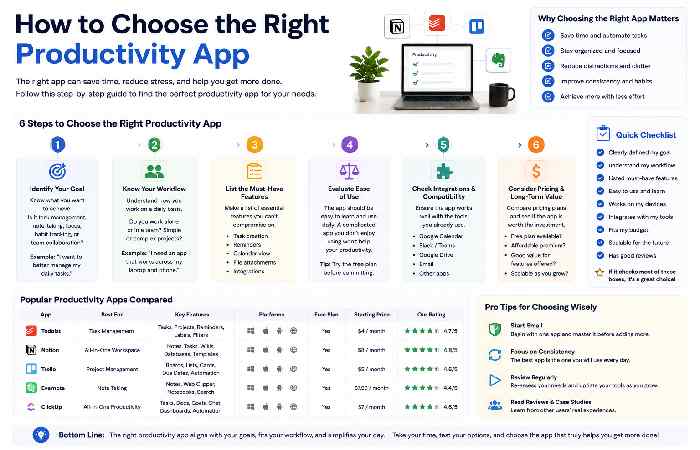
Consider these factors before selecting a productivity tool:
1. Define Your Goals
Ask yourself:
- Task management?
- Team collaboration?
- Note-taking?
- Scheduling?
- Automation?
Different tools excel in different areas.
2. Consider Your Devices
Choose apps that work across all your devices.
For example:
- Windows users may prefer Microsoft tools.
- Apple users may benefit from Things 3 or Fantastical.
- Cross-platform users should consider Notion or ClickUp.
3. Evaluate Pricing
Many excellent productivity apps offer generous free plans.
Start with free versions before upgrading.
4. Integration Support
The best productivity systems connect with tools you already use.
Look for integrations with:
- Gmail
- Outlook
- Google Drive
- Dropbox
- Slack
- Zoom
Common Productivity Problems and Fixes
Problem: Too Many Productivity Apps
Solution
Use fewer tools and create a centralized workflow.
A combination of:
- Notion
- Todoist
- Google Calendar
is often enough for many users.
Problem: Missing Deadlines
Solution
Enable notifications and recurring reminders.
Use calendar integrations whenever possible.
Problem: Information Scattered Everywhere
Solution
Choose a single note-taking platform and store everything there.
Notion, OneNote, and Evernote are excellent options.
Frequently Asked Questions
What is the best productivity app overall?
Notion is often considered the best all-around productivity app because it combines note-taking, project management, databases, and collaboration features in one platform.
Which productivity app is best for students?
Notion and OneNote are among the best productivity apps for students due to their flexibility and organizational features.
What is the best productivity app for remote workers?
Slack, Asana, and Zoom form an excellent productivity stack for remote professionals.
Are free productivity apps worth using?
Yes. Many free productivity apps offer enough features for individuals and small teams.
Which productivity app works on all devices?
Notion, ClickUp, Todoist, and Trello support Windows, Mac, Android, iPhone, and web browsers.
Conclusion
The best productivity app depends on your specific needs rather than a single universal solution. Students often benefit from Notion and OneNote, remote workers thrive with Slack and Asana, entrepreneurs appreciate ClickUp and Trello, while teams frequently rely on Microsoft Teams and Google Workspace.
Start by identifying your biggest productivity challenge and choose a tool that directly addresses it. Focus on building a simple, sustainable workflow rather than collecting dozens of apps. With the right productivity system in place, you’ll spend less time managing work and more time getting meaningful results.