Free Productivity Apps Can Make You More Organized With No Subscription Cost: The 7 Best in 2026
With a wide range of free productivity apps available these days, managing your tasks, staying on schedule, writing notes, keeping a focus level up, and collaborating with others are now more achievable without paying for an upfront subscription. From a college student to a beginner freelancer or even the most experienced professionals, you are likely able to pick the right free app to build your own, minimal, cost-efficient productivity system.
Unfortunately, free does not always equal every feature in an app. Many apps offer a limited amount of features on their free version, and while some provide generous offerings (limited storage space, few more advanced tools or no collaboration features) other will really limit your user experience. If you’re looking for help getting your tasks managed with limited cost, here are some of the best free productivity apps to consider in 2026.
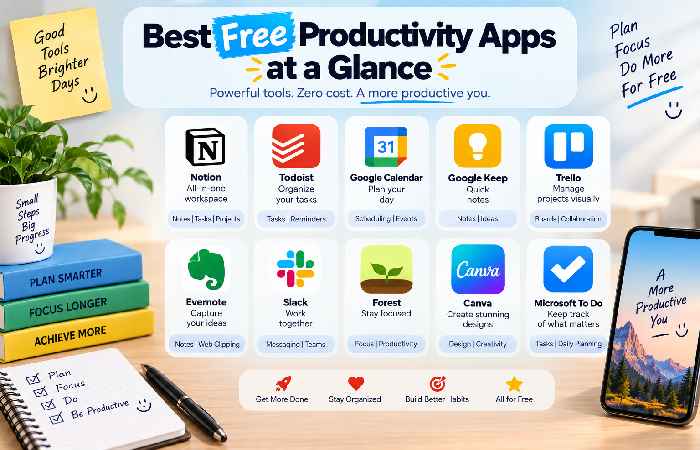
Best Free Productivity Apps at a Glance
Productivity App
Best For
Key Feature
Free Option
Microsoft To Do
Task lists
Reminders and lists
Yes
Google Calendar
Scheduling
Time management
Yes
Todoist
Task management
Projects and priorities
Yes
Notion
Notes and organization
Databases and documents
Yes
Trello
Visual planning
Boards and cards
Yes
Obsidian
Knowledge management
Linked notes
Yes
Forest
Focus
Focus sessions
Yes
1. Microsoft To Do – Best for Beginners
For those who want to get organized and be in charge of their everyday responsibilities without learning complex software, Microsoft To Do makes it incredibly simple. The task organizer allows users to build up lists, add due dates, set notifications to remember upcoming tasks, and organize everything around their workday.
2. Google Calendar – Best for Scheduling
Google Calendar is arguably one of the most helpful free productivity tools there is for managing time. With a few clicks, you can schedule meetings, set appointments, include deadlines, assign recurring event dates, and block out dedicated chunks of time for your workdays. The practice of “time blocking” can also be an effective method of converting a general task, say “work on homework” to “work on homework from 4pm to 6pm on my calendar”.
3. Todoist – Best Free Task Manager
Todoist provides a wonderfully clean and minimalistic interface for managing tasks and projects of all kinds. Best of all is that its free version can be extremely effective for keeping track of simple tasks, deadlines and important daily responsibilities. It’s a strong choice for those looking for a more dedicated task-manager.
4. Notion – Best for Notes and Organization
Notion integrates notes, documents, databases, and even project management tools. For instance, you could use this app to build a custom study planner, a content calendar, project tracking or your very own personal knowledge base. If you want a number of different organization tools in one workspace, Notion could be an option, though some beginners might struggle to find their way around the vast number of customization features.
5. Trello – Best for Visual Planning
For an app that leverages boards, lists and cards for an easy-to-understand visual overview of workflows, try Trello. It can work in handy for an array of purposes such as the example below:
Ideas | To Do | In Progress | Done
While many use this app for visual project planning, students and individuals who focus on content planning could also greatly benefit from this tool.
6. Obsidian – Best for Knowledge Management
Obsidian takes a unique route focusing on connected notes and managing a personal knowledge base. With this app, you’ll be able to link all of your notes and ideas together so that they form one structured library of information. Writers, researchers or students may find Obsidian especially useful for gathering and organizing all their key information.
7. Forest – Best for Focus
Last on our list of best free productivity apps, Forest is a fun way of keeping the focus and ditching all distractors when working. Rather than manage tasks, Forest gamifies your work sessions and challenges you to plant virtual trees to encourage you to stay focused at each session. It’s a great option if you really struggle to get work done in one sitting.
How to Optimize Usage of Your Free Productivity Apps
Do not install every productivity app that is out there. Make a list of everything you struggle with when you try to be productive (i.e. Forgetful tasks, miss deadlines, struggle with work to do) and get rid of that with an app.
If you’re forgetful, pick a task manager.
If you constantly miss deadlines, then add a scheduling app to your list of tools to use. If you get too easily distracted while working, then opt for a productivity-focused app such as Forest. Also, be careful not to have too many notifications, and regularly check in on your system. It’s much better to stick with a simple setup that gets the job done for you than a messy system with too many features.
A Commonality When Using Many Free Productivity Apps
Too many limitations
Too many notifications
Too much complexity
Scattered tasks amongst different apps
Frequently Asked Questions
Q: What are the best free productivity apps?
A: Microsoft To Do, Google Calendar, Todoist, Notion, Trello, Obsidian, and Forest are some of the best free productivity apps that you can use today.
Q: Are free productivity apps worth using?
A: Definitely. Most of them are a really great option because of the sheer volume of features that you get access to for no cost!
Q: What is the best free productivity app for beginners?
A: For beginners, Microsoft To Do is going to be your best option. Its task organization system is incredibly intuitive and easy to understand while also helping you become more productive.
Q: Do free productivity apps have limitations?
A: Some do but some do not. It really just depends on the app. Some limit some of the advanced features and allow them as upgrades in their premium plans while others, if you choose not to upgrade, may not offer many limitations for an average user.
Conclusion
The best free productivity app you decide to use will be entirely dependent on what you are trying to tackle in your workflow and how you manage work in general. Microsoft To Do works great for simple tasks, Google Calendar for scheduling, Notion for organization, Trello for visual planning, and Forest for focused time spent working. There’s no need to install dozens of apps and stack up a number of productivity features when a couple free options working together can provide just enough tools to keep you on track.