Last Updated: September 12, 2026
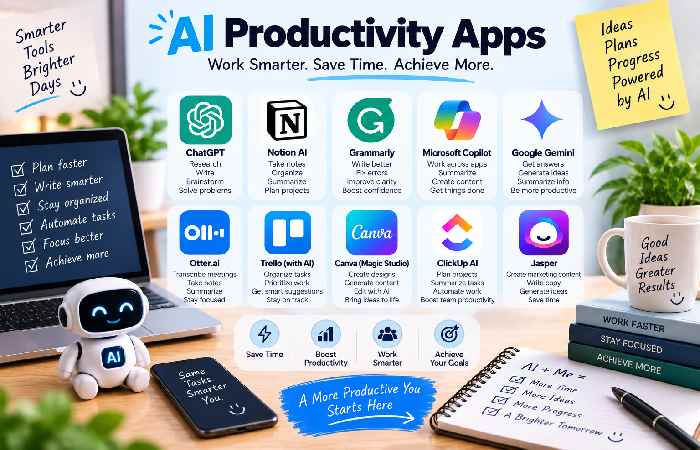
The Top AI Productivity Apps: A Breakdown 7 Amazing AI Productivity Tools Picking the best AI productivity app largely depends on what tasks you need the most support with. Whether it’s writing, planning your day, research, meeting transcriptions or task automation, these are some of the best out there: Application Best Use The main AI capabilities Cost ChatGPT General work Writing and brainstorming Yes Free or Paid
Notion Organization notes and content generation Limited Free or Paid
ClickUp Project management AI task generation and project planning Yes Free or Paid
Motion Scheduling AI for task and calendar optimization Trial or Paid
Grammarly Writing AI for writing enhancement Yes Free or Paid
Otter.ai Meetings AI transcribing and notetaking Yes Free or Paid
Zapier AutomationAI for workflow optimization Yes Free or Paid
1. ChatGPT – Best Overall AI Productivity App
: What It’s For: Drafting written content and brainstorms are among ChatGPT’s many helpful skills. It truly provides the most support for various work tasks in a single assistant. Best For: Day to day tasks, brainstorming and idea development, structuring and reviewing content, explaining topics and research, generating original work and more.
2. Notion – Best Organization-Based AI:
What It’s For: Notes, documentation and task lists combined for excellent workflow tracking. It combines databases and various formats to simplify complex projects and knowledge organization. Notion AI aids in tasks with the data you have access to. Best For: Those who use notes to keep their work organized with the inclusion of AI features.
3. ClickUp – Best for AI Workflows:
What It’s For: Project documentation, goals, task tracking and collaboration unite under a versatile work management platform. ClickUp’s AI enables quick content writing, document organization, and idea summarization. Best For: Collaborative working environments and team members looking for full workflow management combined with AI assistance
4. Motion – Best AI Scheduling Tool:
What It’s For: Specifically built to streamline scheduling. The AI component is effective in integrating your tasks and priorities around your commitments and deadlines. It’s best if you struggle to coordinate all the time you have. Best For: Tasks requiring consistent scheduling and efficiency.
5. Grammarly – Best for Writing Enhancement:
What It’s For: This writing app uses AI to assist with everything from professional communications to formal documents. Best For: Those with heavy involvement in writing or those needing help with the flow and quality of written material.
6. Otter.ai – Best for Meeting Transcription:
What It’s For: Transcribe all of your meetings to audio notes, then receive written transcriptions for quick referencing and easy editing. It’s fantastic for anyone who often attends long and important discussions. Best For: Sharing, tracking and discussing meeting and interview notes efficiently.
7. Zapier – Best AI Automation Tool:
What It’s For: Zapier’s workflow tool can reduce monotonous manual tasks in your business day. Using AI, it automatically syncs information and files between differing apps without user interaction, thus boosting efficiency. Best For: Delegating automated and redundant tasks.
Best AI Productivity Apps Comparison Chart
Task Suggested AI App General Productivity ChatGPT
Notes & Organization Notion
Work Management ClickUp
Scheduling Motion
Writing Grammarly
Meeting Notes Otter.ai
Automation Zapier
Making the Most of AI Productivity Tools Before starting to use an AI feature, make sure you have a specific use case or task in mind that the app can handle, such as writing or task management. Ensure you double-check AI output before utilizing it in important matters, especially for professionals working with significant projects.
Overcoming Common AI Hurdles
“AI isn’t performing as expected:” Increase specificity in your AI prompts, and add more details where necessary.
“I’m using automation too often:” Use automation for low-skilled, repeatable tasks but keep important, value-driven activities under human oversight.
“Concerns regarding data privacy:” Familiarize yourself with app data privacy settings before inputting sensitive or confidential information.
“I’m using too many different AI tools:” Choose a few key tools to manage all your work-related tasks rather than incorporating too many redundant apps into your daily routine.
“The output isn’t always correct:” Always fact check results given by the AI for accuracy.
Frequently Asked Questions about AI Productivity Apps
Q: What are the best AI productivity apps?
A: For those struggling to meet diverse workplace needs, look to AI-powered tools like ChatGPT, Notion, ClickUp, Motion, Grammarly, Otter.ai, and Zapier to complement your existing apps.
Q: Can I get an AI productivity app for free?
A: Many apps with AI features offer free access, though the advanced, full functions require a paid subscription. Even then, many listed offer free plans that might work depending on the needs of individual work styles.
Q: What is the best AI productivity app for new users?
A: It’s best to begin with general task management tools, like those offered by ChatGPT, in order to get a feel for what AI can assist with before upgrading or switching to a specialized tool.
Q: Can AI tools boost my work productivity?
A: Yes, AI can handle many time-consuming activities such as automating repetitive tasks and creating written work.
Q: Can I trust the AI’s answers?
A: For work that requires expert input, such as financial, legal, or academic records, it’s crucial to confirm theAI’s output is factual and accurate.
Conclusion While the ideal AI productivity app will change based on your unique work and personal tasks, a variety of tools have been shown to be beneficial across a wide range of industries, including ChatGPT for general productivity tasks such as concept drafting and brainstorming, Notion for organizing notes and document management, ClickUp for optimizing team workflow and project management, Motion for scheduling needs, Grammarly for refining written correspondence, Otter.ai for transcribing and sharing discussions, and Zapier for automating multi-stage tasks through their integration systems. Instead of relying fully on the use of AI to complete tasks from start to finish, we should prioritize identifying aspects of our work which the AI can handle that takes up low value work, hence we can invest more time in areas which require human creativity.