
Last Updated: July 1, 2026
Introduction
Choosing the best productivity app comparisons can save hours every week and dramatically improve your workflow. With dozens of productivity platforms competing for attention in 2026, finding the right solution isn’t always easy.
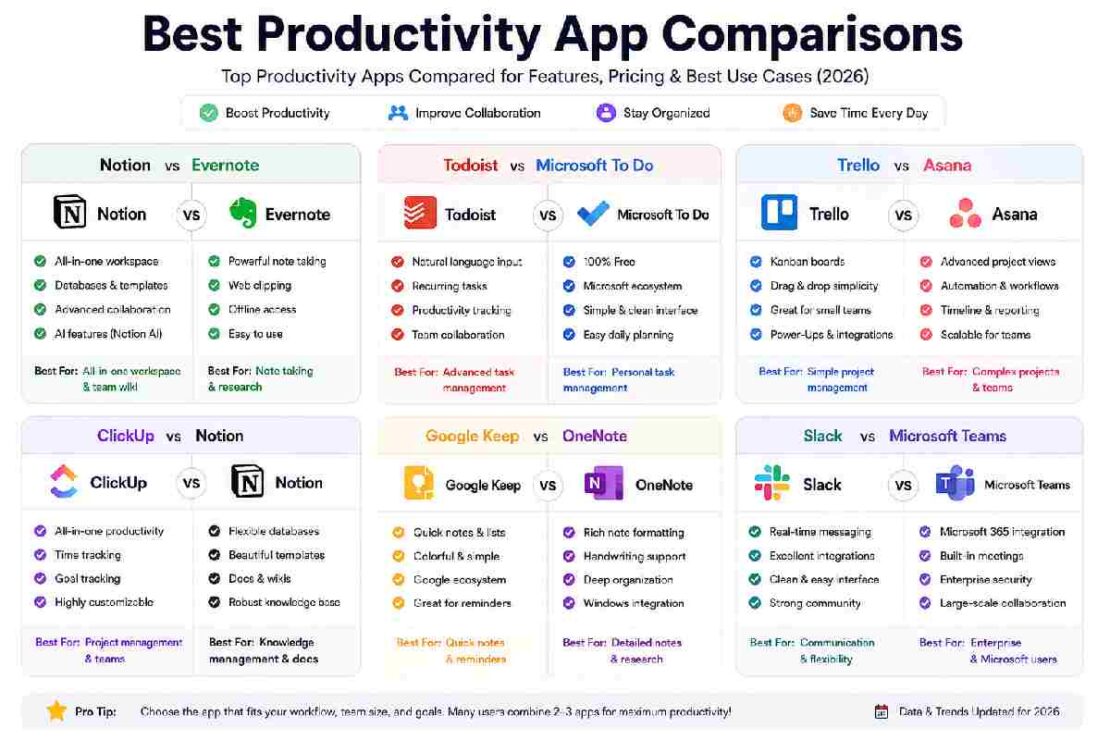
Whether you’re deciding between Notion vs Evernote, Todoist vs Microsoft To Do, or Slack vs Microsoft Teams, this guide compares the most popular productivity tools based on features, pricing, collaboration, ease of use, and real-world performance.
If you’re building a complete productivity system, also check our guides on:
This Article Is Part of the Mobile Apps Resource Hub
Explore more mobile app guides, Android and iPhone tutorials, app reviews, productivity apps, and troubleshooting resources inside our
Mobile Apps Resource Hub.
- Best Productivity Apps
- Best AI Productivity Tools
- Productivity Apps Tutorials
- Best Productivity Gadgets
- Free Productivity Apps for Students
Why Productivity App Comparisons Matter in 2026
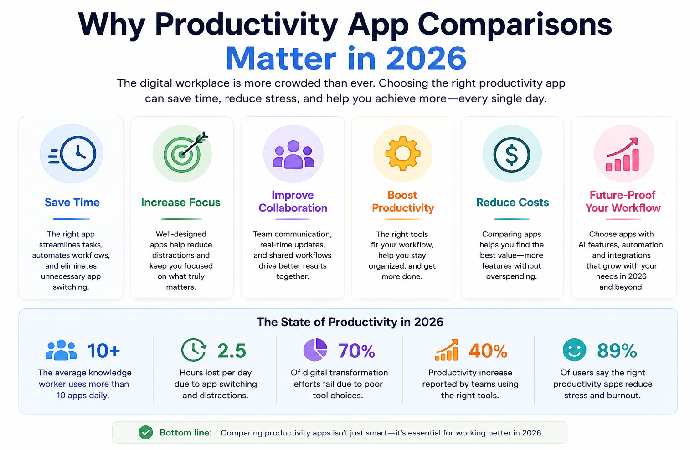
The average knowledge worker now uses more than 10 digital tools daily. Research from major workplace studies shows that excessive app switching can significantly reduce efficiency.
The right productivity software should:
- Reduce distractions
- Improve task organization
- Centralize information
- Enhance collaboration
- Save time through automation
Instead of using multiple disconnected apps, choosing the right productivity platform creates a streamlined workflow.
Productivity Apps Comparison Table (2026)
| App | Best For | Free Plan | Collaboration | AI Features | Ease of Use |
|---|---|---|---|---|---|
| Notion | All-in-one workspace | Yes | Excellent | Strong | Medium |
| Evernote | Note taking | Limited | Good | Moderate | Easy |
| Todoist | Task management | Yes | Good | Moderate | Easy |
| Microsoft To Do | Personal tasks | Yes | Basic | Limited | Very Easy |
| Trello | Visual project boards | Yes | Good | Moderate | Easy |
| Asana | Team project management | Yes | Excellent | Strong | Medium |
| ClickUp | Business productivity | Yes | Excellent | Strong | Medium |
| Google Keep | Quick notes | Yes | Basic | Limited | Very Easy |
| OneNote | Research and notebooks | Yes | Good | Moderate | Easy |
| Slack | Team communication | Yes | Excellent | Strong | Easy |
| Microsoft Teams | Enterprise collaboration | Yes | Excellent | Strong | Medium |
Notion vs Evernote
Notion
Best for:
- Knowledge management
- Documentation
- Team collaboration
- Project tracking
Evernote
Best for:
- Quick note capture
- Research organization
- Web clipping
Comparison
| Feature | Notion | Evernote |
| Databases | Yes | No |
| Project Management | Yes | Limited |
| Templates | Extensive | Moderate |
| AI Features | Advanced | Basic |
| Learning Curve | Higher | Lower |
Winner
Notion wins for most users in 2026 because it combines notes, databases, projects, and collaboration in a single workspace.
Todoist vs Microsoft To Do
Task management remains one of the most searched productivity categories.
Todoist Advantages
- Natural language task creation
- Powerful recurring tasks
- Productivity tracking
- Team collaboration
Microsoft To Do Advantages
- Completely free
- Deep Microsoft ecosystem integration
- Simple interface
Comparison Table
| Feature | Todoist | Microsoft To Do |
| Recurring Tasks | Advanced | Basic |
| Productivity Reports | Yes | No |
| Team Workspaces | Yes | Limited |
| Ease of Use | Easy | Very Easy |
Winner
Choose Todoist for productivity enthusiasts and teams.
Choose Microsoft To Do for simple personal task management.
Trello vs Asana
Trello popularized Kanban-style project boards.
Best for:
- Freelancers
- Small teams
- Content planning
Asana
Best for:
- Growing businesses
- Marketing teams
- Complex workflows
Feature Comparison
| Feature | Trello | Asana |
| Kanban Boards | Excellent | Excellent |
| Timeline Views | Limited | Advanced |
| Automation | Good | Excellent |
| Reporting | Basic | Advanced |
Winner
For simplicity, Trello wins.
For scalability, Asana wins.
ClickUp vs Notion
This comparison has become increasingly popular throughout 2026.
ClickUp Strengths
- Powerful project management
- Time tracking
- Goal tracking
- Team dashboards
Notion Strengths
- Knowledge management
- Documentation
- Databases
- Content planning
Comparison
| Feature | ClickUp | Notion |
| Project Management | Excellent | Good |
| Documentation | Good | Excellent |
| Customization | Excellent | Excellent |
| Team Collaboration | Excellent | Excellent |
Winner
Businesses often prefer ClickUp.
Creators and startups frequently prefer Notion.
Google Keep vs OneNote
Google Keep
Best for:
- Quick ideas
- Shopping lists
- Simple reminders
OneNote
Best for:
- Research projects
- Study notes
- Large notebooks
Winner
Google Keep is ideal for simplicity.
OneNote is ideal for serious note-taking.
Slack vs Microsoft Teams
Communication remains a major productivity bottleneck.
Slack
Pros:
- Excellent user experience
- Strong integrations
- Fast communication
Microsoft Teams
Pros:
- Microsoft 365 integration
- Built-in meetings
- Enterprise security
Comparison
| Feature | Slack | Teams |
| Chat Experience | Excellent | Good |
| Video Meetings | Good | Excellent |
| Microsoft Integration | Limited | Excellent |
| Third-Party Integrations | Excellent | Good |
Winner
Slack wins for flexibility.
Teams wins for enterprise organizations.
Which Productivity App Is Best in 2026?
| User Type | Recommended App |
| Students | Notion |
| Freelancers | Trello |
| Small Businesses | ClickUp |
| Enterprise Teams | Microsoft Teams |
| Content Creators | Notion |
| Personal Productivity | Todoist |
| Quick Notes | Google Keep |
| Research Work | OneNote |
Common Productivity App Problems and Fixes
Too Many Notifications
Fix:
- Disable non-essential alerts
- Use focus modes
- Schedule notification reviews
Duplicate Tasks Across Apps
Fix:
- Consolidate workflows
- Use automation tools
- Establish one source of truth
Team Adoption Issues
Fix:
- Create onboarding guides
- Use templates
- Start with simple workflows
Slow Performance
Fix:
- Archive old projects
- Remove unused integrations
- Update desktop applications
Best Productivity Stack Example (2026)
Many power users combine:
- Notion for knowledge management
- Todoist for task management
- Slack for communication
- Google Calendar for scheduling
This setup balances simplicity with powerful functionality.
Frequently Asked Questions
What is the best productivity app in 2026?
Notion remains one of the most versatile productivity platforms because it combines notes, databases, tasks, and collaboration.
Is ClickUp better than Notion?
ClickUp is generally stronger for project management, while Notion excels in documentation and knowledge management.
Which productivity app is easiest for beginners?
Microsoft To Do and Google Keep offer the simplest learning curves.
Is Trello still worth using in 2026?
Yes. Trello remains one of the easiest project management tools for individuals and small teams.
What is the best free productivity app?
Notion, Todoist, and Google Keep provide excellent free plans.
Conclusion
Finding the right productivity software depends on your workflow, team size, and goals. For most users, Notion remains the most flexible solution, while ClickUp, Todoist, Trello, Slack, and Microsoft Teams continue to dominate their respective categories.
For More Information vsisit : https://www.microsoft.com/en-us/worklab?