Last Updated: July 1, 2026
Introduction
A productivity apps tutorial is one of the best ways to learn how modern tools can help you manage tasks, organize projects, and reduce distractions. In 2026, productivity apps are no longer optional—they have become essential for students, remote workers, freelancers, and business owners.
According to industry reports, professionals lose several hours each week due to poor task management and digital distractions. The right productivity setup can help recover that lost time and improve focus significantly. Instead of relying on memory, successful people use systems powered by productivity apps to stay organized and consistent.
This guide will show you exactly how to build a productivity system using the best apps available today.
This Article Is Part of the Mobile Apps Resource Hub
Explore more mobile app guides, Android and iPhone tutorials, app reviews, productivity apps, and troubleshooting resources inside our
Mobile Apps Resource Hub.
What Are Productivity Apps?

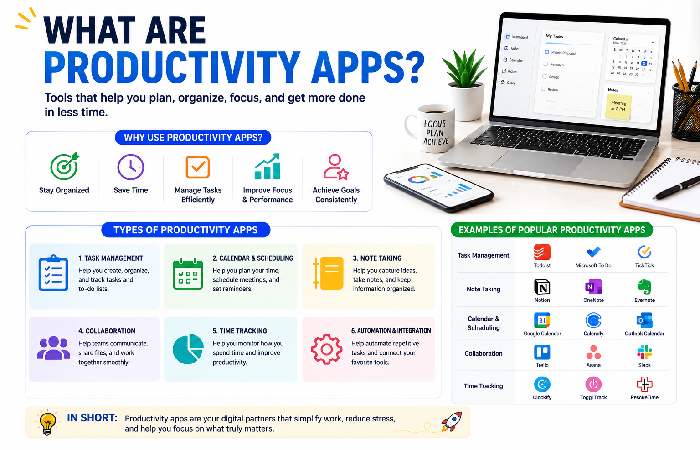
Productivity apps are software tools designed to help users:
- Manage tasks
- Plan schedules
- Track goals
- Take notes
- Collaborate with teams
- Automate repetitive work
Their purpose is simple: help you accomplish more in less time.
Popular categories include:
| Category | Examples |
|---|---|
| Task Management | Todoist, Microsoft To Do |
| Note Taking | OneNote, Notion |
| Calendar Management | Google Calendar |
| Team Collaboration | Trello, Asana |
| Time Tracking | Clockify |
| AI Productivity | ChatGPT, Perplexity |
How to Be More Productive Using Apps
Many users install productivity apps but never use them effectively.
Follow this simple framework:
Step 1: Create a Single Task Hub
Choose one task manager.
Recommended:
- Todoist
- Microsoft To Do
- TickTick
Avoid managing tasks in multiple places.
Experts consistently recommend maintaining one master task list to prevent information from getting lost.
Step 2: Use Calendar Blocking
Schedule important work directly on your calendar.
Example:
| Time | Activity |
|---|---|
| 8:00 AM | Planning |
| 9:00 AM | Deep Work |
| 11:00 AM | |
| 2:00 PM | Meetings |
| 4:00 PM | Review Tasks |
This approach reduces decision fatigue.
Step 3: Capture Ideas Immediately
Use a note-taking app for:
- Meeting notes
- Study notes
- Research
- Quick ideas
Best options:
- OneNote
- Notion
- Google Keep
Cloud synchronization allows seamless access across devices.
Step 4: Automate Repetitive Tasks
Automation can save hours every week.
Examples:
- Auto-create tasks from emails
- Save attachments automatically
- Sync calendar events
Platforms such as Zapier are commonly used for workflow automation.
Best Productivity Setup for Students
Students need simplicity and affordability.
Recommended Student Setup
| Purpose | App |
|---|---|
| Tasks | Microsoft To Do |
| Notes | OneNote |
| Calendar | Google Calendar |
| Research | ChatGPT |
| Focus | Forest |
Why This Works
Students often juggle:
- Assignments
- Exams
- Projects
- Deadlines
Using dedicated tools for each area creates a streamlined workflow while avoiding unnecessary complexity.
Productivity Tips for Remote Workers
Remote work requires strong self-discipline.
Essential Tools
| Need | App |
|---|---|
| Communication | Microsoft Teams |
| Project Management | Trello |
| Scheduling | Calendly |
| Documentation | Notion |
| Time Tracking | Clockify |
Practical Tips
- Start every day with a task review.
- Use time-blocking.
- Turn off unnecessary notifications.
- Schedule focus sessions.
- End each day with planning for tomorrow.
Remote workers who structure their day typically experience fewer distractions and improved productivity.
How to Organize Tasks Efficiently
One common mistake is keeping hundreds of tasks in a single list.
Use the 4-Level System:
Priority 1: Today
Tasks that must be completed.
Priority 2: This Week
Important but not urgent.
Priority 3: Upcoming
Future projects.
Priority 4: Someday
Ideas and long-term goals.
This method prevents overwhelm and improves focus.
Productivity App Comparison (2026)
Top Productivity Apps Compared
| App | Best For | Free Plan | Ease of Use |
|---|---|---|---|
| Todoist | Task Management | Yes | Excellent |
| Notion | All-in-One Workspace | Yes | Moderate |
| OneNote | Note Taking | Yes | Excellent |
| Trello | Project Management | Yes | Excellent |
| Google Calendar | Scheduling | Yes | Excellent |
Based on industry reviews, Todoist remains one of the strongest task-management options because it balances simplicity and advanced features.
Sample Daily Productivity Routine
Morning
- Review calendar
- Check priority tasks
- Plan top 3 goals
Midday
- Deep work sessions
- Minimize meetings
- Avoid social media
Afternoon
- Complete remaining tasks
- Process emails
Evening
- Review progress
- Plan tomorrow
- Clear inbox
This routine works well for students, professionals, and remote workers alike.
Troubleshooting Common Productivity Problems
Problem 1: Too Many Apps
Solution: Consolidate into one task manager and one note-taking app.
Problem 2: Constant Notifications
Solution: Disable non-essential alerts.
Problem 3: Missing Deadlines
Solution: Use recurring reminders and calendar blocks.
Problem 4: App Overload
Solution: Start with only three tools:
- Task Manager
- Calendar
- Notes App
Add more tools only when necessary.
FAQ
What is the best productivity app in 2026?
There is no single best app for everyone. Todoist is excellent for task management, OneNote is ideal for notes, and Google Calendar remains one of the best scheduling tools.
Are productivity apps worth using?
Yes. They help organize tasks, improve focus, and reduce time spent managing information.
Which productivity app is best for students?
A combination of Microsoft To Do, OneNote, and Google Calendar provides a strong free productivity system.
How many productivity apps should I use?
Most users only need three core tools:
- Tasks
- Calendar
- Notes
Can productivity apps improve remote work performance?
Yes. Proper use of planning, scheduling, and collaboration tools can significantly improve remote work efficiency.
Conclusion
Building an effective productivity system in 2026 is less about finding the perfect app and more about creating a consistent workflow. The most successful people rely on simple systems that combine task management, note-taking, scheduling, and automation.
Whether you’re a student, remote worker, freelancer, or business professional, starting with a small set of well-chosen productivity apps can dramatically improve organization, focus, and overall performance. By applying the strategies in this tutorial, you’ll spend less time managing work and more time completing it.