Last Updated: August 12, 2026
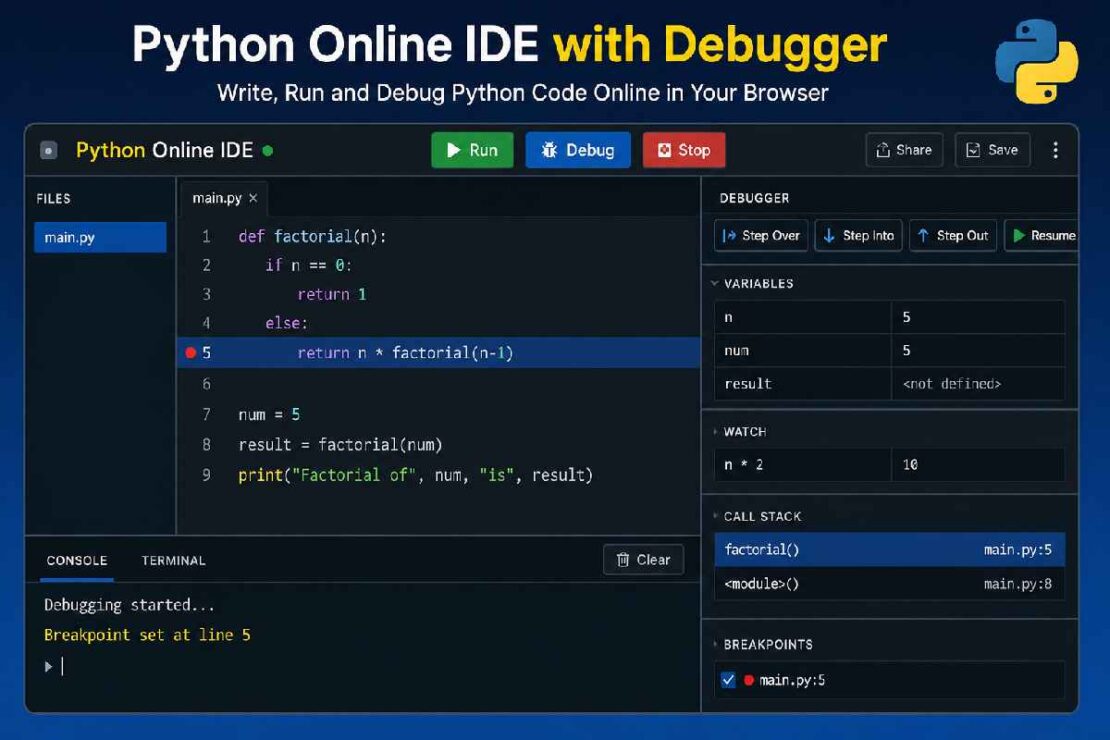
Debugging may be one of the crucial programming skills that you’ll ever uncover. When Python online IDE with debugging: it’ll assist you pinpoint code bugs, check in your variables and pause execution using breakpoints to discern precise the way to are getting use of to work your code. You could get to try all this without installation on a Python native installation on your machine in the primary place!
Nowadays browser based IDes integrate these skilled debugging capabilities, that once seemed reserved for desktop tools only.
If youre trying to learn python or producing production code, an internet debugger will immensely shorten a developing time span. Here’s a tutorial on how you could try and test code debugging on the net, list some in the latest online debuggers with in your grasp and show you simply step-by-step precisely what happens as you’re getting to check python codes.
What Is a Python Online IDE with Debugger?
A Python online IDE combines three essential features:
- Code editor
- Python compiler/interpreter
- Integrated debugger
Unlike a simple online compiler that only executes code, a debugger allows you to:
- Pause execution
- Execute code line by line
- Inspect variables
- Monitor function calls
- Analyze stack traces
- Identify runtime errors
Think of it as watching your Python program think in slow motion.
Why Use an Online Python Debugger?

Instead of repeatedly adding dozens of print() statements, modern debuggers provide visual tools that make finding bugs much faster.
Benefits include:
- Faster error detection
- Better understanding of program flow
- Easier debugging for beginners
- No local installation required
- Works from any browser
- Ideal for coding interviews
- Great for classrooms
Best Python Online IDEs with Debugging Support (2026)
| IDE | Breakpoints | Variable Inspector | Stack Trace | Collaboration | Best For |
|---|---|---|---|---|---|
| Replit | ✅ | ✅ | ✅ | ✅ | Overall Best |
| OnlineGDB | ✅ | ✅ | ✅ | ❌ | Learning Debugging |
| PythonAnywhere | Limited | Partial | ✅ | ❌ | Cloud Development |
| JDoodle | Basic | ❌ | Basic | ❌ | Quick Testing |
| Programiz | No | ❌ | Basic Errors | ❌ | Absolute Beginners |
Winner
For most users, Replit offers the best balance of debugging features, usability, and cloud-based development.
How Debugging Works
A debugger pauses your application at specific locations called breakpoints.
Example:
numbers = [4,8,10]

total = 0

for n in numbers:
    total += n

print(total)
Instead of running everything instantly, the debugger lets you:
- Pause before the loop
- Execute one line
- Watch variables change
- Inspect memory
- Continue execution
This makes bugs much easier to understand.
Understanding Breakpoints
Breakpoints tell the debugger:
“Pause execution here.”
When execution reaches that line, you can inspect:
- Current variables
- Objects
- Function arguments
- Current loop iteration
- Program state
Breakpoints eliminate guesswork and reduce debugging time significantly.
Step-by-Step Python Debugging Workflow
Step 1: Write Code
Create or paste your Python program.
Step 2: Set Breakpoints
Click beside the desired line number.
Step 3: Start Debugging
Launch Debug Mode instead of Run.
Step 4: Inspect Variables
Observe how variables change.
Example:
count = 0After each iteration:
count = 1
count = 2
count = 3
Seeing these updates visually makes logic errors obvious.
Step 5: Continue Execution
Once you’ve identified the issue, resume program execution.
Common Python Errors You Can Debug Online
| Error | Meaning | Debugger Helps? |
|---|---|---|
| SyntaxError | Invalid syntax | Partial |
| NameError | Variable missing | ✅ |
| IndexError | List index problem | ✅ |
| KeyError | Dictionary key missing | ✅ |
| TypeError | Wrong data types | ✅ |
| ValueError | Invalid value | ✅ |
| ZeroDivisionError | Divide by zero | ✅ |
| AttributeError | Missing object property | ✅ |
Python Stack Trace Explained
When your program crashes, Python displays a stack trace.
Example:
Traceback (most recent call last):It shows:
- Which file failed
- Which function caused the error
- Exact line number
- Error type
Instead of guessing, use the debugger to inspect the variables at the failing line.
Debugging vs Using Print Statements
| Feature | Print() | Debugger |
|---|---|---|
| View variables | Limited | Excellent |
| Pause execution | ||
| Step through code | ||
| Watch expressions | ||
| Stack trace | Basic | Detailed |
| Productivity | Medium | High |
Professional developers almost always prefer debuggers over excessive print() statements.
Debugging Workflow Comparison
| Method | Average Time to Find Bug | Ease of Use |
|---|---|---|
| Print Statements | High | Medium |
| Browser Debugger | Low | Easy |
| Desktop IDE | Very Low | Advanced |
As projects grow larger, debugging tools become increasingly valuable.
Troubleshooting Common Debugging Problems
Breakpoints Are Not Triggering
Possible causes:
- Running instead of debugging
- Breakpoint placed after the crash
- Unsupported online compiler
Solution:
Use an IDE that supports interactive debugging.
Variables Don’t Update
This usually happens because:
- The code hasn’t reached that line yet
- You’re inspecting the wrong scope
- Execution is paused elsewhere
Step through the code line by line.
Infinite Loop
Symptoms:
- Browser hangs
- CPU usage increases
- Execution never finishes
Pause execution and inspect loop conditions.
Stack Trace Is Confusing
Read from bottom to top.
The final line almost always identifies the real exception.
Best Practices for Debugging Python Code
- Use meaningful variable names.
- Add breakpoints before complex logic.
- Inspect variables instead of guessing.
- Read the complete stack trace.
- Test small sections of code.
- Avoid changing multiple things at once.
- Keep functions short and modular.
- Remove temporary debug code after fixing bugs.
Who Should Use an Online IDE with Debugger?
An online debugger is ideal for:
- Python beginners
- College students
- Coding bootcamp learners
- Interview preparation
- Competitive programmers
- Educators
- Remote developers
Because everything runs in the browser, setup takes only a few seconds.
Frequently Asked Questions
The finest Python online IDEs with debugger?
Replit as well as OnlineGDB offer best browser-based debugger features, including breakpoint support, variable inspection and stack trace support.
Can I debug Python without installing it?
Yes, various cloud based IDEs you allow to write, run, debug Python code from your browser without installing any software.
What are breakpoints in Python?
Breakpoints let your program execution stops at a selected line of code so you could inspect variables, evaluate flow of program as well as discover logical mistakes.
What is the importance of a stack trace?
A stack trace presents at what place the error occurred, which functions have been called and which line is responsible for the exception. It simplifies debugging so much.
Are online debuggers great for newbies?
Definitely. Visualizing debugging tools allows newbies to comprehend the way Python executes codes.
Conclusion
Using a Python online IDE with debugger fills that divide between writing code and actively understanding it. Having access to breakpoints, variables viewer, stack tracing and step through execution means that you can find bugs faster, and it’s often easier to discover what they are in your online development environment than just using print statements.
For Beginners
When starting, a debugger makes learning Python a much more accessible task and you won’t struggle trying to figure out why everything doesn’t work as planned. You may even find that you come to a debugging stage, which for me was something more encouraging when I began, making sure you get and have those bug fixing skills to hand, sooner rather than later.
For experienced developers
If you are an experienced Python coder, and just need quick checks on your script without the need for an install, then this IDE with debugger is a savior. It will have you find those small annoying bugs in no time and have your scripts working again. Not only this, you’ll find that without doing all that unnecessary setting-up work you’ll have that much more time to be producing more Python based work and projects.