To succeed with your app, you need a good understanding of the mobile app development process. No matter if you’re a startup founder, enterprise team, or sole entrepreneur, adhering to a systematic development process allows you to develop at a minimal cost, save time and deliver a robust product that can be scaled over time. In this tutorial, you’ll get yourself familiar with each phase of the mobile app development lifecycle, ranging from the idea validation stage, analysis of the app’s requirements through to UIUX designs, app coding, testing, deployment and after support to all users.
Why Following a Structured Mobile App Development Process Matters
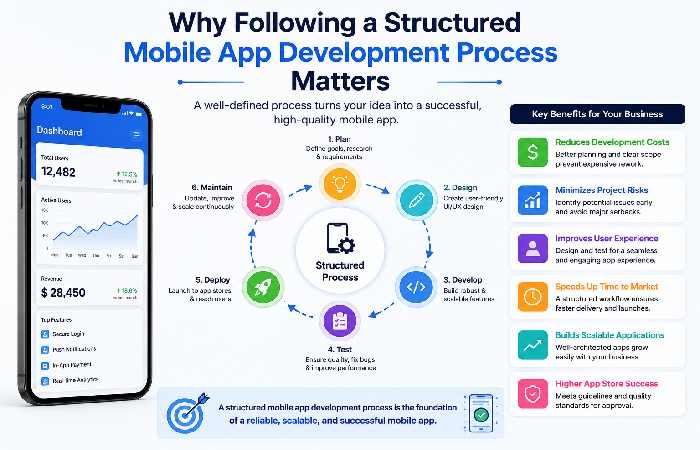
Proper planning a clear development process: Saves cost on developing an app Minimizes the risks of the project Reduces UX problems Helps speed up product development Helps in creating scalable apps Offers better app store approval rate Traditional and modern ways of app development Modern teams utilize agile, continuous testing, AI-assisted development to reduce cycle times.
Mobile App Development Life Cycle
| Stage | Goal | Typical Duration |
|---|---|---|
| Requirement Analysis | Define business objectives | 1–2 Weeks |
| UI/UX Design | Design app screens & prototype | 2–4 Weeks |
| Development | Frontend + Backend Coding | 8–20 Weeks |
| Testing | Fix bugs & improve quality | 2–6 Weeks |
| Deployment | Publish to App Stores | 1 Week |
| Maintenance | Updates & Improvements | Ongoing |
Step 1: App Requirement Analysis
Every successful application begins with planning.
During this phase, developers identify:
- Business goals
- Target audience
- Competitor research
- Required features
- Revenue model
- Technical feasibility
Deliverables
- Product Requirement Document (PRD)
- Feature List
- User Personas
- User Journey
- Wireframes
Step 2: Mobile App UI/UX Design Process
Design is far more than aesthetics—it determines usability and engagement.
The UI/UX design process generally includes:
- Low-fidelity wireframes
- Interactive prototypes
- Visual design
- Design systems
- Accessibility checks
- User testing
Popular Design Tools (2026)
| Tool | Best For |
|---|---|
| Figma | UI Design |
| Adobe XD | Prototyping |
| Sketch | iOS Design |
| Miro | User Flows |
Screenshot Recommendation: Include a Figma project dashboard showing wireframes and interactive prototypes.
Step 3: Choosing the Right Technology Stack
The technology stack directly impacts performance, scalability, and development cost.
| Technology | Best For | Advantages |
|---|---|---|
| Native (Swift/Kotlin) | High-performance apps | Best speed |
| Flutter | Cross-platform | Single codebase |
| React Native | MVPs | Faster development |
| PWA | Web-first apps | Lower cost |
Cross-platform frameworks such as Flutter and React Native often reduce development time and cost compared with building separate native apps.
Step 4: App Development Stages
Development usually happens in Agile sprints.
Typical activities include:
Frontend Development
- Screens
- Navigation
- Animations
- Forms
Backend Development
- APIs
- Authentication
- Database
- Notifications
- Payment Gateway
Integrations
- Google Maps
- Firebase
- Stripe
- Analytics
- AI APIs
Step 5: Mobile App Testing Process
Testing ensures reliability before launch.
Testing Checklist
- Functional Testing
- Performance Testing
- Security Testing
- Device Compatibility
- UI Testing
- API Testing
- Regression Testing
Continuous Integration (CI) and automated testing can improve release speed and reliability in mobile projects.
Step 6: App Deployment Process
After successful testing, the app is published.
Deployment includes:
- Google Play Store submission
- Apple App Store submission
- Store optimization
- Privacy policies
- App review process
Typical deployment takes several days, depending on platform review requirements.
Step 7: Maintenance & Continuous Improvement
Launching isn’t the end.
Ongoing work includes:
- Bug fixes
- Security updates
- Performance optimization
- Feature additions
- OS compatibility
- Analytics monitoring
Many agencies recommend budgeting 15–20% of the original development cost annually for maintenance.
Mobile App Development Timeline Comparison (2026)
| App Type | Timeline | Team Size |
|---|---|---|
| MVP | 2–3 Months | 3–5 Members |
| Startup App | 3–6 Months | 5–8 Members |
| E-commerce App | 4–7 Months | 6–10 Members |
| Enterprise App | 6–12 Months | 10–20 Members |
Development Process vs Cost Impact
| Development Stage | Cost Impact |
|---|---|
| Planning | Low |
| UI/UX | Medium |
| Development | Very High |
| Testing | Medium |
| Deployment | Low |
| Maintenance | Ongoing |
Common Challenges During App Development
| Problem | Solution |
|---|---|
| Changing requirements | Freeze MVP scope before development |
| Budget overruns | Prioritize essential features |
| Slow performance | Optimize code and backend |
| App rejection | Follow App Store guidelines |
| Security risks | Conduct regular security audits |
Frequently Asked Questions
Main mobile app development processstages Whatare themainstagesof themobile appdevelopmentprocess?
Requirementanalysis,UI/UXdesign,development,testing,deploymentandpost-launchmaintenance.
Howmuchdoesmobileappdevelopmenttake?
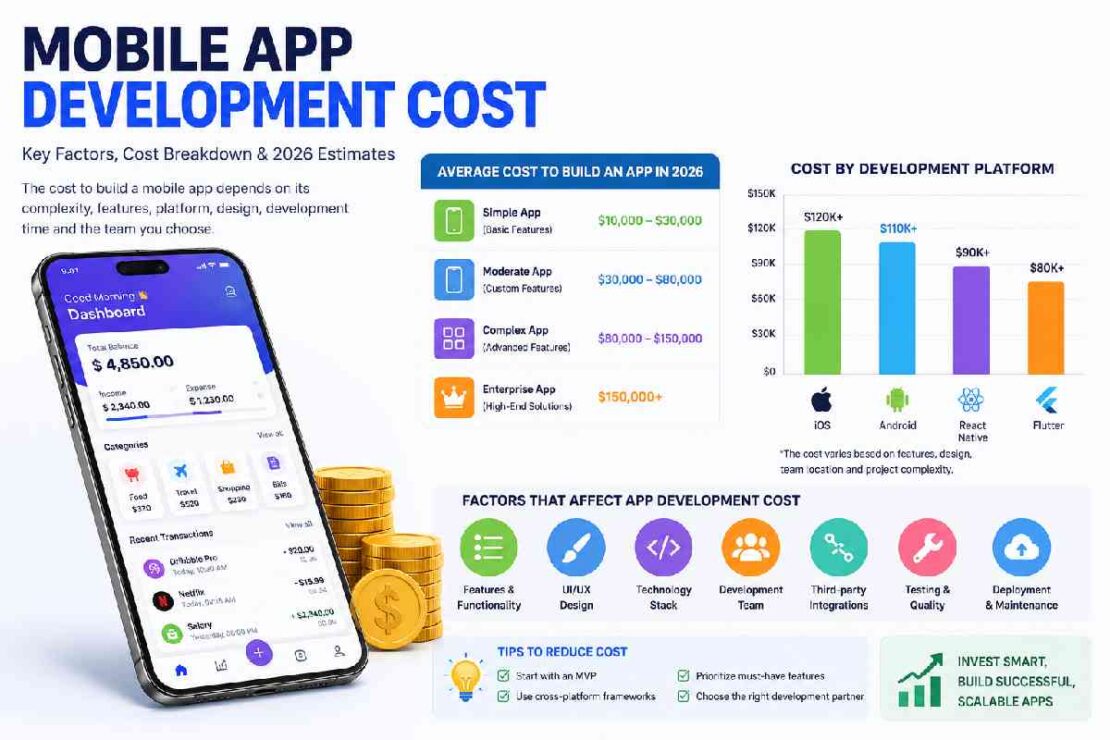
Typically:a-month MVPwilltypicallycostbetween5–5,5,5 –6,50(USDDLL).
Ancomplex enterprise solutioncanrangebetween$95,5-5,5 and$ 5.00(USDLL) ormore.
Which development approach is best?
Thisdependsontheprojectrequirements-Native( iOS: Swift, Android: Kotlin/Java-offerspremierperformance ,cross-platform-Flutter/React Native-enable afasterlaunch and a much more budget-friendly option..
Why istestingrequired?
Though testing may be timeconsumingand may even prove expensive to any AppDevelopmentprogram, it can prevent bugs or security flaws. ITisvital not merelyto secure the application butalso to enhance overall performance and provide customers with an identical users experienceacross their various devices..
Conclusion
Knowing the whole mobile application development process will enable to build an intuitive, effective and scalable app. From the requirement analysis stage till the maintenance stage through UI/UX design, development and testing-every step is vital in creating a quality product that will fulfill your business and user needs.
Regardless of whether your plan for an MVP or comprehensive enterprise based solution, incorporating the SDLC model helps in minimizing risk, gaining better control over project costs, and increasing the velocity to market. And as the mobile world keeps evolving in 2026, businesses that opt for good planning, current development practices, and continued growth will have more opportunity to make the leap for the right choice of apps.