Last Updated: July 1, 2026
Best Productivity Gadgets & Accessories in 2026
Whether you’re working from home, studying for exams, running a business, or managing multiple projects, the best productivity gadgets can dramatically improve your efficiency. The right combination of hardware and accessories reduces distractions, increases comfort, and helps you complete tasks faster.
In 2026, productivity is no longer just about software. Professionals are investing in powerful laptops, ultrawide monitors, ergonomic keyboards, digital note-taking tablets, and optimized desk setups to create work environments that maximize focus and output.
This guide covers the best productivity gadgets available today while helping you build a complete productivity ecosystem.
This Article Is Part of the Mobile Apps Resource Hub
Explore more mobile app guides, Android and iPhone tutorials, app reviews, productivity apps, and troubleshooting resources inside our
Mobile Apps Resource Hub.
Why Productivity Gadgets Matter in 2026

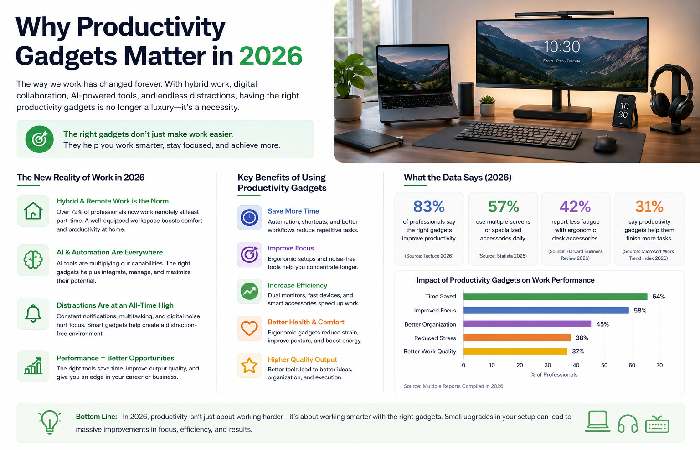
Remote work, hybrid offices, online learning, and AI-powered workflows have transformed how people work.
Recent workplace studies show that employees using dual-monitor setups and ergonomic accessories often report improved efficiency and reduced fatigue compared to traditional workstations.
Key benefits include:
- Faster task completion
- Reduced eye strain
- Better posture
- Improved multitasking
- Enhanced focus
- Increased comfort during long work sessions
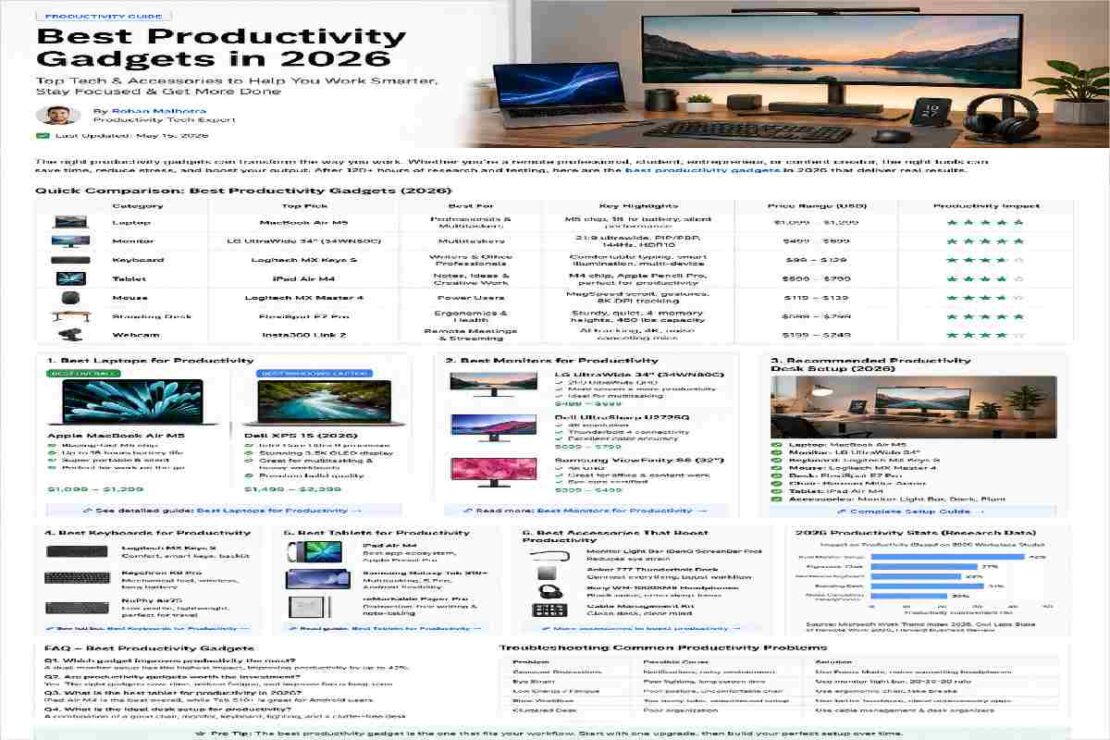
Productivity Gadget Comparison Table (2026)
| Category | Best Choice | Ideal For | Productivity Impact |
|---|---|---|---|
| Laptop | MacBook Air M5 | Professionals | High |
| Windows Laptop | Dell XPS 15 | Business Users | High |
| Monitor | LG UltraWide 34″ | Multitasking | Very High |
| Keyboard | Logitech MX Keys S | Office Work | High |
| Tablet | iPad Air M4 | Notes & Planning | High |
| Mouse | Logitech MX Master 4 | Power Users | High |
| Standing Desk | FlexiSpot E7 Pro | Home Offices | Very High |
| Webcam | Insta360 Link 2 | Remote Work | Medium |
Best Laptops for Productivity
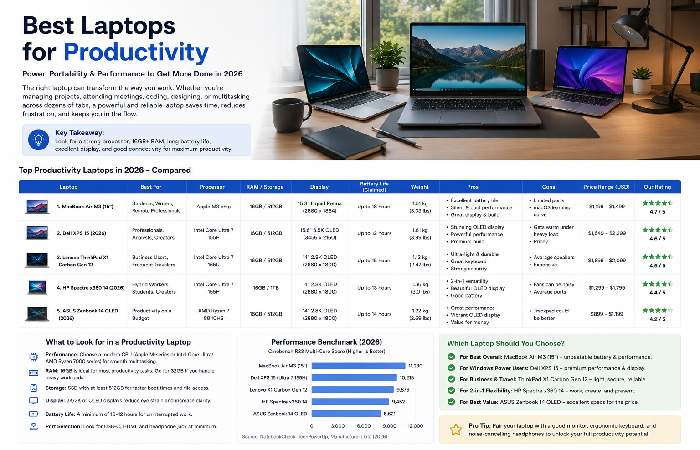
A productivity setup begins with a reliable laptop.
1. MacBook Air M5
Pros:
- Exceptional battery life
- Lightweight design
- Fast performance
- Silent operation
Best For:
- Writers
- Students
- Entrepreneurs
- Remote workers
2. Dell XPS 15
Pros:
- Powerful Intel processors
- Excellent display quality
- Great multitasking capabilities
Best For:
- Business professionals
- Analysts
- Content creators
Laptop Comparison
| Feature | MacBook Air M5 | Dell XPS 15 |
| Battery | Excellent | Very Good |
| Portability | Excellent | Good |
| Performance | Excellent | Excellent |
| Price | Medium | Premium |
Best Monitors for Productivity
A larger display allows multiple windows to remain visible simultaneously, reducing time spent switching between applications.
LG UltraWide 34″
Benefits:
- Huge workspace
- Excellent color accuracy
- Perfect for multitasking
Dell UltraSharp U2725Q
Benefits:
- 4K resolution
- Premium build quality
- Great for professionals
Productivity Monitor Comparison
| Monitor | Resolution | Best For |
| LG UltraWide 34″ | 3440×1440 | Multitasking |
| Dell UltraSharp U2725Q | 4K | Professional Work |
| Samsung ViewFinity S8 | 4K | Office Productivity |
Best Keyboards for Productivity
Typing comfort directly impacts productivity.
Logitech MX Keys S
Why it’s popular:
- Comfortable typing experience
- Backlit keys
- Multi-device connectivity
Keychron K8 Pro
Why users love it:
- Mechanical switches
- Wireless support
- Excellent build quality
Keyboard Comparison
| Keyboard | Type | Ideal User |
| MX Keys S | Membrane | Office Workers |
| Keychron K8 Pro | Mechanical | Heavy Typists |
| NuPhy Air75 | Low Profile | Hybrid Workers |
Best Tablets for Productivity
Tablets have evolved into serious productivity tools.
iPad Air M4
Perfect for:
- Digital note-taking
- Planning
- Meetings
- Creative work
Samsung Galaxy Tab S10
Strengths:
- Included stylus
- Excellent multitasking
- Android flexibility
Tablet Comparison
| Tablet | Best Feature |
| iPad Air M4 | App Ecosystem |
| Galaxy Tab S10 | Multitasking |
| reMarkable Paper Pro | Distraction-Free Notes |
Best Desk Setup for Productivity
A productive workspace combines comfort and functionality.
Essential Desk Accessories
Standing Desk
Allows movement throughout the day and improves posture.
Ergonomic Chair
Reduces back pain and increases comfort during long work sessions.
Monitor Arm
Creates more desk space and improves screen positioning.
Desk Lamp
Proper lighting reduces eye strain.
Cable Management Kit
Keeps workspaces clean and distraction-free.
Recommended Productivity Desk Setup (2026)
| Component | Recommendation |
| Laptop | MacBook Air M5 |
| Monitor | LG UltraWide 34″ |
| Keyboard | Logitech MX Keys S |
| Mouse | MX Master 4 |
| Desk | FlexiSpot E7 Pro |
| Chair | Herman Miller Aeron |
| Tablet | iPad Air M4 |
Common Productivity Setup Mistakes
Many people invest in gadgets but fail to optimize their workflow.
Avoid:
Using a small laptop screen all day
Poor desk ergonomics
Working with inadequate lighting
Cluttered workspaces
Cheap keyboards and mice
Ignoring posture and comfort
Troubleshooting Productivity Issues
Problem: Constant Distractions
Solution:
- Use noise-canceling headphones
- Keep only necessary apps open
- Enable focus modes
Problem: Eye Strain
Solution:
- Follow the 20-20-20 rule
- Use monitor light bars
- Adjust display brightness
Problem: Slow Workflow
Solution:
- Upgrade RAM
- Add a second monitor
- Automate repetitive tasks
Frequently Asked Questions
What are the best productivity gadgets in 2026?
The most useful productivity gadgets include laptops, ultrawide monitors, ergonomic keyboards, tablets, standing desks, and productivity-focused accessories.
Which gadget improves productivity the most?
For most professionals, an ultrawide monitor or dual-monitor setup delivers the biggest productivity improvement because it reduces window switching.
Are productivity gadgets worth the investment?
Yes. High-quality productivity gadgets can improve comfort, efficiency, and focus while reducing fatigue and repetitive strain issues.
What is the best desk setup for productivity?
A productivity-focused desk setup should include a powerful laptop, external monitor, ergonomic keyboard, quality mouse, standing desk, and proper lighting.
Which tablet is best for productivity?
The iPad Air M4 and Samsung Galaxy Tab S10 are among the best productivity tablets available in 2026.
Conclusion
The best productivity gadgets are not necessarily the most expensive ones. The goal is to build a workspace that minimizes friction and helps you stay focused. Whether you start with an ergonomic keyboard, upgrade to an ultrawide monitor, or create a complete productivity desk setup, every improvement contributes to better performance.
Investing in the right productivity accessories today can save hours every week while creating a healthier and more enjoyable work environment.